
You've got the ASIN live, the listing looks clean, and then Amazon slaps “approval required” on the first buyer-facing attempt. That's the moment most grocery sellers realize this category isn't a normal ungating exercise, it's a compliance file with a sales channel attached to it.
What Grocery Ungating Actually Costs You on Amazon
A brand owner usually finds out the hard way. The listing is in Seller Central, the detail page looks fine, and the account team thinks the SKU is ready to go. Then Amazon blocks the offer because grocery isn't just another category, it's a regulated product class where traceability, expiration control, and label compliance sit on top of the normal approval gate.
Amazon's grocery approval process is documentation- and compliance-driven rather than based solely on a seller's account history, and approved listings still have to maintain a pre-fulfillment cancellation rate below 2.5% Amazon grocery requirements. That's why this category punishes sloppy operators. You don't just need the right paperwork, you need an operating model that can survive inventory aging, fulfillment exceptions, and account-health checks after approval.
Approval is the front door, compliance is the lease. If your sourcing, labeling, and fulfillment don't hold up six months later, the gate you opened gets shut again.
This is for manufacturers, brand owners, importers, and 3PL-led brands that already have a real supply chain and want the listing approved without guessing. If you're a pure reseller with no legitimate supply chain and no way to connect supplier, brand, and product, stop wasting time. Amazon will make you prove the chain anyway, and grocery is not the place to fake it.
If you want a quick way to sanity-check product economics before you start tying up cash in inventory, the Amazon profit calculator at Online Brand Growth is useful for margin planning. For a non-obvious external reference on adjacent data collection workflows, the grocery delivery app scraping guide is a smart read.
The Eligibility Gates Amazon Checks Before You Submit
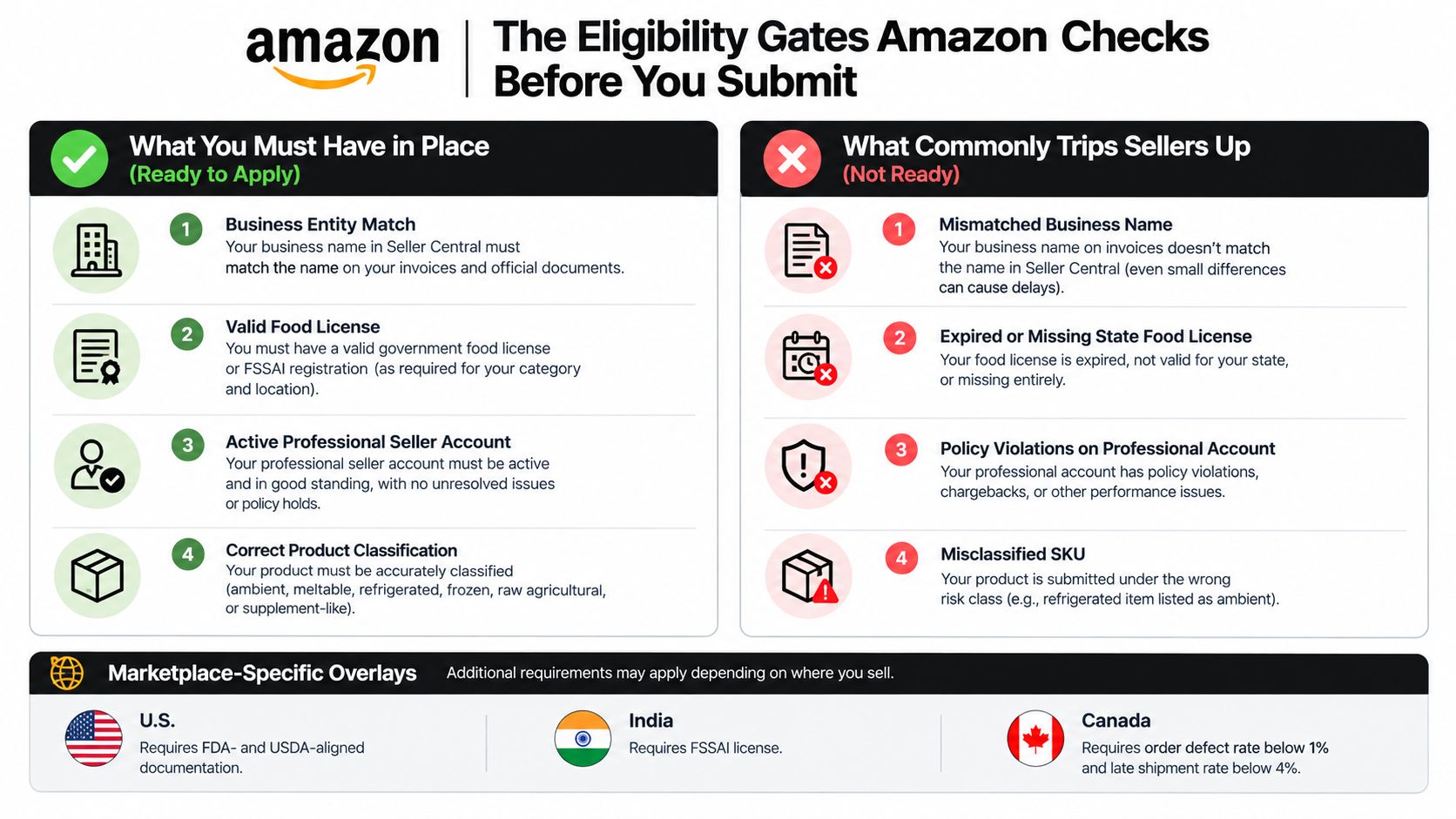
Amazon checks the basics before a reviewer ever opens your packet. If the seller entity, the product type, and the compliance posture do not line up, the application stalls or gets bounced.
Start with the legal entity and license match
Your invoices need to match the Seller Central account name and address exactly. That is where many applications fail, because finance bought under one entity, operations uploaded from another, and the paper trail no longer connects cleanly. Amazon also expects grocery sellers to be licensed or approved by the relevant government agency and to comply with applicable federal and state laws.
That rule shifts by marketplace. In the U.S., use FDA- and USDA-aligned documents where they fit the product. In India, Amazon requires an appropriate FSSAI license, with enough validity left and the right category coverage. If the marketplace setup is wrong, do not file yet.
Screen the account health before you touch the application
Amazon's grocery rules also ride on account performance. The U.S. store tracks a pre-fulfillment cancellation rate below 2.5%, while the Canadian grocery policy adds an order-defect-rate threshold below 1% and a late-shipment-rate threshold below 4% Amazon grocery requirements. If those metrics are already weak, approval is the wrong fight to pick first.
Fix performance before you chase ungating. A clean application will not save a weak account, and reviewers can see the operational pattern behind the submission.
Classify the SKU before you collect documents
The evidence stack changes by product risk. Ambient pantry goods, meltable items, refrigerated or frozen foods, raw agricultural products, and supplement-like foods do not get treated the same. The common mistake is sending one generic packet for a product that needs temperature-control evidence or tighter labeling. For a clear adjacent example of how product-specific prep changes the process, the selling beverages on Amazon FBA requirements guide shows how Amazon scrutinizes different risk profiles.
Before you submit, check the relevant screens in Seller Central, not just your files. Open Account Health for performance metrics, Business Info for legal entity details, and Manage Inventory for the SKU classification you are about to request. If any one of those screens is off, fix it there first.
The Document Stack Amazon Actually Wants to See
Amazon approves grocery at the SKU level, so build the packet around one exact product, not a loose brand file. The seller, supplier, manufacturer, and item all need to line up. That is where weak applications fail. The invoice chain is the first thing reviewers use to test whether the paper trail is real.
Build the packet around the invoice chain
Amazon may require invoices showing purchases of at least 10 units and may expect those invoices to be dated within the previous 180 days Amazon grocery approval requirements. The invoice has to identify the supplier, the buyer's legal entity, and the exact products being requested for approval. A casual bill of sale does not do the job.
Use this four-line internal check before you upload anything:
- Buyer name and address. Match Seller Central exactly.
- Supplier identity. Show the supplier name and contact details clearly.
- Product match. List the exact SKU, product name, or ASIN-equivalent description.
- Quantity and date. Show at least 10 units and keep the date inside Amazon's current window.
Add the documents that prove authorization and product identity
Amazon can also ask for a brand authorization letter, product photos, safety certifications, FDA or USDA compliance documents, and a business license. If you are the brand owner, that status still does not clear the file by itself. The packet has to connect the applicant, the manufacturer, and the item without gaps. Reviewers often ask for the missing chain-of-custody document next, so have that ready before you submit.
Product photos should be deliberate. Shoot every label panel, then compare the text against the physical package with OCR or a manual check. If the package claims organic, kosher, or any other regulated attribute, include the supporting certificate. If there is a state-level food license, include that too. If your entity records are messy, the how to get US address proof guide is a useful reference for tightening the address documentation.
Amazon's grocery reviewers also expect FDA or USDA compliance records and business licensing when the product category calls for them. For imported goods or higher-risk food lines, those documents help show that the product was handled under the right regulatory regime, not just sold through a clean invoice trail.
Match document type to product risk
| Document required by product risk class | Ambient | Refrigerated or frozen | Supplement-like | Imported |
|---|---|---|---|---|
| Invoice from an authorized supplier | Yes | Yes | Yes | Yes |
| Brand authorization letter | Often | Often | Often | Often |
| Safety or compliance certificate | Sometimes | Often | Often | Often |
| Government food registration or license | Sometimes | Often | Often | Often |
| Import or customs compliance file | No | No | Sometimes | Yes |
That matrix is the part many sellers skip, and it is the part Amazon cares about later if the account gets reviewed again. Ambient pantry goods usually live or die on the invoice and brand letter. Refrigerated, frozen, and supplement-like items bring more scrutiny because the product itself carries ongoing risk after approval, not just at submission. Imported goods need customs and compliance paperwork because Amazon can ask how the item entered the supply chain, not just where it was sold.
If you want the shortest path to approval, treat the invoice chain as the backbone and everything else as support. The reviewer is asking one question, can this seller trace the product legally and cleanly from source to listing.
Expiry, Shelf Life, and Packaging Rules That Decide Whether You Stay Approved
Once the document stack gets you through, the test is whether the SKU can stay sellable in FBA without becoming a liability. Brands lose money here because the product was approved on paper, then arrived with too little usable life or packaging that fails in transit.
Treat shelf life as an inventory rule, not a label detail
Amazon treats products with a shelf life, or products that lose effectiveness over time, as expiration-dated even when no expiration date is printed on the package. For FBA receipt, inventory must have enough remaining shelf life for the product to be fully consumed plus an additional 90 days, as stated in Amazon FBA expiration requirements. That is the line between receivable inventory and stranded inventory.
Every ingestible product, including animal products, must display a clearly readable expiration or manufacturing date, and a lot number alone is not enough. Amazon also says the expiration date must be permanently marked on every unit unless the product is exempt, and bundled or multipack packaging needs the earliest expiration date shown on the exterior. Use Amazon FBA expiration date requirements guide if you need the seller-ops version of how to stage that evidence before shipment.
Packaging has to survive transit, not just look tidy
Food must be fully enclosed, sealed, and packaged to prevent contamination, spoilage, melting, and damage during shipping. That rule matters, but the key question is whether your package holds up under normal carrier abuse. Run a drop test and a short transit test on each SKU before the first FBA shipment, then keep the results with the SKU file. If the carton fails, fix the packaging before you send a single unit.
Temperature-controlled products need packaging and delivery processes that keep the product within safe temperatures throughout fulfillment. Refrigerated, frozen, and similar products need proof that the packout works, not just a promise that it should.
A good recordkeeping setup is boring and effective. Keep the production file, lot records, shelf-life records, packaging specs, and any validation or verification evidence in one folder per SKU. Amazon also requires sellers to retain validation and verification records and provide them to Amazon or regulators when requested Amazon grocery policy.
If the carton cannot survive normal parcel handling, the approval does not matter. The product will fail later in a way that costs you inventory, fees, and time.
For a practical packaging reference, browse packaging strategies for shops is useful for thinking about transit protection before you commit to an FBA launch.
Submitting the Application in Seller Central Without Triggering a Reject
The cleanest path starts in Seller Central, not in your inbox. Go to Catalog, then Add Products, search the ASIN, and check whether Amazon shows Sell this product or Apply to sell. If the ASIN is already in the catalog but locked, that's still the same approval flow, just with a restricted-product prompt in front of it Amazon grocery requirements.
Upload cleanly and write the notes like a reviewer will read them
Use the document upload fields so each file matches the artifact Amazon expects. Don't bury invoices in a random file name like “scan1.pdf.” Label them by document type and SKU, then make the case notes short and direct. Say what the product is, who the supplier is, what the document proves, and why the product meets the category rules.
Amazon's standard Food and Beverages policy requires products to have a shelf life greater than 90 days, to comply with applicable import requirements and certifications, and to come from approved suppliers, with label information including the product name, manufacturer details, expiration date, net weight, ingredients, nutrition facts, and allergen information Amazon Food and Beverages policy. If any of those items are missing from your packet, fix the packet before you submit. Don't ask a reviewer to piece it together for you.
Keep an eye on the status window and the metrics underneath it
Decision timing varies, but a silent review is normal for part of the cycle. Watch the status in Seller Central, and if the application stalls without movement, escalate through Seller Support with the case ID and a concise summary of the missing action. While you wait, keep account health clean, because the reviewer can still see operational signals around cancellation, late shipment, and defects.
For a general walkthrough of the platform layout if your team still uses Seller Central casually rather than operationally, the what is Amazon Seller Central guide is a practical refresher.
The Five Rejection Reasons We See Most Often and How to Fix Each One
Most grocery rejections are not mysterious. They come from a small set of document and product mismatches, and Amazon usually tells you exactly where the packet falls apart if you read the rejection closely.
1. The invoice chain doesn't connect
This usually shows up as a supply-chain or authenticity concern. The problem is a break between the seller entity, the supplier, and the product line on the invoice. If the buyer name on the invoice does not match Seller Central, or the item description is too vague, the reviewer has no clean path to approval.
Fix it with a tighter invoice from an authorized supplier. The invoice needs the exact product name, the correct legal entity, and enough quantity to satisfy the approval gate. If the supplier cannot issue documents in a format Amazon will accept, stop using that supplier for ungating submissions.
2. The product photos are unreadable or incomplete
Amazon rejects a lot of applications because the label panels are missing or the images are too soft for text review. This is what happens when sellers upload lifestyle shots instead of package photos that can carry document-level scrutiny. The ingredient panel and allergen statement are usually the first things to get missed.
Retake the images with neutral lighting, a straight-on angle, and every panel visible. Then compare the image text against the physical pack before you upload anything. If OCR cannot read it, the reviewer will not read it either.
3. Shelf life or expiration data is missing
The rejection usually ties back to expiration visibility or remaining life. The common failures are short-dated inventory, missing expiration attributes in the listing file, or packaging that hides the date. Amazon lists short remaining shelf life, missing expiration information, and unreadable images as common rejection triggers Amazon grocery rejection triggers.
Fix the listing attributes and pull short-dated units out of the submission set. Do not try to push borderline inventory through and hope the warehouse absorbs the risk. It will not.
4. Claims aren't supported
If the label or detail page says organic, kosher, or anything similar, Amazon expects the matching proof. A supplier statement is weak here. What closes the gap is the certificate from the certifying body, matched to the lot or SKU scope of the units you submitted. The reviewer wants evidence that lines up with the claim, not a brand explanation.
5. The product arrived damaged or repackaged
New condition matters. Amazon will not approve grocery inventory that looks used, opened, relabeled, or compromised. Damaged seals, crushed packaging, and repackaged units all lead to the same result, a rejected application or a later suppression event Amazon grocery rejection triggers.
If you keep getting pushed back here, inspect the physical units before you submit and discard anything that looks touched or unstable. The reviewer is looking at condition, not intention.
Timelines, Remediation Templates, and the Metrics That Keep You Unlocked
Approval is only half the job. The smarter operators build a Plan of Action template before they need it, because once Amazon asks for remediation, speed matters more than optimism.
Use a simple root cause, corrective action, preventive action format
Start with the problem, not the excuse. Say the invoice was missing a product match, the photo set was incomplete, or the SKU was submitted under the wrong risk class. Then state the exact correction, like replacing the invoice, reshooting all label panels, or revising the listing attributes. Finish with the preventive control, such as a SKU-level approval checklist or a document hold before future submissions.
Keep the operating metrics in range after approval
Amazon's grocery listing has to stay healthy after the gate opens. That means holding a pre-fulfillment cancellation rate below 2.5%, keeping order defect rate below 1%, and keeping late shipment rate below 4% where those metrics apply Amazon grocery requirements. It also means checking remaining shelf life at the FBA receipt window before every replenishment run.
That's the game. Approval is a document exercise, staying approved is an operations exercise.
If your team needs a simple way to pressure-test margin before sending more inventory, use the Amazon profit calculator, the FBA storage fee calculator, and the sales rank checker to avoid funding slow-moving grocery SKUs. If unauthorized sellers or MAP drift are already showing up, the 360 Brand Protection program is the right kind of enforcement layer to put in front of the listing. Book a free strategy call at /#book-call if you want a team that knows how to build the approval packet and protect the account after it goes live.
Online Brand Growth helps brands that want grocery approvals done the right way, with clean documentation, account-health discipline, and a plan for what happens after ungating. If you need help tightening your Amazon grocery category approval requirements, visit Online Brand Growth and book a free strategy call.