
“Find missing units and file a claim” is incomplete advice. Under the FBA reimbursement policy, identifying a shortage doesn't establish eligibility, prove ownership, or preserve your filing window. A perfectly real loss can remain unpaid because the shipment paperwork doesn't reconcile or the wrong event date starts your deadline.
Treat reimbursement as a documentation and deadline control process. Your team needs to connect shipment records, Inventory Ledger events, refunds, case IDs, and actual credits, not just produce a list of negative inventory adjustments.
What the Policy Covers and Excludes
Start with a short eligibility check: Was the SKU registered in FBA when the loss occurred? Did the shipping plan match the items and quantities shipped? Was the product compliant with FBA requirements? Is the selling account in normal status? These questions determine whether you have a claim worth investigating.
Amazon's FBA inventory reimbursement policy allows replacement units or monetary reimbursement for eligible inventory lost or damaged at an Amazon fulfillment center, or by a carrier operated by or on behalf of Amazon. Its conditions include FBA registration, product and inventory compliance, exact shipment-plan quantities, no seller-requested disposal, and normal account status during filing and review.
That isn't a blanket promise to pay whenever your stock count falls. It works like insurance: the coverage conditions matter before the loss, not just when you submit paperwork.
Separate an eligible loss from an inventory problem
The same policy excludes defective products and customer-damaged items. Don't group every unsellable unit into a warehouse-damage claim because Amazon holds the inventory.
Consider a manufacturer shipping a multipack. If the shipment plan identifies individual units but the cartons contain bundled packs, your receiving discrepancy may involve a shipment-definition problem rather than a straightforward missing-unit claim. Resolve the unit-of-measure mismatch before calculating a reimbursement request.
Use these distinctions when triaging exceptions:
- Amazon handling loss: Investigate the fulfillment-center event and whether Amazon already replaced or reimbursed the unit.
- Product defect: Route the issue to quality control rather than assuming warehouse responsibility.
- Customer damage: Review the return disposition without relabeling it as fulfillment-center damage.
- Requested disposal: Retain the disposal instruction so your team doesn't later claim inventory it deliberately removed from circulation.
Account health belongs in the workflow
Don't assign reimbursement ownership entirely to finance while another team manages account health. A suspended account can stall an otherwise valid claim because normal account status remains an eligibility condition during review.
Practical rule: Establish eligibility before estimating recovery. A missing unit isn't automatically a receivable.
Your operations team should maintain shipment accuracy, your compliance owner should preserve product records, and your finance team should verify credits. Reimbursement is an operational-control issue, because the records and account conditions already in place determine what you can substantiate.
Claim Windows for Every FBA Loss Type
| Claim type | Filing window | Clock starts at | Identifier to keep |
|---|---|---|---|
| Missing units on an inbound shipment | 15 to 60 days | Shipment delivery date | Shipment ID and FNSKU |
| Inbound shipment outer limit | Up to nine months under the applicable policy pathway | Verified delivery date | Shipment ID and carrier proof of delivery |
| Damaged or misplaced inventory in a fulfillment center | 60 days | Inventory Ledger event | Transaction item ID and adjustment date |
| Customer return not received | 60 to 120 days under the customer-return policy discussed below | Customer refund or replacement date | Order ID, FNSKU and refund date |
| Removal shipment lost in transit | 15 to 75 days | Removal shipment creation date | Removal order ID |
| Other removal-related losses | 60 days | Delivery back to seller | Removal order ID and delivery date |
| Valuation dispute | 60 days | Reimbursement issued by Amazon | Reimbursement case ID |
FBA reimbursement filing windows by claim type. A missed filing window can make an otherwise eligible loss unrecoverable.
Amazon's reimbursement-window guidance states the inbound, fulfillment-center, and removal deadlines shown in the table, but specifies 45 to 105 days for customer returns, rather than the separate customer-return policy's window. These aren't interchangeable schedules, so confirm the policy displayed for your marketplace and claim workflow before configuring alerts.
Amazon's shipment-claim policy summary also describes a nine-month outer limit after verified delivery under an applicable shipment-to-Amazon pathway. Don't interpret that outer limit as permission to ignore a shorter filing deadline.
Store the event date, not just the discovery date
For inbound shortages, preserve delivery confirmation alongside the shipment ID. For fulfillment-center damage, capture the Inventory Ledger event and transaction item ID. Neither deadline should start when someone finally notices the discrepancy in a spreadsheet.
Removal claims need a separate distinction: shipment creation starts the lost-in-transit clock, while delivery back to your business starts the clock for other removal-related losses. Putting both into a generic “removal date” field invites mistakes.
Your exception register should contain:
- Applicable policy: Marketplace, claim category, and the help page your operator checked.
- Opening and closing dates: When filing becomes permissible and when eligibility expires.
- Evidence status: What's missing and who must supply it.
- Claim status: Unfiled, submitted, under review, reimbursed, or disputed.
Set alerts against the shortest applicable deadline, with enough time to obtain missing documents. Monthly reconciliation is useful, but a monthly meeting isn't a substitute for deadline-driven action.
Documentation That Wins Reimbursement Claims
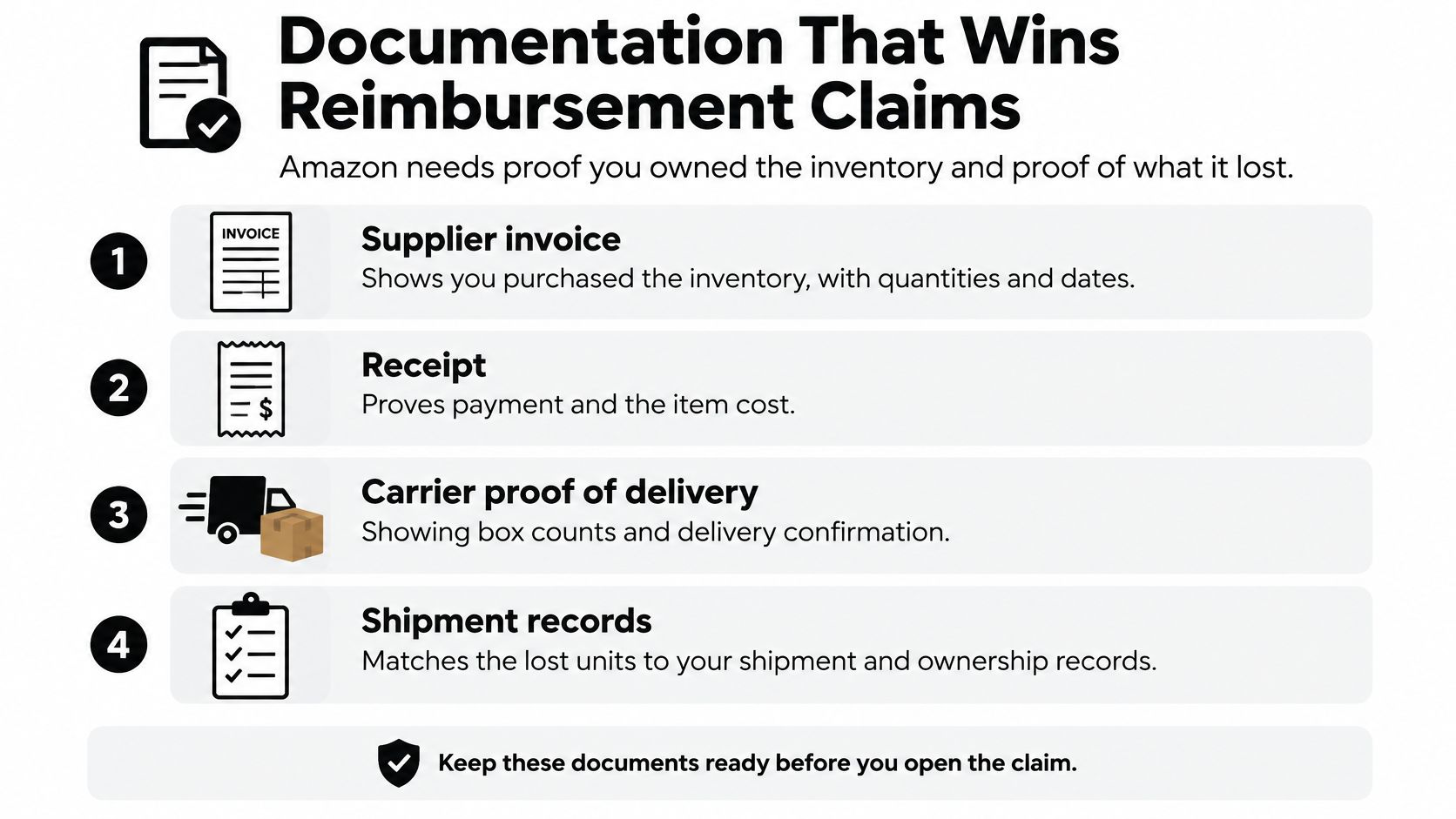
A supplier invoice is the straightforward case. It helps establish ownership and quantities, while shipment records connect those goods to the inventory Amazon received or failed to receive.
Amazon's inventory reimbursement documentation policy recognizes supplier invoices, receipts, manufacturer packing slips, and carrier proof of delivery, including box counts and weight where relevant. For manufacturers, it specifically recognizes a signed packing slip, which matters when no conventional supplier invoice exists.
Keep the ownership and shipment records together before a discrepancy appears.
Build an evidence trail that matches the shipment
A signed manufacturer packing slip should identify the shipping entity, shipment reference, product identifiers, quantities, and the person signing it. Reconcile those fields against the actual shipment plan rather than preparing a generic document after the shortage appears.
For in-house production, preserve bills of materials and production records. For imported or intercompany inventory, connect freight paperwork, customs records, and transfer records to the same shipment. These are supporting audit records, not a promise that every document substitutes for Amazon's requested ownership evidence.
Evidence to keep by loss event
| Loss event | Evidence to keep | Identifier to tie it to |
|---|---|---|
| Inbound shipment shortage | Supplier invoice, receipt, signed packing slip, carrier proof of delivery with box count and weight | Shipment ID and FNSKU |
| Fulfillment-center damage or misplaced stock | Shipment record, product compliance proof, proof of ownership | Transaction item ID and inventory adjustment date |
| Customer return not received | Order or customer-return record, refund or replacement date, missing return status | Order ID and FNSKU |
| Removal shipment loss | Removal order record and carrier delivery proof | Removal order ID |
Add seller type and marketplace to that matrix in your working file:
| Seller type | Inbound shortage | Fulfillment-center damage | Removal loss | Marketplace control |
|---|---|---|---|---|
| Brand purchasing finished goods | Invoice and shipment match | Ownership and adjustment record | Removal record and delivery evidence | Retain the local policy requirements |
| Manufacturer | Signed packing slip and production trail | Production ownership and event record | Removal record linked to manufactured goods | Check accepted manufacturer documentation |
| Importer | Purchase evidence plus freight and customs trail | Ownership chain and event record | Removal and carrier records | Keep destination-market records together |
Preserve records before you need them
- Store the signed packing slip against each shipment ID.
- Keep carrier delivery proof with box count and weight.
- File the bill of materials against each relevant FNSKU for manufactured goods.
- Archive freight and customs paperwork per shipment.
- Link intercompany transfers to the shipment plan.
We file only legitimate, well-documented claims through Amazon's standard processes, and never use automated mass-filing. Weak or padded paperwork creates rejection risk, not stronger evidence.
Design inventory documentation as an audit trail. The useful records are the ones your team already holds when the discrepancy occurs.
How to File a Claim in Seller Central
A claim should let the reviewer identify the event, verify the quantity, and inspect the supporting documents without reconstructing your operation. Keep the explanation short and the attachments complete.
Submit a reviewable case
Confirm the claim category and open window. Classify the discrepancy as inbound, fulfillment-center, customer-return, removal, or valuation-related. Check the live Seller Central policy for that marketplace before proceeding.
Review eligibility against the original event. Confirm FBA registration, shipment-plan accuracy, product compliance, and normal account status. Don't let a valid-looking ledger adjustment bypass this check.
Assemble the evidence package. Use ownership and delivery documents for inbound shortages, or order and refund records for customer-return discrepancies. Give files descriptive names so the reviewer can distinguish the invoice from the packing slip.
Open the relevant shipment investigation or support workflow in Seller Central. Select the loss type involved, then identify the shipment ID, FNSKU, transaction item ID, or order ID, together with the disputed quantity and supported reimbursement expectation.
Attach the complete evidence set. Explain any entity-name or product-code mismatch directly. If your factory's item code differs from the FNSKU, include a clear mapping rather than expecting the reviewer to infer it.
Record the case ID, submission date, attachments, and next follow-up. Assign an owner who will respond to requests for additional information and verify the outcome.
Keep fee disputes separate from inventory losses
If the discrepancy is an overcharged FBA fee, use the fee-dispute workflow rather than describing it as a missing unit. Cite the original order's fee line and identify the charge you're challenging.
Your underlying report routine matters here. Build the case file from the Seller Central reports to check weekly, so the operator filing the claim works from the same records finance uses.
A concise claim with matching identifiers is more useful than a long explanation with unresolved quantity differences.
Keep account-health monitoring active throughout review. Filing the case doesn't remove the need to maintain the account conditions that support eligibility.
Customer Return Claims and the 60-Day Wait
Don't claim every refund immediately. A refund records a financial event, not proof that Amazon has lost the associated unit.
Amazon's customer-return reimbursement policy states that claims must be submitted no sooner than 60 days and no later than 120 days after the customer refund or replacement date. Use that schedule only where this policy applies, and verify the live marketplace workflow before filing.
The delay gives the customer time to send the product back and Amazon time to process it. Your operator needs to distinguish a unit that's received, damaged, still moving through returns, or not returned at all.
A worked month of return exceptions
Consider a hypothetical month with 200 refunded units. Your team matches 170 to returned-unit activity in the Inventory Ledger, leaving 30 without a corresponding return status.
Of those unmatched units, suppose 12 have passed the waiting period and remain within the applicable filing window. The other 18 are too recent to claim. These are illustrative quantities, not a recovery benchmark.
| Illustrative group | Operator action |
|---|---|
| Refunded units matched to received returns | Close the missing-return exception, then inspect disposition separately if needed |
| Unmatched refunds eligible for filing | Check for existing credits and assemble the claim |
| Unmatched refunds still in the waiting period | Keep monitoring without filing prematurely |
A returned unit doesn't have to become sellable stock to count as received. Don't confuse a damaged return disposition with proof that the return never arrived.
Build a focused exception report
Keep these fields together:
- Order evidence: Order ID or customer-return record.
- Product identity: ASIN or FNSKU.
- Financial trigger: Refund or replacement date.
- Return evidence: Missing return status, matched receipt activity, and any reimbursement already posted.
- Deadline priority: Time remaining before the applicable filing window closes.
Reconcile recent refunds for visibility, but keep them out of the claim-ready queue until eligible. Sort that queue by the nearest closing date, not by refund value alone.
Your team should also understand Amazon's return policy, because return eligibility, refund processing, and seller reimbursement are different operational questions. A buyer receiving a refund doesn't, by itself, establish a reimbursement entitlement for your brand.
Why Reimbursement Credits Fall Short of Sale Price
A reimbursement isn't automatically a full-price sale. Don't forecast recovery by multiplying missing units by your current listing price.
Amazon's Brazil reimbursement policy describes a calculation of product value minus applicable selling and FBA fees, with a maximum of R$19,250 per item. That example is marketplace-specific, not a global valuation rule or a guarantee that every loss category uses the same basis.
What each reimbursement credit is built from
| Component | Where to verify it | What to compare it against |
|---|---|---|
| Product value used in the calculation | Case record and product-value evidence | Historical sale price or documented cost |
| Selling fees deducted | Original order fee detail | Referral fee on the same SKU and order |
| FBA fees deducted | Original order fee detail | Fulfillment fee for the same size tier and marketplace |
| Marketplace per-item maximum | Amazon policy for the loss marketplace | Brazil example above; elsewhere, the applicable local policy cap |
| Net credit posted | Reimbursements report and Payments transaction view | Expected credit calculated from the applicable lines above |
Reconstruct the credit before disputing it
Start with the valuation basis Amazon applied. Compare it with the evidence relevant to that loss type, rather than assuming historical sale price always controls.
Next, inspect selling-fee and fulfillment-fee deductions where applicable. If a warehouse loss has no original customer order, don't manufacture an order-level comparison. Use the calculation and supporting records applicable to that inventory event.
Export reimbursement transactions by SKU and marketplace, then add the valuation basis, relevant fees, quantity, and expected net credit. A single blended recovery figure can conceal an underpayment on one SKU behind a correct payment on another.
Challenge the disputed component
If the amount looks low, identify the specific issue: unsupported product value, incorrect quantity, questionable deduction, or an incorrectly applied marketplace limit. Submit evidence addressing that issue rather than asking Amazon to pay the retail price without explaining why.
Log the valuation-review deadline when the reimbursement is issued. Don't assume an open support conversation preserves your ability to challenge the amount.
Finance check: Report the net reimbursement against contribution margin, not as the equivalent of a new customer sale.
Model that distinction with Online Brand Growth's free Amazon profit calculator, and use the FBA storage fee calculator when assessing the broader cost of holding or removing inventory. Keep demand analysis through the sales rank checker separate from reimbursement valuation, because sales potential isn't proof of the amount Amazon owes.
Verify Each Reimbursement and Run the Monthly Routine
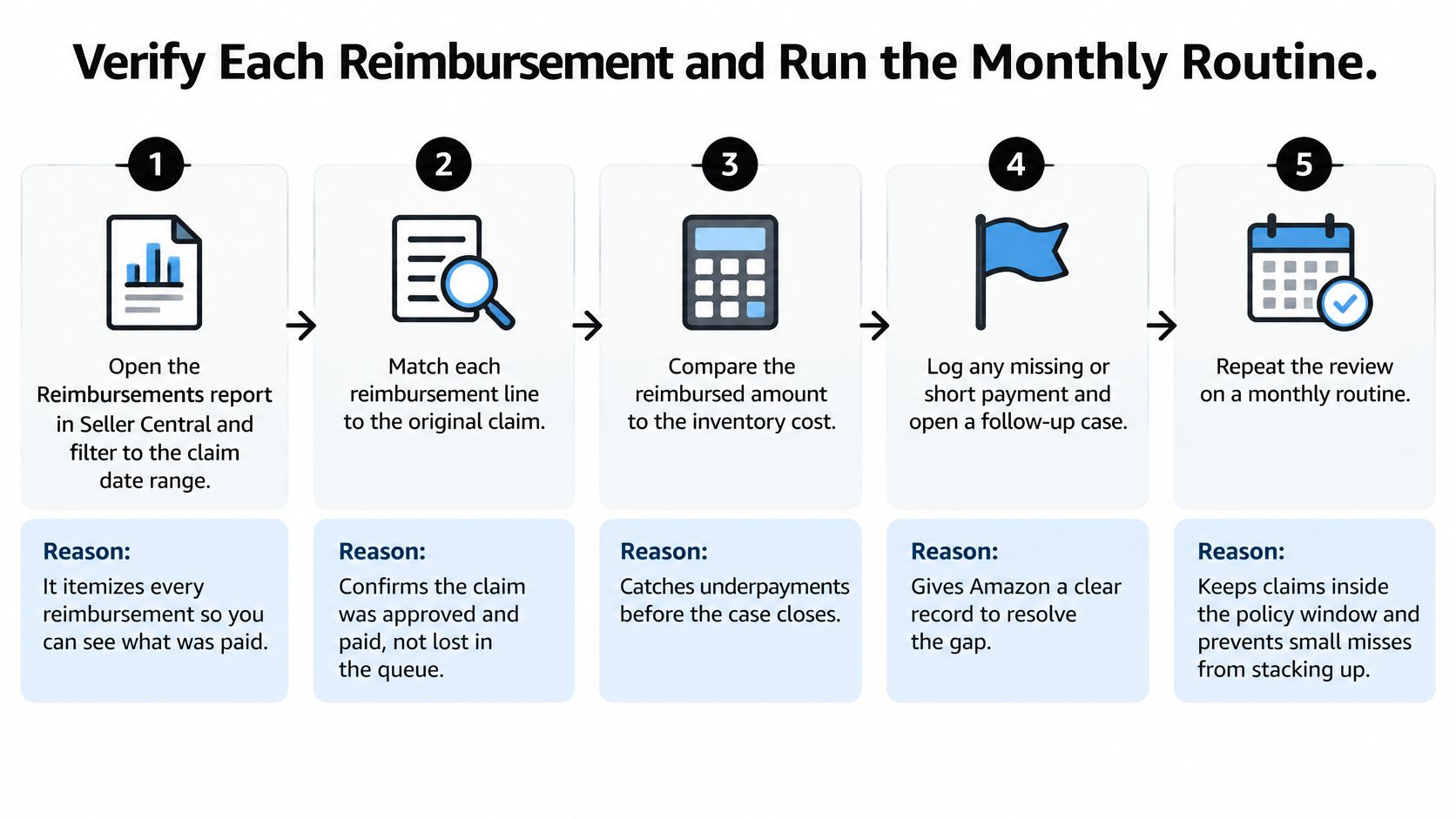
Approval isn't the final control. Close a discrepancy only after you can connect the inventory event, the reimbursement record, and the actual account credit.
Use this flow as a review checklist, then retain the underlying transaction evidence.
Verify the payment trail
Open the Reimbursements report in Seller Central and filter to the relevant claim and posting dates. Inspect reimbursement type, product information, amount, and seller-submitted case details, including automatically generated credits in your reconciliation.
Match each reimbursement line to its original claim and Inventory Ledger adjustment. Compare FNSKU, quantity, event type, case ID, and credited amount, allowing for credits that don't map neatly to a single case.
Go to Payments, open Transaction view, and choose Other in the filter. Search the Product Details column for “Balance Adjustment” or “FBA Inventory Reimbursement” so an unfamiliar posting description doesn't look like a missing payment.
Flag delayed credits. Amazon's Reimbursements report guidance states that approved reimbursements generally appear in the account 4 to 5 business days after approval, which gives your team a concrete payment-check trigger.
Use the Inventory Ledger reconciliation link, where available. Follow it to the detailed reconciliation or reimbursement transaction to establish what Amazon resolved.
Log every mismatch with the case ID, expected amount, actual amount, and follow-up owner. Preserve the report exports supporting your conclusion and act before the applicable review deadline closes.
Keep the monthly review deadline-driven
Maintain a single register joining shipment IDs, FNSKUs, transaction item IDs, adjustment dates, refund dates, case IDs, and reimbursement records. Review open claims by closing deadline, unmatched credits, and eligible refunds without received returns.
Treat the inbound waiting period as an earliest filing trigger, not a filing deadline. Distinguishing those fields prevents your team from submitting too early or mistakenly waiting until the last permissible day.
Integrate this register with your FBA inventory management routine. Receiving, removals, returns, and finance shouldn't maintain disconnected versions of the same exception.
Use the walkthrough alongside your own Seller Central records when setting up the review.
Assign a named owner to each unresolved item and close it only with a documented outcome: inventory found, replacement received, credit verified, or a supported determination that it isn't eligible. That keeps next month's review focused on genuine exceptions rather than reopening the same unexplained adjustments.
Online Brand Growth offers standalone FBA reimbursement recovery for lost and damaged inventory, overcharged FBA fees, and customer-return or refund discrepancies, with documented claim filing and ongoing monitoring. Book a free strategy call to review your reimbursement controls and identify gaps in the evidence-to-payment process.