
A SKU can sell every day and still lose you money in FBA. If it occupies too much cubic space relative to how fast it ships, storage and utilization charges eat the margin you think you're making on the sale. That's why good FBA inventory management isn't a unit count. It's a weekly judgment about days of cover, lead time, cube and contribution, made ASIN by ASIN before Amazon makes the expensive version of that judgment for you.
Stock Targets for Each SKU Segment
Start where Amazon starts, then stop treating its band as a target. Amazon's own guidance puts a starting range at roughly 30 to 60 days of expected sales, and that range is useful only if you move each SKU inside it based on how it behaves. Apply one number to the whole catalog and you'll overstock the slow tail while starving the hero that pays for everything else.
Here's the one-line test to run today: if a SKU's cover falls below its band before its inbound units land, the reorder is already late. That sounds obvious. In practice, most stockouts I would audit first trace back to someone checking on-hand units, seeing a comfortable number, and missing that inbound was still in transit and reserved units weren't sellable.
How to calculate days of supply properly
Days of supply is sellable plus inbound units divided by expected daily sales. It is not on-hand units alone. Reserved inventory is tied to customer orders, transfers or processing, so it doesn't protect tomorrow's sales. Inbound counts toward cover, but only from the date it becomes sellable, not the date you printed the label.
Segment first, then set cover. A steady seller with a short, predictable domestic lead time can run lean because you can correct a miss quickly. An overseas SKU can't. If a container slips, you don't have a two-day fix, you have an empty listing and a rank rebuild.
| SKU segment | Starting cover (days) | Move the target when | Review cadence |
|---|---|---|---|
| Steady seller, short lead time | 30-45 | Demand flat for eight weeks | Weekly |
| Long or volatile supply chain | 60 or more | Lead time varies by more than a week | Weekly |
| Seasonal product | Set per season | Sales curve peaks or falls | Every two weeks before peak |
| Expiry-sensitive or fast-depreciating | Under 30 | Shelf life or price drop ahead | Weekly |
Moving within the band
Steady sellers, short lead time: Run near the lower end. Cash sits in the bin for less time, aged exposure stays low, and a weekly review catches drift before it becomes a stockout. If demand has been flat for eight weeks, don't carry launch-level insurance out of habit.
Long or volatile supply chain: Ocean freight, a single overseas factory, or a supplier whose ship dates move by more than a week justifies 60 days or more. You're not buying excess, you're buying time. The trade-off is real, though. More cover means more cube and more cash locked up, so reserve this treatment for SKUs where a stockout costs more than the storage.
Seasonal products: Size to the build-up and sell-off curve, never to average monthly sales. Averaging is how brands carry peak stock into January and then pay to clear it. Build before the peak, stop replenishing while sales still look strong, and plan the exit quantity in advance.
Expiry-sensitive or fast-depreciating products: Stay at the bottom of the band or below it. Supplements, food, cosmetics and trend-driven goods lose value while they wait. A stockout hurts, but expired or obsolete stock hurts and charges you storage on the way down.
Practical rule: Set the band by segment, then let lead time and cube move the SKU inside it. Never let last month's order quantity set this month's target.
Review cadence matters as much as the number. Weekly is the default for anything material. Seasonal SKUs need a check every two weeks before peak because the decision window closes early. Once the peak order is placed, you're managing the landing, not the forecast.
How to Set Reorder Points and Safety Stock
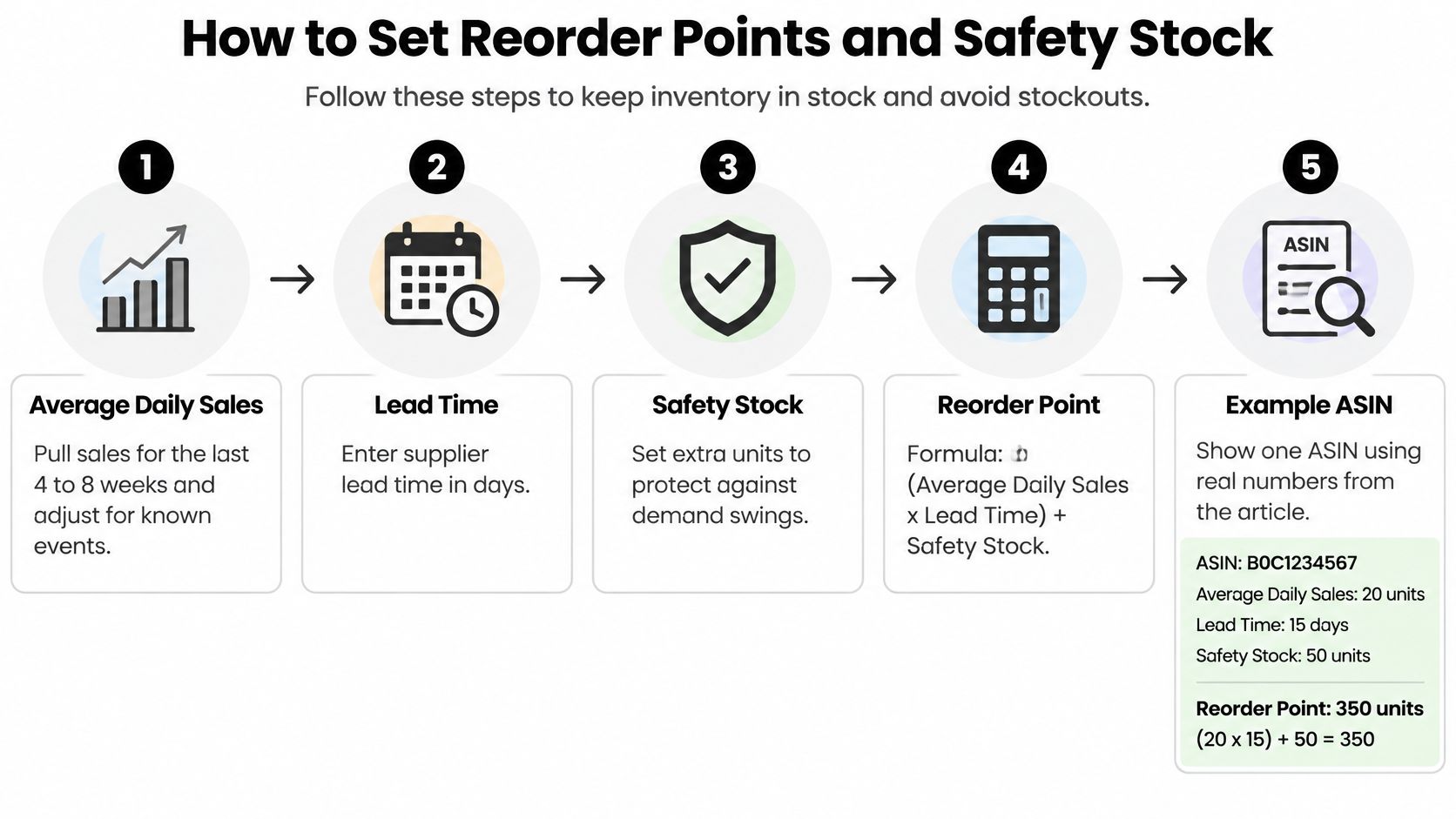
Forecast at the ASIN level, convert it to days of cover, and reconcile it against lead time and receiving variability. That's the method in Amazon's Seller Central inventory guidance, which calculates a reorder point as expected daily demand multiplied by total replenishment lead time, plus a safety-stock buffer based on demand and lead-time variability. We forecast demand by ASIN, build in lead-time and safety-stock buffers, and trigger reorders early to keep top products in stock. The steps below make that concrete.
The reorder math, step by step
Pull average daily sales: Use the last four to eight weeks, then adjust for known events such as a promotion, a price change or a competitor going out of stock. For a new SKU with no history, borrow the daily rate of a comparable ASIN and correct it after four weeks of real data. The usual slip is using a promo week as your baseline and ordering to a spike.
Add total lead time: Count from purchase order to sellable at FBA. That means supplier production, transit, Amazon receiving and check-in. Most brands stop at transit and then wonder why they're short. Check-in time is lead time whether you like it or not.
Calculate lead-time demand: Multiply daily demand by total lead time. This is what you'll sell while you wait. If that number is larger than your current sellable stock, you're already inside the danger zone.
Add safety stock: Size the buffer to variability, not to anxiety. A supplier who ships on the promised date needs a thin buffer. A supplier whose dates slip by a week needs a larger one, roughly a week of sales or more. Skipping this buffer on a long supply chain is the most expensive shortcut in the whole process.
Set and compare the reorder point: Reorder point equals lead-time demand plus safety stock. Compare it against sellable, inbound and reserved units together, tracked separately. Don't count inbound as available today, and don't ignore it either, because double-ordering creates the excess problem you'll pay for later.
Order before you hit the point: Place the purchase order before projected available inventory reaches the reorder point, not when the bin looks empty. By the time stock looks low in Seller Central, you've usually been late for two weeks.
A worked example
Say an ASIN sells 20 units a day with a 45-day total lead time. Lead-time demand is 900 units. Add a 150-unit safety buffer for a supplier with moderate variability and your reorder point is 1,050 units. When sellable plus confirmed inbound projects down to 1,050, the PO goes out that week.
Segment your review the same way Amazon does, into sellable, inbound, reserved, excess, aged and unfulfillable, so each bucket gets its own decision. For the forecasting layer underneath this math, our guide to Amazon inventory forecasting covers how to build the demand input. You'll know the math works when the next order lands and becomes sellable before the reorder point is breached, with no air-freight rescue in between.
Clearing Excess and Aged Units Before Surcharges
Treat day 181 as a deadline, not a milestone. Once units cross into aged territory, the surcharge is assessed monthly, so age becomes a recurring carrying cost that compounds while you decide. The brands that avoid it aren't better at negotiating with Amazon. They're earlier.
Amazon's excess definition is specific. According to Amazon's inventory management guidance, a product qualifies as excess when it has more than 90 days of supply and at least one unit aged over 90 days, and Amazon recommends targeting roughly two months of supply. Cross that threshold and the correct first move is to pause replenishment, even if the sales chart still looks healthy.
The warehouse view below is where this work starts, with age checked at the ASIN level rather than assumed from your last shipment date.

| Inventory age | What Amazon charges or flags | Your move |
|---|---|---|
| 0-90 days | Standard monthly storage only | Watch sell-through in the FBA Inventory tool |
| 91-180 days | Excess flag only if supply is over 90 days and a unit is over 90 days old | Pause replenishment and test a promotion |
| 181 days and older | Aged-inventory surcharge on the 15th of each month | Pick removal, disposal or a promotion before the charge |
The clearing routine
Filter by age: Open the FBA Inventory tool and filter by inventory age. Don't start from the restock view, because it hides aging units behind healthy headline stock.
List what's approaching the surcharge: Pull every ASIN with units moving toward the aged threshold and note the unit count and cube. Bulky and slow is the expensive combination, so sort by that first.
Pause replenishment on flagged ASINs: If it's excess, no new PO and no new inbound shipment. Adding fresh units to an excess position doesn't fix sell-through, it extends the problem.
Pick a path per aged group: Promotion, coupon, removal order or disposal. Price the promotion against the removal fee and the next surcharge, then choose. Set the decision date before the next monthly assessment, not after it posts.
Check the oldest shipments, not the newest: Amazon applies first-in, first-out treatment across its network, so the units you sent most recently aren't necessarily the units sold first. Assuming your stock is fresh because your last shipment was recent is how aged units surprise you.
Don't replenish a flagged SKU because velocity looks fine. Velocity against too much stock is still excess, and Amazon charges you for the stock, not the sales rate.
Set a calendar reminder around day 150 for every slow ASIN. That gives you a full promotion cycle and a removal window before the surcharge starts, instead of a rushed disposal decision at day 179.
Storage Cube, Capacity Reservations and Profit per Cubic Foot
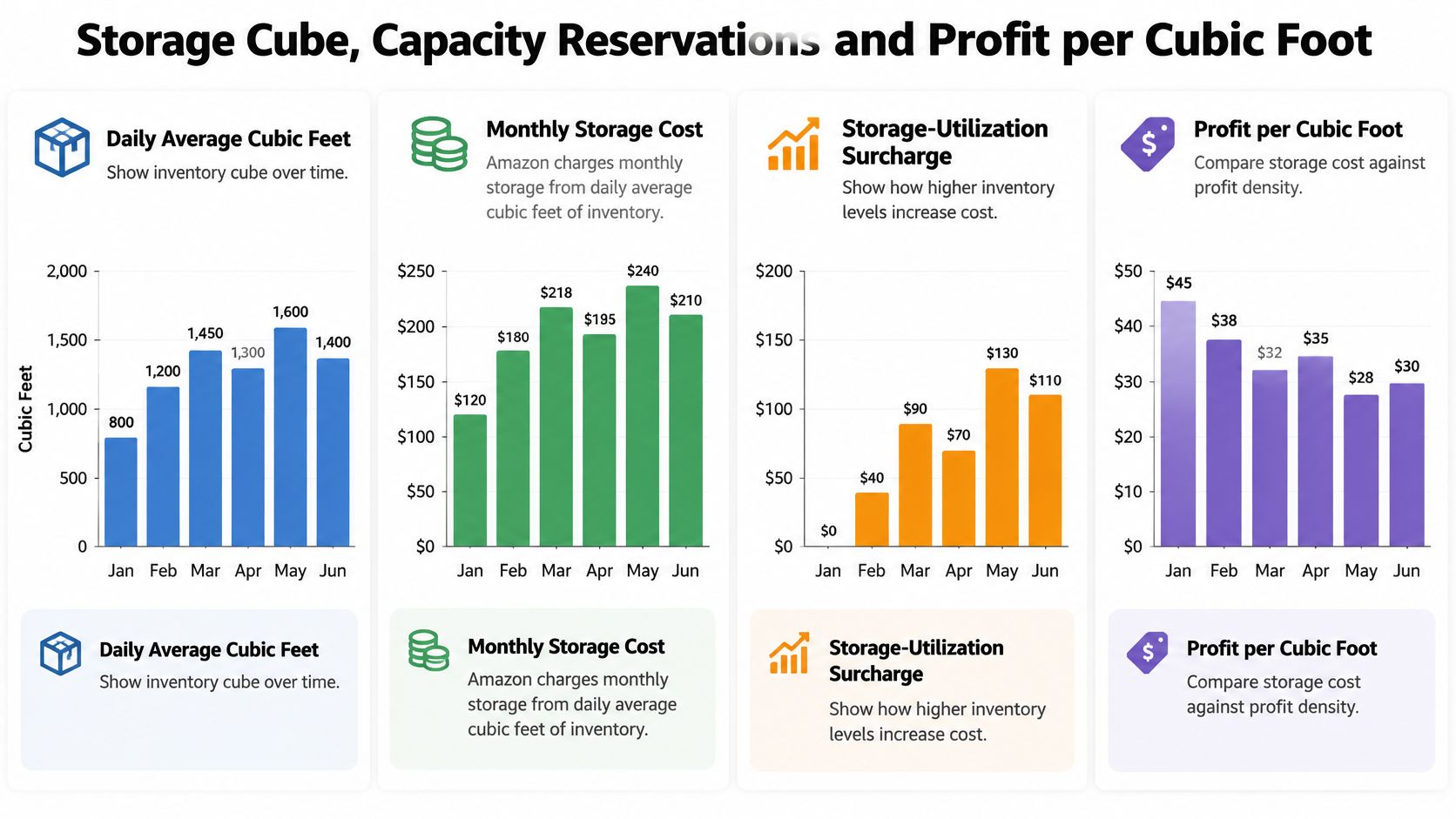
The 30 to 60 day rule answers the wrong question on its own. Amazon doesn't charge you for units. It charges you for cube multiplied by time, and capacity is allocated in cubic feet too. Two SKUs with identical days of cover can have completely different economics.
Storage charges run off daily average cubic feet, and utilization compares how much volume you hold against how much you ship. A bulky SKU that ships slowly gets penalized even when unit sales look steady. That's the counterintuitive trap for brands coming from retail, where shelf packaging was designed to look big, not to ship efficiently.
Should you reserve more capacity
Capacity adds a second decision on top of the reorder point. Per Amazon's capacity documentation, Capacity Manager lets sellers bid for additional capacity through a reservation fee, inventory above the assigned limit can incur overage fees, and capacity limits are generally announced during the fourth week of each month. That short window means you decide your bid logic in advance, not when the limit posts.
Use this test. Compare the contribution margin from avoiding a stockout against the reservation fee, carrying cost, expected markdown or removal cost, and the probability the demand shows up. If a seasonal SKU has a coin-flip forecast, reserving peak capacity to protect it can worsen your utilization while the stock sits. Our breakdown of Amazon FBA capacity limits walks through how those limits are set.
Judge every SKU by profit per cubic foot per week
Define it plainly: contribution after FBA fees, storage, returns, ads and aged surcharges, divided by cubic feet occupied and weeks of supply. Run your dimensions through the FBA storage fee calculator for monthly cost by size, and pull margin inputs from the Amazon profit calculator. Then rank the catalog.
| Pack | Units per week | Illustrative contribution per unit | Weekly contribution per cubic foot |
|---|---|---|---|
| Large carton, 2 cubic feet | 10 | $6 | $30 per cubic foot |
| Smaller pack, 0.5 cubic feet | 8 | $5 | $80 per cubic foot |
The large carton sells more units and more dollars. The smaller pack earns far more from the space it occupies. When capacity is tight, the smaller pack gets the allocation, and the large carton gets a packaging review. That's the point most guides miss. Packaging redesign often beats more advertising when carton dimensions waste cube, because ads push more units through bad economics while a smaller carton fixes the economics on every unit. I would check dimensions before raising bids on any bulky, slow-turning ASIN.
Recovering Stranded and Unfulfillable Inventory
Stranded inventory isn't a counting problem. It's usually a listing or offer problem wearing an inventory costume, and treating it as a warehouse issue wastes weeks. Units sit in a fulfillment center, earn nothing, accrue storage, and age toward surcharges while everyone waits for a fix nobody owns.
The five recovery steps
Open the stranded inventory report: Find it under Inventory in Seller Central and note the affected ASINs, unit counts and reason codes. Fix the listing or offer issue first, whether that's a suppressed detail page, a missing attribute or a closed listing, then request a review. Relisting before fixing the root cause just strands the units again.
Create removal orders for what you can't sell: From the Manage Inventory page, choose return or disposal. Weigh the removal fee against unit value and remaining shelf life. Returning low-value bulky stock to sit in your own warehouse isn't a recovery, it's a relocation of the same cost.
Check unfulfillable inventory weekly: Damaged and defective units land here before they show up clearly in the restock view. If you only look monthly, you'll reorder against stock that can never sell and misread your true cover.
Review the Reimbursements report monthly: Look for lost or damaged stock and inbound discrepancies, then file claims for units Amazon has lost with documentation attached. This is recoverable money, but only if someone checks on a schedule. Our guide on Amazon stranded inventory covers the common reason codes and fixes in detail.
Reconcile inbound discrepancies promptly: Compare received counts against your Send to Amazon shipment plan as soon as a shipment closes. Short receipts and wrong quantities get harder to resolve the longer they sit, and they distort your reorder math in the meantime.
The mistakes that keep units stuck
Two patterns repeat. First, teams chase a stranded SKU as if units were miscounted, opening inventory cases when the listing itself is broken. Second, they let removal decisions drift while waiting for a fix that may never come, paying storage on dead units the whole time.
Guardrail: No unfulfillable unit sits more than a week without a decision, an owner and a date.
Unauthorized sellers complicate this picture too, because stray offers and listing interference can strand or suppress your own stock. That's where our 360 Brand Protection program for unauthorized seller removal and MAP enforcement connects to operations. A clean listing isn't just a brand issue. It's what keeps your inventory sellable.
Weekly IPI and Dashboard Review
Your weekly review should start with one number and branch outward. The Inventory Performance Index runs from 0 to 1,000 and reflects whether inventory held is balanced against inventory sold, whether excess and aged units stay low, whether listing problems get resolved, and whether popular products stay available. Those signals move together. A falling score usually traces back to excess or aged stock building up gradually, not to one bad week.
The review works best as a team habit with a shared log, like the session pictured here, rather than a solo glance at a dashboard.

| Metric | Where to find it | What to do with it |
|---|---|---|
| Inventory Performance Index (0-1,000) | FBA Inventory dashboard | Log the weekly trend and act on any drop, threshold two consecutive weekly declines |
| Days of supply | Restock report | Compare with the segment band from section one |
| Aged inventory units | Aged inventory filter in FBA Inventory tool | Decide on promotion or removal before 181 days |
| Estimated storage cost | Inventory dashboard storage estimate | Compare with the storage fee calculator result |
| Unfulfillable units | FBA Inventory tool | Remove or fix within one week |
| Sales rank after a stockout | Sales rank checker | Confirm recovery within two weeks, target return to pre-stockout rank range |
The weekly routine
Log the IPI trend: Open the FBA Inventory dashboard and record the score. One dip is noise. Two consecutive declines mean excess, aged stock or listing problems need action that week.
Check days of supply against segment bands: Flag every ASIN outside its band in either direction. Below band means reorder risk. Above band means pause and clear.
Filter aged units: Note anything approaching the surcharge threshold and assign each ASIN a promotion, removal or disposal decision with a date.
Review storage volume and estimated cost: Compare the dashboard estimate against your own calculation so a dimension error doesn't inflate fees unnoticed for months.
Log unfulfillable units and open listing issues: Every stranded or damaged unit gets an owner. Unassigned problems don't get fixed.
Check rank recovery after any stockout: Note sales rank movement for SKUs that went out of stock and confirm recovery with the sales rank checker. If rank hasn't recovered within two weeks, the listing needs velocity support, not patience.
The short video below walks through how these dashboard signals connect in practice.
Finish the review with money, not just units. According to Amazon's FBA guidance on fees and the Revenue Calculator, the calculator includes referral fees, fulfillment costs, monthly storage and variable closing fees, but does not automatically include removal-order costs, long-term storage costs or return-processing costs, which must be added through the Miscellaneous cost field. Run it alongside your weekly log before approving any large replenishment, or your margin per ASIN is overstated by exactly the costs this article is about avoiding.
Run the Replenishment Review Before Your Next PO
Every purchase order above a set value should pass a go or no-go check before it goes out. Not a long meeting. Six questions, answered in writing, in the weekly log. If your wider purchasing workflow needs tightening alongside this, the steps from requisition to payment from Jumpstart Partners are a useful reference for the approval side.
The pre-PO checklist
Confirm cover after inbound lands: Days of supply once the new units become sellable must stay inside the segment band. Current stock looking low isn't a justification by itself.
Check aged and excess flags on the same ASIN: If it's flagged, cut the quantity or pause the order. Replenishing into an excess flag is how a manageable problem becomes a surcharge.
Estimate storage cost for the new quantity: Run it through the storage fee calculator and compare the result with the margin from stockouts avoided. If storage eats the margin, order less and order more often.
Check capacity for the next cycle: Limits land late in the month, so decide now whether a reservation is worth the fee using the contribution test, not optimism about the forecast.
Confirm lead time in writing: Get real transit and check-in days from your 3PL and freight partner before the PO, so the reorder point uses actual numbers. We don't physically handle client inventory. Our FBA Logistics and Operations work covers inventory planning, replenishment strategy, shipment creation, labeling and inbound management through Seller Central workflows and coordination with your 3PL and freight partners.
Record the decision and trigger date: Log the quantity, the reasoning and the date. The next weekly review should be able to judge whether the call was right.
Run this before the PO, not after the container ships. If you want a second set of eyes on your numbers, book a free strategy call and we'll review your cover, cube and reorder points with you.
If your FBA inventory management is tying up cash in the wrong SKUs or letting heroes stock out, Online Brand Growth can run the planning, replenishment and Seller Central workflows with your 3PL and freight partners so every PO is judged on margin and cube, not habit. Visit Online Brand Growth to see how we'd rebuild your weekly inventory review.