
A complete Amazon hazmat review is typically 2 business days when the documentation is clean, but actual timelines often stretch to 4 business days or more once the first submission gets rejected or needs a correction. If the product is already at a fulfillment center, Amazon can give you 14 business days to supply the requested paperwork, and that is where a lot of launches get stuck.
The mistake I see most often is waiting until inventory is inbound before dealing with the classification. By then, the clock is already working against you, and a simple documentation issue can turn into a blocked FBA launch, a delayed replenishment, or inventory sitting in limbo while Seller Central waits for a clean answer.
What Happens When Your Product Triggers a Hazmat Review
The worst move is to treat hazmat review like a last-minute admin task. Once Amazon flags a listing, the product can move into a status such as Unable to classify or Dangerous Good Under Review, and that can stop it from being sold through FBA until the classification is resolved. Amazon's own guidance says possible hazmat inventory already stored at a fulfillment center can trigger a 14 business day documentation window, and failure to respond can create shipment, delivery, or inventory-disposition consequences. Amazon's hazmat documentation window
What usually sets it off
Amazon doesn't need a dramatic incident to start the process. A listing can get flagged because of batteries, aerosols, pressurized packaging, chemicals, or even product attributes that make the catalog look risky. In practice, the trigger is often not the product alone, it's the combination of the item, the listing data, and the documents attached to it.
Practical rule: submit dangerous-goods paperwork before inventory is inbound. Once the box is at Amazon, your options narrow fast.
The operational mistake is assuming the hazmat clock starts when you submit a case. It usually starts much earlier, when Amazon detects a product that needs classification. That's why launch teams should build the compliance step into the product timeline, not bolt it on after receiving.
For sellers handling documentation through a broader operations workflow, a transport-focused eSignature stack can help keep approvals moving without email sprawl, especially when teams need to compare transportation eSignature solutions from Closer Innovation Labs Corp. That won't change Amazon's review rules, but it can remove friction from your internal signoff chain.
If the product is a beverage, packaging and ingredient review can overlap with hazmat questions, so it's worth checking the Amazon FBA requirements for selling beverages before you push inventory live.
What sellers should do first
Start with the ASIN detail page and the supporting document set. Then reconcile the product name, brand, manufacturer, and file language before you upload anything. If those pieces don't line up, Amazon can stop the review before it ever becomes a true classification decision.
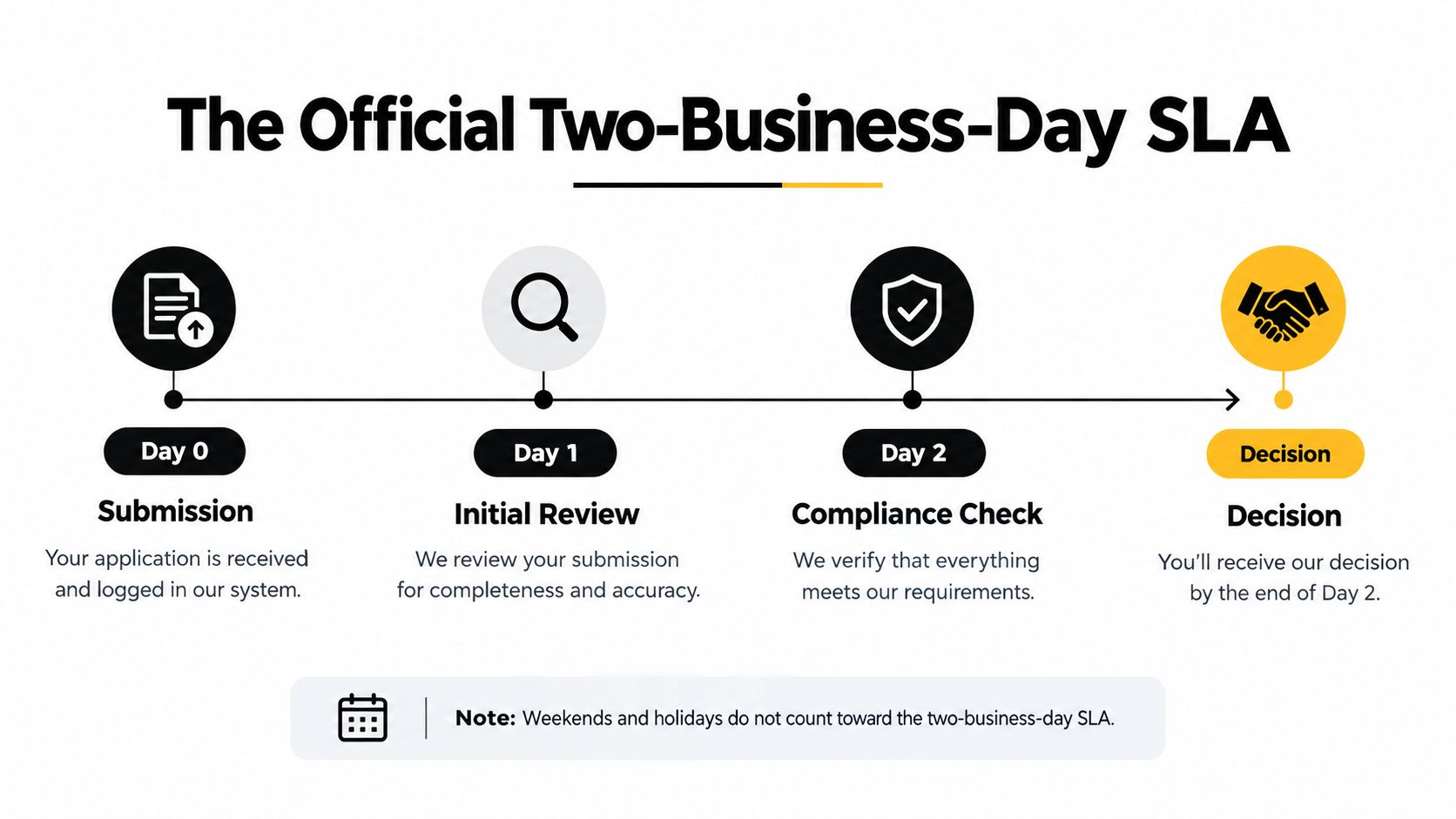
The Official Two-Business-Day Timeline Explained
Amazon's stated standard is simple, 2 business days for complete and accurate dangerous-goods submissions. The part that trips people up is that Amazon counts business days, not calendar days, and it excludes public holidays. Amazon's two-business-day review standard
Why the calendar math matters
A Monday submission is generally due by the end of Wednesday. A Thursday submission is generally due by the end of the following Monday. A weekend submission starts counting on Monday and is generally due by the end of Wednesday. Those examples matter because launch teams often plan against calendar time, then discover Amazon is working off a different clock.
That gap is exactly why a “2 business day” promise can still consume several calendar days. If you ship inventory on Thursday and submit documents at the same time, you're already pushing the review into the weekend math. Around public holidays, that gap gets wider.
Treat the SLA as a processing target, not a shipment green light.
The safest operational habit is to submit documents several business days before inbounding inventory or scaling ads. Waiting for the status to flip before you move the rest of your launch plan is how brands miss their replenishment window and end up paying for storage while they wait.
How operators should plan around it
Build your internal launch calendar around the review, not around the shipment. If the product has any chance of triggering dangerous-goods classification, the review needs to happen before the product becomes urgent. That means documentation, file checks, and seller account routing all happen earlier than many teams realize.
If you've ever wondered amazon hazmat review how long does it take in real life, the honest answer is that the official answer is only the starting point. The launch schedule has to absorb weekends, holidays, and whatever happens if the first document upload isn't accepted.
Why Your First Submission Usually Gets Rejected
The first submission is where most delays start, because Amazon cares less about your intent and more about whether the SDS or exemption sheet matches the listing exactly. Each resubmission generally adds another 2 business days of review, so one correction can turn a nominal 2-day process into roughly 4 business days of review time, excluding weekends and holidays. Resubmission adds another review cycle
The document problems that cause the pain
Amazon specifically looks for a current SDS or exemption sheet. Where an SDS is required, it needs to be internally consistent, match the product listing details, and include the expected hazard information. If the product name, manufacturer, or brand details don't line up with the ASIN, the document can get rejected even if the PDF looks polished.
That's why distributor-submitted paperwork often fails. If the formulation owner can't support the product details, the review stalls. The same thing happens when the file is in the wrong language, when the upload is corrupted, or when the SDS is missing sections Amazon expects to see.
Pre-submission checks that save time
Before you upload anything, verify these points one by one:
- Product identity matches exactly. Check the ASIN name, brand, and manufacturer against the document text.
- Document type is correct. Use an SDS when Amazon expects an SDS, or an exemption sheet when that's appropriate.
- File access works. If the PDF opens poorly or uploads incorrectly, the review can stall for reasons that have nothing to do with compliance.
- Information is internally consistent. A listing that says one thing and a document that says another is a delay waiting to happen.
- The source is defensible. Make sure the manufacturer can stand behind the formulation and document data.
The fastest way to lose a week is to send Amazon a document that looks complete but doesn't match the listing.
A lot of operators ask why the review “took forever” when Amazon says 2 business days. The answer is usually in the correction cycle, not the first submission. One clean upload moves quickly. A messy one forces the review to restart.
Understanding the FBA Dangerous Goods Program Enrollment
Review and program enrollment are not the same thing, and that's the hidden bottleneck many sellers miss. Amazon lists typical Dangerous Goods Program enrollment at 5 business days, Monday through Friday, excluding public holidays, and the product still has to be correctly classified even if the seller isn't enrolled yet. Dangerous Goods Program enrollment timing
Review result versus fulfillment permission
A product can pass classification and still need special program enrollment before it's fully ready for FBA. That is where the timeline stretches beyond the hazmat review itself. If the item falls into a restricted dangerous-goods path, the fulfillment network may apply storage limits, routing requirements, and other handling controls before the inventory is fully sellable.
That distinction matters because many teams confuse “reviewed” with “released.” They're not the same. Classification tells you what the product is, enrollment and routing determine whether Amazon will move it through the network.
For a broader operational refresher on the FBA model, see what Fulfillment by Amazon means in practice.
Why this can slow a launch
If a product already sits in a fulfillment center and then gets reclassified into a restricted path, Amazon can add the seller to the waitlist and hold the inventory until a spot opens. That means the review might be fast while the usable launch date is still far away. In other words, the classification answer is not the end of the timeline.
A useful way to think about it is like this, review tells you whether the item belongs in the hazmat system, enrollment tells you whether the system is ready to accept it. If you skip the second step in your planning, you can end up with approved inventory that still can't move.
For teams working through the broader hazard taxonomy, a guide to the nine hazard classes from Aeros Couriers is a handy reference point for understanding why some products trigger more friction than others.
Where to Check Your Review Status in Seller Central
You do not need to guess where the file is stuck. Amazon's Dangerous Goods Status Report is the place to check, and Seller Central also allows ASIN lookups for direct status verification. The report shows the current status of FBA listings classified as dangerous goods, including ASINs still under Dangerous Good Under Review. Dangerous Goods Status Report guidance

What the report tells you
The value of the report is simple, it gives you a live status without opening a new support case every time the clock feels slow. Amazon says the product compliance team may take up to 4 business days to review an ASIN that is under DG review, which is longer than the document-review target many sellers quote to themselves. That longer practical window is why status monitoring matters.
Inside Seller Central, the report helps you separate normal delay from genuine blockage. If the ASIN is still under review, you know to wait and watch. If the status has stalled or changed, you know the problem is probably document quality or a classification issue, not just processing time.
For a basic orientation to the interface, see what Amazon Seller Central is.
How to use it without wasting time
Check the report before you start a support case. Then compare the report status against the file you submitted and the timeline you expected. If the ASIN is still in review and the documents were clean, patience is usually the right move. If the ASIN keeps cycling or the review age feels abnormal, that's when escalation starts to make sense.
The goal is not to flood Amazon with messages. The goal is to know whether the status is moving normally, whether the queue has backed up, or whether your submission has a document problem that needs a resubmission.
Escalation Paths and Real-World Timeline Scenarios

The cleanest way to think about hazmat timing is to separate three clocks. The first is document review, the second is resubmission time, and the third is program enrollment or fulfillment release. When those clocks overlap, the launch window gets long fast.
A realistic delay chain
A complete submission can move through the stated 2 business day review target. If Amazon asks for more information, the next cycle generally adds another 2 business days. If the product also needs Dangerous Goods Program enrollment, that is another 5 business days of typical processing. Add those together and a seller can quickly be staring at a much longer path than the original estimate.
That's before you account for a product already sitting in a fulfillment center and waiting on documentation, where Amazon may give 14 business days to respond. If the case is moving cleanly, great. If it's not, the inventory can sit inactive, deliveries can be delayed, or disposal can become a risk.
When to escalate
Escalation makes sense when the file is clean, the timeline is beyond the normal review window, and the status hasn't moved in Seller Central. It also makes sense when a correction cycle has already happened and the next review window is running without any visible change. That's a different situation from a fresh, active review, where the queue may still be normal.
If the paperwork is accurate and the ASIN still hasn't moved after the expected window, don't assume Amazon is “just slow.” Check the status report, verify the submission trail, and escalate with the exact ASIN history.
The practical lesson is to budget launch time from first submission to sale-ready inventory, not from approval to approval. That means factoring in document prep, rejection risk, DG enrollment, and the possibility that inventory reaches a fulfillment center before the classification is finished. Brands that do this rarely panic, because they planned for the friction instead of being surprised by it.
If you need help building a cleaner Amazon operating model around hazmat, catalog risk, and seller-side enforcement, Online Brand Growth can help with account health, launch planning, and protection work that keeps revenue from leaking into preventable problems. Explore Online Brand Growth for support with Amazon operations, logistics, and brand protection, then book a free strategy call at /#book-call.