
One defective order in 100 orders puts you at exactly 1% Order Defect Rate, and Amazon's seller performance standards require ODR to remain below 1% over the applicable 60-day evaluation period. This is Amazon account health for a smaller catalog. You don't have a buffer, you have zero room. A single A-to-z claim, chargeback, or negative feedback event can be the breach, while a larger account absorbs the same event without moving. If you're running Amazon as a peer operator, not as a dashboard watcher, you need to manage account health at offer level, by SKU, carrier, warehouse, and marketplace, long before the score turns yellow.
Account Health Thresholds Amazon Enforces
A 7-day cancellation window and a 10-day late-shipment window can fail one offer while a 180-day Account Health Rating still reads healthy. Match your live figures to the lines below before you touch bids, inventory, or handling time.
| Metric | Evaluation window | Required level | What it covers |
|---|---|---|---|
| Order Defect Rate (ODR) | 60 days | Under the published defect ceiling | Negative feedback, A-to-z claims and chargebacks |
| Pre-fulfillment cancellation rate | 7 days | Below 2.5% | Seller-initiated cancellations before shipment |
| Late Shipment Rate (LSR) | 10 and 30 days | Below 4% | Orders without shipment confirmation by the expected ship date |
| Valid Tracking Rate (VTR) | 30 days | Above 95% | Seller-fulfilled shipments with valid tracking, per product category |
| Account Health Rating (AHR) | Rolling 180 days | 200 or higher (Healthy) | Policy adherence and selling activity, scored 0 to 1,000 |
| Account Health Assurance (AHA) | 6 months | AHR of at least 250 | Conditional protection against deactivation |
Read the rows at offer level
ODR is a post-purchase verdict. It counts an order that picks up negative feedback, an A-to-z Guarantee claim, or a credit card chargeback. A sound product can still defect if the refund dispute goes sideways, so service handling belongs with product quality. One ASIN with a cluster of claims can lean on the account rate while the rest of the catalog looks quiet.
Cancellation rate is an inventory honesty test. The 7-day window is short on purpose. Oversell one SKU on Monday and cancel through Friday, and later orders barely dilute it. Available quantity in Seller Central has to match what the warehouse can pick that week. That control sits on the offer, not on a monthly account average.
Late shipment scores the ship-date promise. Amazon checks whether you confirmed shipment by the expected ship date, on both a 10-day and a 30-day window. Set handling time to one day when the team needs two, and you create late shipments every week. Correct the promise on the offer before you blame the carrier. A bad shipping week shows up on the 10-day view first.
VTR is a category metric, not a vanity average. The line is above 95% on seller-fulfilled shipments over 30 days, scored per product category. I treat 95% as a floor you do not touch. One missed carrier scan batch can pull a thin category under that line in a day while the account page still looks fine.
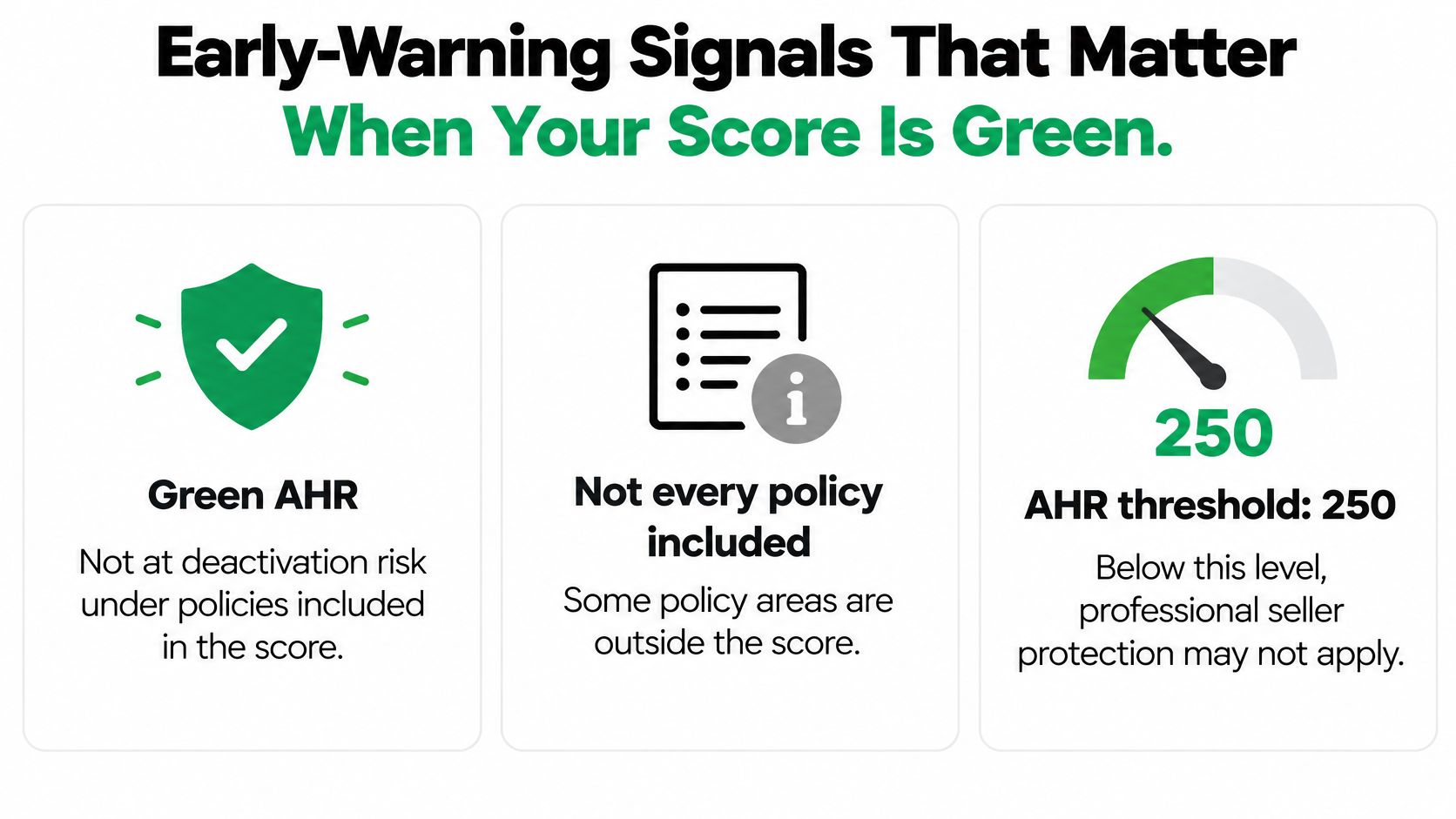
AHR at 200 or higher is the healthy line on a rolling 180 days. It can stay there while category VTR or the 7-day cancellation rate is already through its own ceiling. Account Health Assurance asks for an AHR of at least 250 across 6 months, and the protection against deactivation is conditional. A green rating is not that assurance.
Why the windows change the response
Every window above rolls. A bad week does not reset on the first of the month. It ages out day by day. Clean orders you confirm today start diluting the rate immediately, so speed of correction matters more than a polished explanation.
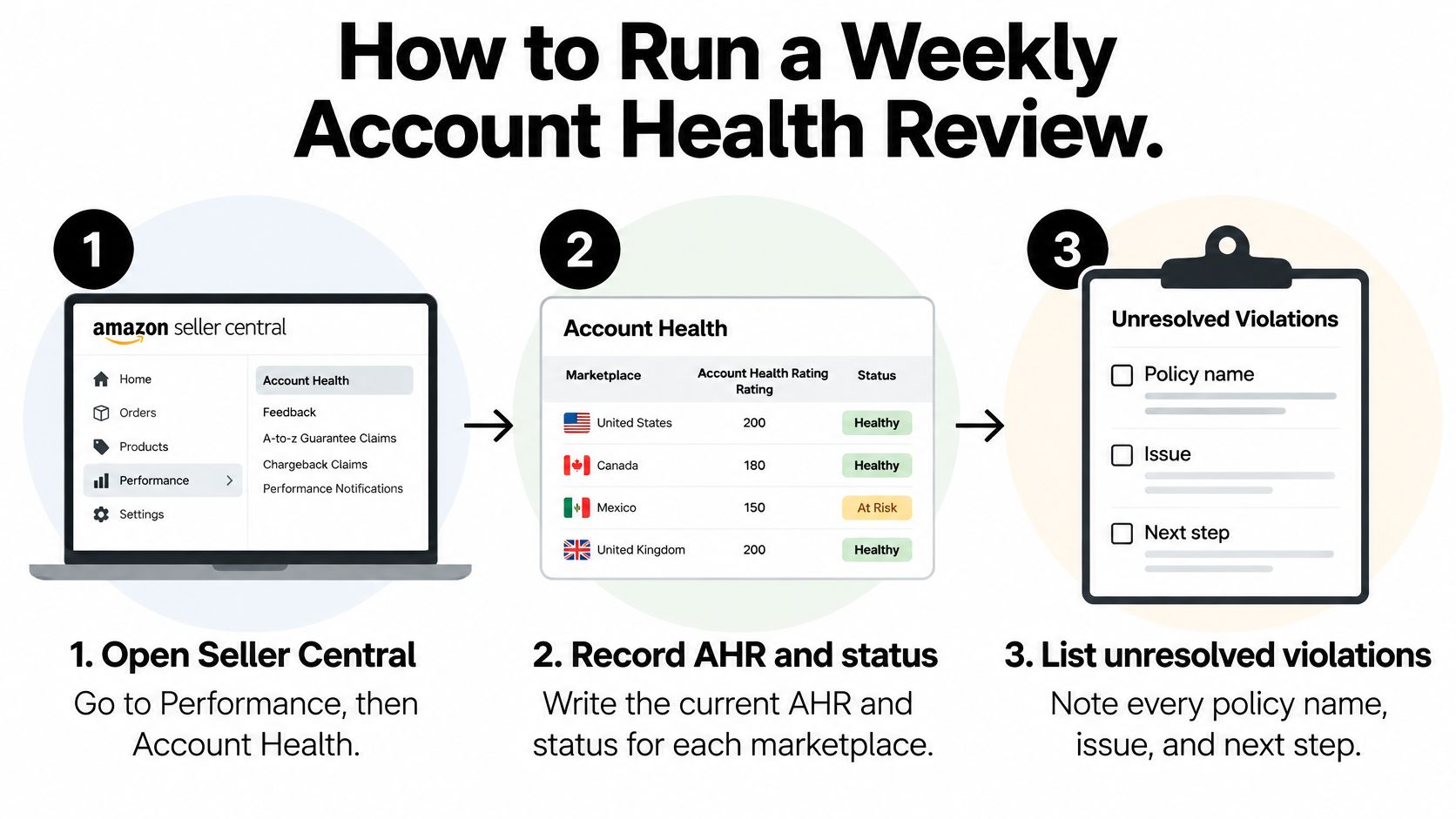
Open Seller Central, go to Performance, then Account Health, and write the current figure for each row, per marketplace. Next to any rate near its line, name the SKU, carrier, warehouse, or category feeding it. Those offer-level sources are what the score is slow to show.
How the Account Health Rating Scores Your Account
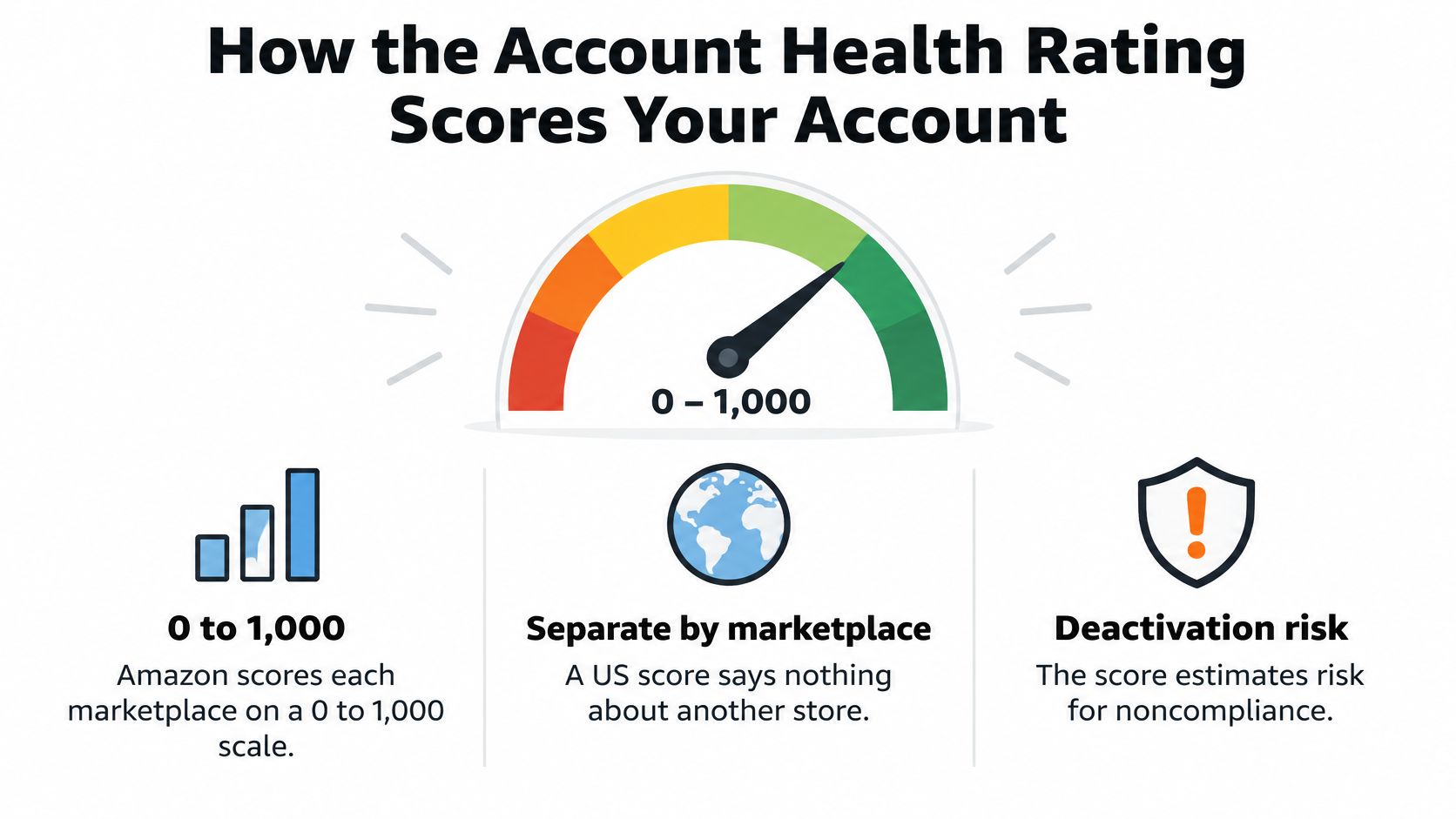
Amazon's Account Health Rating guidance describes AHR as a marketplace-specific score from 0 to 1,000, with new sellers starting at 200 and a green or Healthy range covering 200 to 1,000.
That Healthy band is wide. A store near the floor and a store near the ceiling are both green. Chasing the top of the scale burns time that belongs on open violations. At Risk and Critical sit below Healthy. I would confirm the exact cutoffs on your Account Health page rather than trusting any summary, including this one. Amazon can change how the bands are shown, and your store view is the operating source.
Separate Scores per Marketplace
Each store is scored on its own. A clean US score says nothing about Canada, the UK, or the EU. Three marketplaces means three account health files, three violation lists, and three evidence folders. Brands get caught when the home marketplace looks fine and a smaller store stacks the same listing error in another language.
The score reflects policy adherence and selling activity over the preceding 180 days. Resolved issues age out. New violations land immediately. The rating updates on a near real-time basis, so a fix submitted at 9 a.m. will not show by 10 a.m. Movement usually arrives after the next evaluation. Until then, clear the underlying violation. A submitted appeal is not a closed one.
The Volume Effect Most Brands Miss
A steady run of successful orders across that 180-day window supports the score. A busier account has more of that support than a brand-new seller sitting at the 200 starting point with almost no order history. The same minor violation can push the new account toward At Risk while the busier account stays inside Healthy.
Volume cuts the other way when it falls. A slow season, a deliberate SKU pause, or an out-of-stock stretch on the hero product can pull the score down with no new violation at all. If a major inventory gap is on the calendar, expect the score to soften. Resolve every open item before the gap starts.
Score Risk Is Not the Same as Privilege Risk
AHR estimates deactivation risk for the policies included in the score. It is one account-level number. Offer-level problems sit under it. One ASIN can carry a suppressed offer, repeated complaints, or a broken detail page while the account score stays green, because the rest of the catalog is still shipping clean orders.
Breaches on ODR, cancellation rate, or late shipment can restrict or remove selling privileges on their own paths, even while the rating still reads Healthy.
Buy Box share is often the first place that shows. If Buy Box percentage on core ASINs drops and price and stock have not changed, open performance notifications and the offer-level issues on those ASINs before you change advertising. You are looking at an account health consequence that has not turned into a formal notice yet.
Treat any drop out of Healthy as a same-week task with a named owner. It is never a quarterly review item.
Order Math Behind Defect, Cancellation and Tracking Rates
Percentages hide how little room you have. Convert every threshold into exception counts at your real order volume, and the operating problem becomes obvious fast.
At 100 orders, a single defective order is exactly 1%, and the requirement is below 1%. Your allowed count is zero. That's not a rounding issue, it's the whole story for low volume SKUs and new marketplaces.
| Metric | Allowed at 100 orders | Allowed at 1,000 orders |
|---|---|---|
| Order Defect Rate, below 1% | 0 defective orders | 9 defective orders |
| Pre-fulfillment cancellation, below 2.5% | 2 cancellations | 24 cancellations |
| Late shipment, below 4% | 3 late shipments | 39 late shipments |
| Valid tracking, above 95% | 4 invalid or missing records | 49 invalid or missing records |
What Actually Feeds Each Numerator
ODR counts three event types, negative feedback, A-to-z claims, and chargebacks. A buyer who skips your support team and files a claim has created a defect whether you refund them or not. Fast, generous first response isn't soft service, it's defect prevention.
Cancellations count seller initiated cancels before shipment over 7 days. One stockout on a promoted SKU shows up inside the same week, while the promotion is still running. If you're driving traffic with a coupon or a Prime event, your inventory check has to happen before the deal goes live, not after orders land.
Late shipment counts orders without confirmation by the expected ship date. Your handling time setting is the lever. Extending handling time by a day costs you some conversion, but a late shipment breach costs you the offer. I would take the conversion hit every time on a SKU with unreliable pick times.
Valid tracking uses 30 days of seller-fulfilled shipments. Five missing or invalid records in 100 shipments gives you exactly 95%, which fails, because the requirement sits above that level. Untracked small parcel methods and manual tracking entry are where this usually breaks.
Segment or You Will Chase the Wrong Fix
Reconcile daily, not weekly, and split everything four ways:
- By SKU: One product with bad packaging can drive your entire defect count.
- By warehouse: A single site with a late carrier pickup creates late confirmations that look like a company wide problem.
- By carrier: Invalid tracking often traces to one carrier's first scan discipline.
- By handling time promise: SKUs set to same day handling fail differently than SKUs set to two days.
When you find the segment, fix the cause. Switch the carrier, move the pickup earlier, correct the handling time, or fix the listing expectation that keeps generating claims. Appealing individual metric events one by one doesn't change the rate, and it burns the response time you need for real violations.
How to Run a Weekly Account Health Review
A weekly review works when it's a numbered routine with owners, not a glance at a green badge. Amazon's AHR policy page notes the score is a marketplace-specific, near real time score from 0 to 1,000, and that reaching the maximum number of repeat violations for one policy within a 180-day period can place the account at immediate risk of deactivation. That repeat mechanic is why the order of your review matters.
The Seven Step Routine
- Open Seller Central, go to Performance, then Account Health. Record the current AHR and status for each marketplace in a dated log. The common slip is checking only your home store.
- List every unresolved violation. Capture policy name, product, marketplace, and issue date. If it isn't on the list, it doesn't get worked.
- Sort by severity, then by repeat count. A second violation of the same policy outranks a first violation of similar severity, because the point penalty grows with each recurrence and the repeat ceiling is what triggers immediate deactivation risk.
- Assign one owner and one response deadline per violation. Name the person who holds the evidence too. Shared ownership is how a violation sits untouched for three weeks.
- Open the evidence file for each item. You need dated material for product authenticity, intellectual property, restricted products, and listing accuracy, ready before you write a word to Amazon.
- Submit highest severity responses first. Mark an item resolved only after Amazon confirms it. The most common slip in the whole routine is closing your internal ticket on submission day.
- Compare this week's ODR, cancellation, late shipment, and tracking figures with last week's. Log the trend, not just the totals. A metric that's compliant but worsening for three straight weeks is next month's violation.
If you want the wider reporting cadence that sits around this review, our rundown of the Seller Central reports worth checking every week covers the business and advertising reports that pair with the Account Health page.
What Good Looks Like After a Month
After four cycles you should have a dated AHR line per marketplace, a violation register with no ownerless rows, and trend lines for the four performance metrics. You'll also know your repeat exposure by policy, which is the number that predicts trouble.
A review that records totals but skips the trend is bookkeeping. The trend is the early warning, and it's the only part that lets you act before Amazon does.
Remember that score changes appear after the next evaluation. Your review doesn't move today's number. It determines where the next evaluation starts, which is exactly why weekly beats reactive.
Evidence Packs and Plans of Action That Clear Violations
Appeals fail on evidence, not on writing style. Build the file before you need it, organized by violation family.
| Violation type | Evidence to keep on file | Usual root cause |
|---|---|---|
| Intellectual property complaint | Supplier invoices, brand authorization letters, product photos | Inventory sourced without rights documentation |
| Product authenticity | Purchase receipts from authorized distributors, lot numbers | Stock bought from unverified channels |
| Restricted product or listing accuracy | Compliance certificates, test reports, corrected listing copy | Listing claims not backed by documents |
| Late shipment or invalid tracking | Carrier scan history, pickup logs, label records | Carrier pickup failure or unrealistic handling time |
The Response Sequence
- Identify the exact violation and its level. Policy level actions and category level actions have different scopes and different appeal paths. Don't write one generic response for both.
- Pull the evidence and date every document. Undated invoices and screenshots without context slow reviews down and invite a second request.
- Write the plan of action around four facts. Root cause, process change, owner, and the date the change took effect. Our walkthrough of how to structure an Amazon appeal plan of action breaks down that format section by section, and Million Dollar Sellers has a useful companion piece if you need to navigate the Amazon appeal process from first notice to final submission.
- Use the category path for category actions. For a VTR suspension, open the Account Health page, find the affected category, and select Submit Appeal next to it.
- Attach carrier evidence and the corrected process. Scan history plus the new pickup or label procedure, not a promise to do better.
- Track the response and keep the file audit ready. The same documents will be asked for again on the next complaint.
Scope the Appeal to the Actual Action
Amazon's Valid Tracking Rate policy requires at least 95% VTR at the product category level for seller-fulfilled orders, and a category below 95% can lead to suspension of seller-fulfilled listings in that category. FBA listings and seller-fulfilled listings in categories still above 95% aren't impacted by that specific action. A low VTR can also reduce eligibility for premium shipping, so the revenue cost starts before any suspension.
That narrow scope is good news if you use it. Appeal the affected category with that category's carrier data. Don't dilute it with company wide shipping stats from categories that were never in trouble.
The mistake I would avoid at all costs is describing a fix you haven't implemented yet. If the new label printer arrives Friday, you submit after it's installed and producing clean scans, with the evidence to prove it. Where the root cause is unauthorized sellers creating authenticity or IP noise rather than your own process, route the case through our 360 Brand Protection program for unauthorized seller removal and MAP enforcement, and file the removal evidence alongside the violation record so the pattern is documented if it recurs.
Test for a finished plan: Every claim in it should be backed by a document you can produce on request, dated before the submission.
Early-Warning Signals That Matter When Your Score Is Green
A green AHR means your account isn't at deactivation risk under the policies included in the score. Read that sentence again. Not every policy is included, and the score says nothing about individual listings. The risk that costs established brands money sits at offer level, where one SKU loses its listing or its Buy Box while the account badge stays green and everyone relaxes.
Two Layers, Two Cadences
Build your watch list in two layers, because they fail at different speeds.
Account layer, reviewed weekly:
- AHR status per marketplace: Direction of travel matters more than the absolute number while you're in Healthy.
- Repeat violation count per policy: This is your distance from the repeat ceiling.
- Unresolved violations by age: Anything aging without a submission is compounding risk.
ASIN layer, reviewed daily:
- ODR drivers per SKU: Claims and chargebacks traced to the product that generated them.
- Cancellation trend per SKU: Early stockout signal on promoted items.
- Valid tracking by carrier: First scan failures by service level.
- Late shipments by warehouse: Site specific pickup and handling problems.
- Buy Box share and A-to-z claims opened per product: The revenue facing symptoms.
Starting Tripwires Worth Setting Today
These are practitioner starting points, deliberately set inside Amazon's enforced lines so you act while you still have room. Flag ODR trending toward 0.7% on a rolling basis, cancellations above 2%, valid tracking below 97%, and late shipments above 3%. Flag any second violation of the same policy immediately, regardless of severity. Flag a drop of 10 points in Buy Box share week on week on any core ASIN.
Every signal needs three attachments, an owner, an evidence file, and a contingency you've decided in advance. Switch the carrier, tighten or extend handling time, pause the SKU, move stock to FBA. Decide in the calm, execute in the spike. When Buy Box share drops on a SKU, check its rank trend with our free sales rank checker to separate a demand problem from an offer problem before you reprice anything.
Green is a statement about deactivation risk today. It is not a statement about next month's revenue on your top five ASINs.
Run the account layer weekly and the ASIN layer daily for the first 60 days after any change to fulfillment, sourcing, or carrier mix. That's the window where a process change becomes a metric problem while the score still looks untouched.
When to Escalate and How Account Health Assurance Works
Sellers who treat Account Health Assurance as a standing shield stop doing the weekly work. That is how the protection gets pulled.
The dashboard below is where eligibility and open issues meet. Your escalation owner should know that screen cold.

The Conditions, Stated Plainly
To stay eligible as a professional seller, keep your Account Health Rating inside Amazon's qualifying range over a six-month period, keep a verified emergency contact on file, meet your regulatory obligations, respond promptly when Amazon reaches out, and fully resolve the issue. Miss that response window, or leave an issue open, and the protection does not hold. A repeat violation still counts against you either way.
AHA does not stop offer-level restrictions, suppressed listings, or a lost Buy Box. The account can stay active while your best ASIN stops selling. Keep a separate track for listing-level actions. That habit is what keeps a policy miss from turning into the account suspension recovery process.
This walkthrough shows how the assurance conversation with Amazon typically unfolds once you are contacted.
Escalation Triggers to Set in Advance
Escalate internally the same day on three triggers. A drop out of Amazon's qualifying AHR range inside your six-month window. A violation approaching its repeat limit for that policy. An open item that has passed the window Amazon expects you to answer in. Each trigger gets a named responder, not a shared inbox.
I would name that person before the first Amazon email, not after it lands.
Multinational brands need coverage across time zones, a documented handover between shifts, and an emergency contact who is a real person, checked daily. Online Brand Growth operates inside the client's Amazon account as a dedicated team. The account remains the client's account and brand. No client service is outsourced, and every human action in that account is performed by an OBG employee, so the owner your team calls is a named person, not a queue.
Set Up Your Weekly Account Health Review This Week
You don't need a new tool to start. You need three dated actions and the discipline to finish them in order.
Three Actions, Dated
Today: Pull AHR status, ODR, cancellation rate, late shipment rate, and valid tracking rate for every marketplace you sell in. Record each one against the threshold table, and circle anything inside your early warning tripwires, not just anything in breach.
Within 48 hours: Build the violation register. Every open item gets an owner, a response deadline, and the location of its evidence. If a document doesn't exist yet, that's a register row too, with a deadline to produce it.
This week: Put the weekly review on the calendar as a recurring working session, and set a daily ASIN check for any SKU with a rising trend. The register and the metric pull are the inputs. Don't hold the first session without both, or you'll spend it gathering numbers instead of making decisions.
Where a decision involves pausing or repricing a problem SKU, check the margin first with our free Amazon profit calculator. If the fix involves holding more buffer stock at FBA while you stabilize a seller-fulfilled category, run the carrying cost through the FBA storage fee calculator so the operations fix doesn't create a margin problem. I would rather pause a thin margin SKU that's generating defects than protect its revenue and risk the category.
This is work our logistics and operations team handles daily, including Amazon catalog management, FBA inventory management, FBA reimbursement services, seller support case management, and account health management. If you want a second set of eyes on your setup, book a free strategy call and we'll review your account health structure with you. The complimentary OBG360 Amazon Account Audit is provided as part of that free consultation call when the brand is a fit.
Online Brand Growth manages Amazon account health as part of full service channel management for manufacturers and consumer brands, pairing weekly health reviews, evidence file discipline, and offer level monitoring with advertising, listings, and FBA operations. If your score is green but your ASIN level risk is unmanaged, that's exactly the gap we close. Visit Online Brand Growth to book a free strategy call and have our team audit your account health setup.