
You've got a performance notification open, selling privileges paused or a key ASIN deactivated, and someone on the team has already drafted an apology. That draft is the problem. An Amazon Appeal Plan of Action isn't a letter asking for another chance. It's a compliance dossier that either proves you fixed a specific failure or proves, with records, that Amazon got it wrong.
I would not write a word until you've worked out which appeal Amazon asked for. The route decides the evidence, the evidence decides the root-cause sentences, and those sentences decide whether a reviewer can reinstate you without guessing. Work in that order and you stop wasting submissions on prose that can't answer the notice.
Choose the Right Appeal Route First
Say you submit a generic Plan of Action that promises better quality control. Amazon rejects it in two lines. The gap was never wording. You owed a supplier invoice, a corrected image, or a rights-owner retraction, and now you've spent an appeal attempt while that document is still missing.
Before you draft, screen for the case where a Plan of Action doesn't apply at all. Amazon's policy-violation FAQ states that a Plan of Action will not be accepted for certain policy-compliance violations, so the exact wording in the notice outranks any template you've saved.
The Seller Central guidance on appealing a policy violation describes two materially different response paths. One fits sellers who understand and acknowledge the violation and have changed the product condition or description. The other fits sellers who believe the violation occurred in error and can provide documentation confirming compliance. Pick the wrong one and your evidence won't match the option you selected in Account Health.
Triage matters at current enforcement levels. Amazon suspensions affected 14% of seller accounts in Q1 2025, up from 11% in 2024, according to Ruit's cited Amazon compliance data.
Match the Notice to One Row
Copy the exact violation name, policy reference, and every affected ASIN from the performance notification. Match them to one row below, then gather that row's evidence. Check your Amazon Account Health Rating at the same time so you know whether you're fixing one listing or protecting the account score.
| Notice type | Response route | Evidence to attach | Where to submit |
|---|---|---|---|
| Listing deactivated for a policy violation | Acknowledge and correct | Before and after listing screenshots and proof of the corrected title, images or claims | Account Health, open the violation and select Submit appeal |
| Authenticity or product quality complaint | Dispute with evidence, or acknowledge and correct | Supplier invoices from the last 365 days, supplier identity and sourcing records | Account Health appeal questionnaire |
| Intellectual property complaint | Rights-owner authorization or retraction | Authorization letter from the rights owner or the retraction notice | Account Health violation view |
| Account-level suspension | Full Plan of Action with questionnaire | Invoices, business licenses, policy acknowledgments and a root cause for each issue | Performance, Account Health, Reactivate your account |
| Negative feedback combined with undelivered orders | One Plan of Action with a separate root cause per deactivation reason | Carrier tracking data, delivery records and the complaint log | Account Health appeal questionnaire |
| Request for additional information after submission | Answer only what was requested | The specific documents named in the request | Account Health, View Appeal |
If your notice doesn't fit a row cleanly, don't force it. Re-read the notification until you can name the submission channel Amazon specified. That's the instruction that counts.
Assemble an Evidence Library Before You Write
Pull the documents first. For authenticity and product-quality cases, that means invoices from the previous 365 days for every ASIN in the notice, not one representative SKU. If an invoice sits outside that window or doesn't correspond to the affected inventory, pull a different one or acknowledge the gap and fix the sourcing. Don't submit something close enough.
What to Check on Each File
Open every invoice and confirm five fields before it enters the package.
- Supplier identity: Legal name, address, phone, and contact person Amazon can verify.
- Product match: Item description that clearly ties to the ASIN, variant, and pack size under review.
- Quantity and date: Units that reconcile with your Seller Central sales volume for the period, dated inside the requested window.
- Buyer identity: Your business name and address, matching the seller account.
- Supporting set: Business license, supplier authorization, lot or batch records, packaging photos, and certificates for quality complaints.
That reconciliation is where brands get caught. You sold 800 units and your invoice shows 200. The reviewer sees unaccounted inventory and doubts the rest of the file.
Redact, Never Edit
You can redact confidential pricing and margin lines. You can't alter names, dates, quantities, or item descriptions. An edited invoice reads as fabricated, and that's a worse problem than the original complaint.
Label each file with the ASIN, document type, and date, then store everything in one shared folder built on a repeatable naming standard. If your documentation process needs tightening, MakeAutomation on B2B compliance workflows is a useful reference for turning ad hoc folders into auditable workflows. Run the same discipline against our Amazon account audit checklist so supplier records stay current before the next notice arrives.
A document that doesn't match the notice hurts more than no document, because it contradicts the root-cause sentence you're about to write.
Map Each ASIN to Its Root Cause
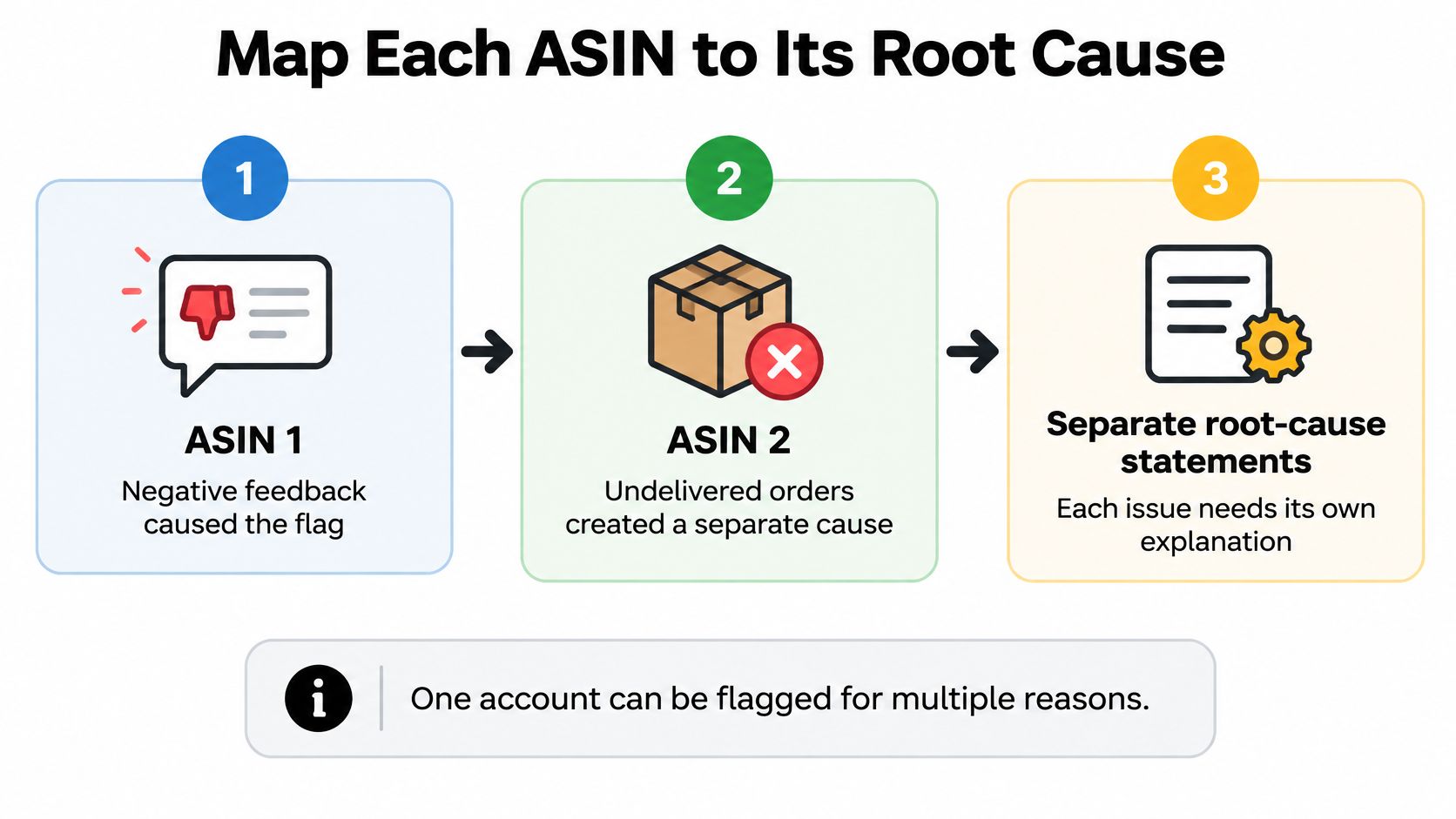
Combined deactivations hide multiple failures. An account can be flagged for negative feedback plus undelivered orders at the same time, and Amazon expects each reason explained separately. One umbrella cause like operational issues tells the reviewer you didn't investigate.
The diagram below shows the mapping logic. Each ASIN gets its own row, its own cause, and its own evidence trail.
The Five-Step Map
- Copy the notice into a spreadsheet. One row per violation name, ASIN, and policy reference. Don't merge ASINs that share a parent if Amazon listed them separately. The notice defines the scope, not your catalog structure.
- Name what failed in the operation. Work through the concrete options. An unverifiable supplier, an inventory-management gap, a quality-control miss, a listing claim nobody checked, or a carrier handoff with no tracking upload. If you can't attach the failure to a process step, you haven't found it yet.
- Write one sentence per row. Name the failure, the date it began, and the units or orders affected. Dates and counts prove investigation. Adjectives don't.
- Test the sentence against your records. Do invoice quantities match sales volume for that ASIN? Do complaint dates line up with one batch or one shipment? Did the listing change go live on the date you claim? If the data contradicts the sentence, rewrite the sentence.
- Flag any row you can't explain. Mark it unresolved and keep digging through supplier emails, FBA shipment records, and Voice of the Customer. A guessed cause fails review faster than an honest gap you're still closing, because the attached evidence won't support it.
A Worked Example
Say a supplement brand gets flagged on two ASINs. One drew inauthentic complaints. The other drew damaged-item feedback. Those are different failures, even though they arrived in one notification and both involve product quality on the surface.
- ASIN B0SUPP001: "We purchased 600 units from a wholesaler between March 3 and April 10 without verifying authorization from the manufacturer, and seven customers reported the product as inauthentic."
- ASIN B0SUPP002: "Lot L-2291 shipped in single-wall packaging from May 1, and 23 units arrived with cracked seals because we skipped inbound packaging inspection for that lot."
Each sentence names a supplier decision or an inspection step, a date range, and a count. Each one points to a different corrective action and a different control, which is exactly what the questionnaire will ask for next.
If a listing in the notice is also suppressed, work the fix in parallel using the steps in our guide to fixing Amazon listing suppression, but keep the suppression evidence in its own row. Don't blend it into the authenticity row.
Practical rule: Every row in your spreadsheet must map to one answer in the appeal questionnaire. If a row has no answer, the notice still has an unexplained issue.
Corrective and Preventive Actions With Owners
Keep the tense honest. Corrective actions already happened. Preventive actions stop a repeat. Amazon distrusts future-tense corrections because they don't reduce current risk, so every correction needs a completion date and a record.
The planning view below is how this should look before submission, with dates and evidence references in front of you.
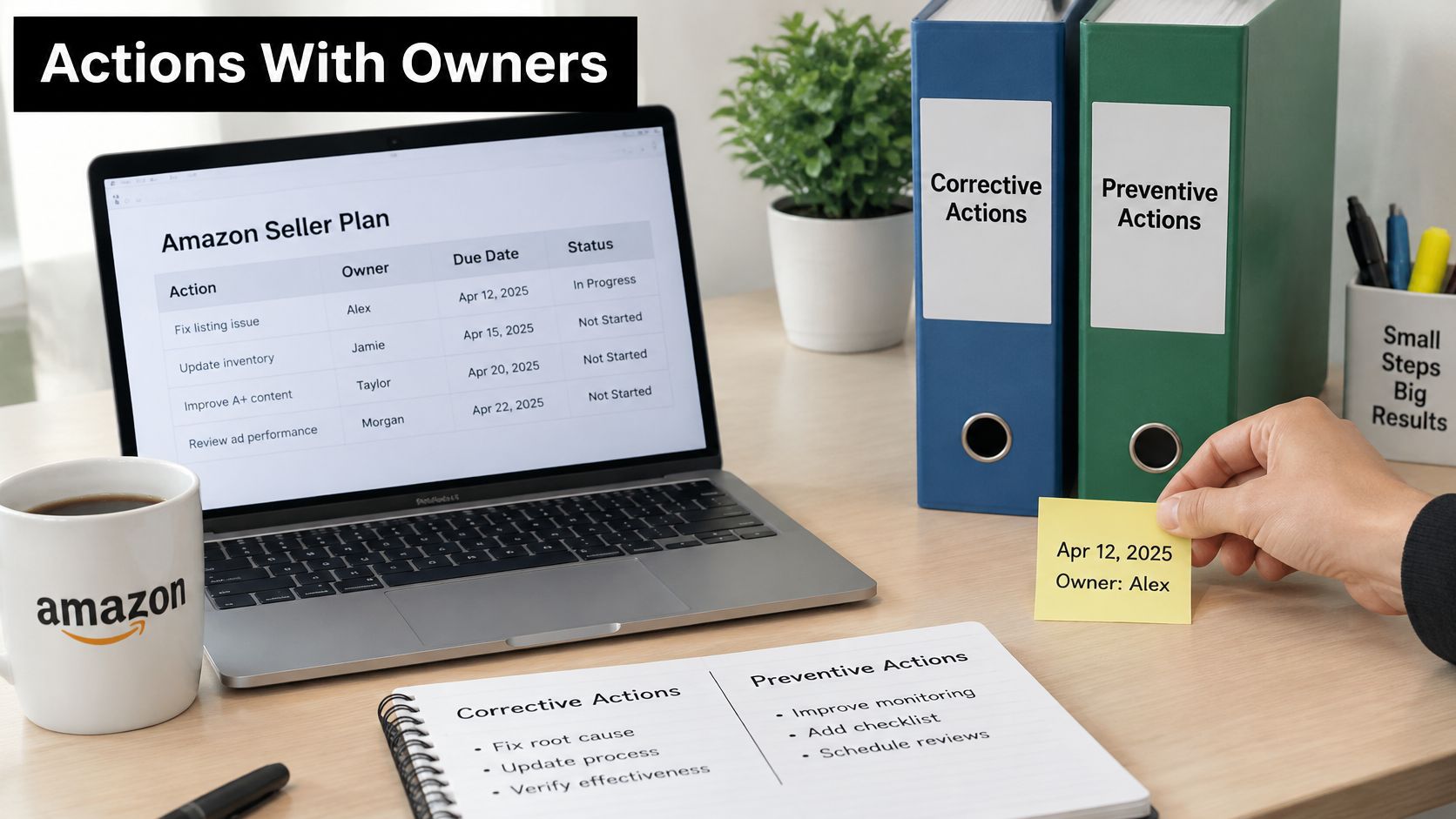
Typical corrections include deleted prohibited listings, removed unsupported claims, corrected tracking data, quarantined inventory, refunded affected customers, and replaced unverifiable suppliers. Write each one as what, when, proof. "On June 12 we created a removal order for 96 remaining units. Proof is the removal order confirmation." That's checkable in ten seconds.
Before you quarantine stock or pause an ASIN, run the numbers in the Amazon profit calculator so you know what the pause costs per week in lost contribution. That figure shapes how fast you source replacement stock, and it keeps finance aligned with the compliance decision instead of fighting it.
Controls a Reviewer Can Audit
A promise to be more careful gets rejected. A control with an owner, a cadence, and an output can be verified, and you can keep running it after reinstatement. Document each control in written sops so the process survives staff changes and the record it produces stays consistent.
| Control | Owner | Cadence | Evidence it produces |
|---|---|---|---|
| Compliance review of every listing change | Listing manager | Every change | Signed review log with date and reviewer |
| Supplier document check before each purchase | Purchasing lead | Every purchase order | Verified invoice and supplier contact record |
| Invoice-to-stock reconciliation by ASIN | Operations lead | Monthly | Reconciliation report with variances explained |
| Lot-level traceability and packaging inspection | Quality lead | Every inbound lot | Lot record and inspection photos |
| Customer complaint trend review | Customer experience lead | Weekly | Complaint log tagged by root cause |
The video walkthrough below covers how these controls fit together in a submission package.
Finished Versus In Progress
Separate the two clearly. Corrections often finish in days. Supplier re-verification can take several weeks because you're waiting on manufacturer confirmation letters and new purchase documentation.
Never describe a control as running if it has no record yet. Write it as in progress with a start date and the first review date, for example a monthly invoice-to-stock reconciliation starting July 1 with the first report due July 31. That honesty reads as control. A claimed control with no log reads as a template.
Write the Plan of Action Section by Section
Build the document in five blocks. The structure forces you to answer what Amazon asked and keeps company background, customer stories, and general apologies out of the submission. Each block exists to answer a specific question the reviewer has, and your evidence library decides what each block can claim before a single sentence is written.
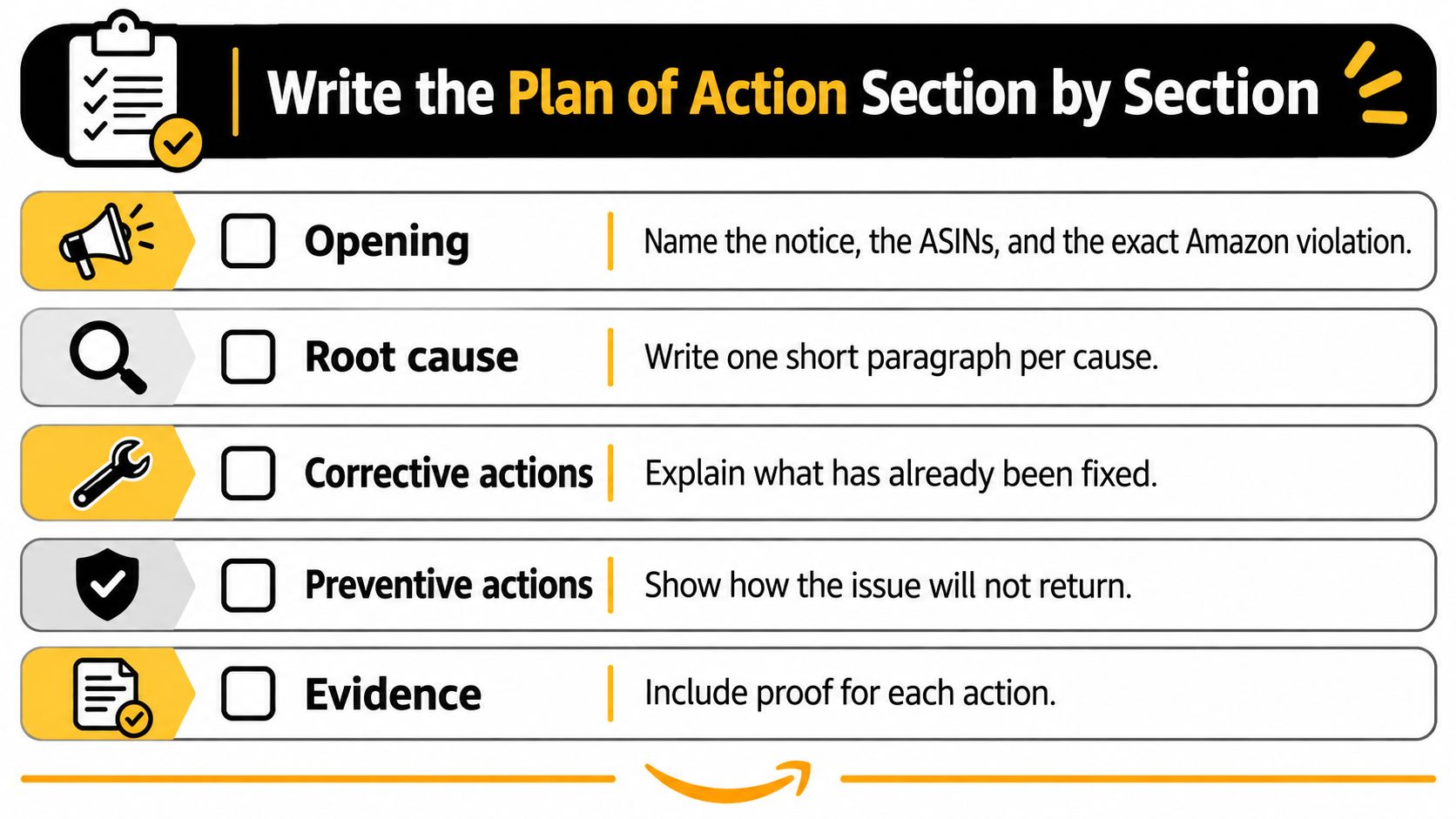
The Five Blocks
Opening. Name the notice, the ASINs, and the violation in the exact words Amazon used, in two or three sentences. Don't paraphrase the violation into softer language. The reviewer is matching your text against the enforcement record, and softened wording can read as a different issue.
Root cause. One short paragraph per cause from your spreadsheet, starting with "The root cause of the issue was." Keep the dates and counts in. The Amazon help page on appealing a deactivation instructs sellers to keep the submission clear, concise, factual, and direct, to focus on the events that caused the issue, and to explain every issue in the deactivation. It names unverifiable suppliers, inventory-management failures, and quality-control problems as example root causes.
Corrective actions. Each completed fix with its date and evidence reference, in past tense. Number them to match your root causes so the reviewer can trace cause one to correction one without hunting. If you can't point to a record for a fix, it isn't done, and claiming it is costs you the appeal.
Preventive actions. The controls from your table, each with an owner and start date, and one line on how it stops the specific cause. A pre-publication compliance approval prevents unchecked claims because no listing change goes live without a signed review log. That causal link is what separates a control from a wish.
Closing. State the outcome you commit to and stop. No request for sympathy, no sales history, no claim about how much revenue you've lost. Two sentences is enough.
Cut Before You Submit
Revise for facts, not tone. Pure Write's guide to revising content makes the useful point that revision means cutting what doesn't serve the reader, and here the reader is a reviewer scanning for dates and documents. Delete any sentence that doesn't name an event, an action, or a record. If the reviewer has to hunt for a file you referenced, the appeal reads as unfinished.
Then run the pre-submission checklist against the draft.
- Every ASIN covered: Each ASIN in the original notification appears in the root cause, the actions, and the evidence list.
- Every cause answered: Each root cause ties to at least one corrective action and one preventive control.
- Every action dated: No undated corrections, no controls without a start date.
- Every document named: File names in the text match the files you attached, with the requested document timeframe followed.
Weak Versus Strong
Weak: "We take quality seriously and will improve our processes going forward."
Strong: "On May 14 we quarantined lot L-2291 and removed 140 units from FBA. Since May 20, our quality lead inspects and photographs every inbound lot before it ships to Amazon. Proof is the lot inspection record attached for ASIN B0SUPP002."
The second version names a batch, a date, a quantity, an owner, and a record. In practice, that specificity is what separates a rejected appeal from a reinstated one.
Submit Through Account Health and Track the Decision
Submit once, with a complete package. Duplicate cases and repeated submissions on the same violation slow review and can consume your chance to revise.
The Submission Path
The Amazon Seller Forums guidance on account reactivation confirms the path runs through Seller Central, Performance, Account Health, and the Reactivate your account button, which may present a detailed questionnaire, policy acknowledgments, a Plan of Action, and supporting documents such as invoices or business licenses.
- Log in to Seller Central and go to Performance, then Account Health.
- Open the right entry point. For a listing violation, open the violation and select Submit appeal. For an account-level suspension, select Reactivate your account.
- Work through the questionnaire. Choose the response option that matches your evidence, acknowledge and correct or dispute with documentation, and paste each block into its matching field rather than forcing the whole document into one box.
- Attach the full package. Include evidence for every ASIN in the notice, named exactly as referenced in your text.
- Log the submission date, case ID, and the files you attached in your spreadsheet so you can measure response time against something concrete and reconstruct what the reviewer saw if you need to resubmit.
While You Wait and If You're Rejected
Monitor the email address associated with the account, including spam folders, every business day, and check Account Health for a View Appeal request for additional information. If Amazon asks for more, send only what was named. Extra narrative dilutes the answer.
If Amazon rejects the appeal, read the stated reason and fix that exact gap before resubmitting. A rejected submission has to answer the reason for rejection, so resubmitting the same text with new adjectives wastes the cycle. And never open a new seller account while the original is under review. It creates an additional account-compliance problem and can lead to permanent suspension, so it is not a workaround.
If the complaint traces back to counterfeit or unauthorized sellers on your listings rather than your own sourcing, that's a different fix. Our Brand Registry & Enforcement services handle unauthorized seller removal and MAP enforcement, and our free Unauthorized Seller Playbook details the exact moves used to identify, document, and remove unauthorized resellers and MAP violators from listings. Book a free 45-minute strategy call and we'll audit your Amazon presence, identify growth opportunities, and recommend an approach.
If your account is deactivated or an appeal keeps coming back rejected, we can help you rebuild the submission around the right route, a defensible root-cause map, and evidence a reviewer can verify quickly. Visit Online Brand Growth to book a free 45-minute strategy call, where we audit your Amazon presence, pinpoint what's blocking reinstatement, and lay out the corrective and preventive controls your team can run from here.