
You've just shortened a title to fit the new limit, rewritten your bullets for the third time this quarter, and now you're staring at a product description on Amazon that says roughly the same thing as both. It reads fine. It also does almost nothing, because shoppers already got those facts higher on the page, and the one question that would stop them buying, whether it fits, works with their model, or needs something else in the box, isn't answered anywhere. That's the normal state of most listings I audit, and it's fixable without writing longer copy.
Amazon Listing Fields and Their Limits
Start with the limits, because they decide what each field can realistically do.
| Field | Limit | What it does |
|---|---|---|
| Title | Up to 75 characters, about 60 recommended | Names the brand, product type and key identifier |
| Item highlights | Up to 125 characters | Summarizes the core benefit in one line |
| Bullet points | Up to 5, at least 3 recommended | Scannable distinct features, benefits, uses and specs |
| Description | Text only, length set by category | Usage, specifications and best applications |
The Amazon Seller Central product detail page rules require titles for most product types to contain no more than 75 characters, including spaces, while item highlights can contain up to 125 characters and a detail page can show up to five descriptive bullet points, with at least three recommended. That structure has been in Amazon's seller documentation since at least March 26, 2010, and it still sets the job for each field.
The division of labor
Your title identifies. It should carry the brand, the product type, and the one identifier a shopper needs to know they're in the right place, such as size, count, or model family. It isn't a sentence and it shouldn't try to sell.
Your bullets scan. Each one covers a distinct feature, benefit, use, dimension, or operating consideration, so a shopper on a phone can confirm the core facts in seconds. If two bullets make the same point in different words, you've wasted one of only five slots.
Your description fills gaps. It's paragraph text for usage, technical specifications, and best applications that don't already appear above it. Think setup, care, compatibility detail, and the situations where the product works best, not a second version of bullet two.
Practical rule: For each sentence in the description, ask whether the same fact already appears in a bullet. If it does, cut it and replace it with a fact that isn't on the page yet.
Repeating the title inside the bullets is the most common waste. Say your title already says 24 oz stainless steel bottle. A bullet that opens with that same phrase gives the shopper nothing new. Use that bullet for lid type, cupholder fit, or cleaning method instead.
The description is also shared at the ASIN level, not private to your offer. Other contributions can change what shoppers see around it, so your copy has to stand on its own and stay accurate without relying on a promotion, a price, or seller specific promises. Keeping those fields clean in one system is much easier when your catalog data lives in one place, which is why disciplined product information management matters before anyone starts rewriting sentences.
A Five-Step Workflow for Compliant Copy
Good copy starts with catalog governance, not keywords. The Amazon Seller Central product detail page policy requires descriptions to be accurate, trustworthy, clearly written, and non-misleading, prohibits HTML and JavaScript, competitor mentions, and offer related claims, and sets a text only description limit that varies by category.
The workflow below keeps you inside those rules while you write.
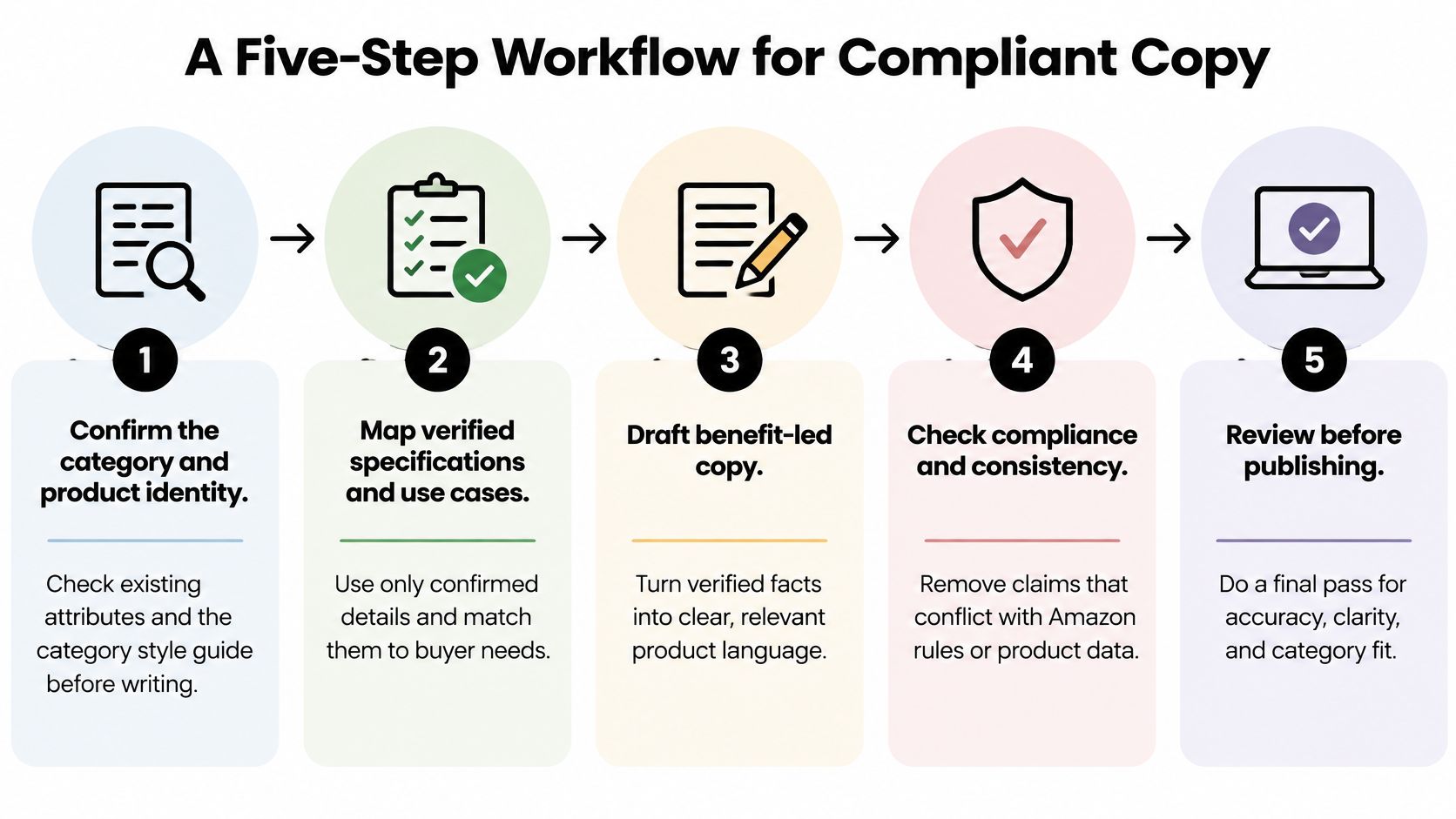
- Confirm category and product identity. Check the existing attributes and the category style guide before you draft a word. The common slip is writing to the wrong category, which breaks the attribute set and forces a full rewrite.
- Map verified facts. Pull specifications, use cases, benefits, limitations, and required accessories from the spec sheet or test file, not from the marketing brief or memory. The common slip is copying a claim from a brief that nobody ever verified.
- Draft by objection. Write short, customer facing paragraphs, one per buying objection. The common slip is drafting for search first, which produces a keyword block shoppers skip.
- Strip prohibited content. Remove competitor mentions, pricing, promotions, shipping promises, superiority language, and seller specific information. The common slip is treating words like best as harmless filler when Amazon treats them as claims.
- Validate before submission. Check the draft against the category style guide and link every measurable claim to a source record. The common slip is submitting clean sounding copy with no proof file behind it.
This short walkthrough shows how the fields sit together in Seller Central before you submit.
The phone gate
Before you submit, open the draft as a shopper would see it, below the title, bullets, and images on a phone. Check that units are unambiguous, compatibility statements name exact models, and dimensions say what was measured. Inches without saying width or assembled height will create returns.
A finished draft must state four things clearly: specifications, intended use, limits, and what's in the box. If one is missing, you're not done, even if the prose sounds polished.
Placing Keywords Without Losing Retrieval
Amazon may not use your description keywords at all. The Amazon Seller Central discoverability guidance warns that Amazon may not use all supplied product description or bullet point content when retrieving products in customer search results, for reasons including search computational efficiency, shopping result manipulation, irrelevant search terms, and offensive or illegal terms. Keyword insertion in the description isn't a guaranteed indexing tactic.
That changes how you should spend your effort. Write the description to answer questions and explain use. Put searchable attributes in the copy naturally, and don't build your retrieval plan on a field Amazon can choose to ignore.
Where terms belong
- Title first: Place the highest volume product term where it reads naturally as identification, such as travel mug or replacement filter. Don't cram synonyms into 75 characters until the title stops making sense.
- Bullets second: Put attribute terms in the bullet that proves them, one idea per bullet. Material, size, capacity, and compatibility belong next to the fact, not in a list at the end.
- Description last: Use natural variants as explanation. If shoppers also say camping mug, that phrase can appear in a sentence about outdoor use, not as a repeated tag.
Say you're selling a travel mug. The weak version ends with a comma separated block: camping mug, hiking mug, coffee tumbler, insulated cup, travel coffee mug. The stronger version writes one useful paragraph: it's a 16 oz insulated travel mug sized for a car cupholder, with a locking lid for a commute bag, and the body and lid go on the top dishwasher rack. The second version contains searchable attributes, but every phrase tells the shopper something true.
Find terms from places that reflect real shopping language. Use Search Query Performance in Brand Analytics, review wording, Amazon search autocomplete, and competitor titles to see which attributes shoppers name first. Keep backend terms separate from front end copy, and manage them under your Amazon backend keywords process instead of dumping them into paragraphs.
I would work with three to five target terms per listing. For each one, read the sentence aloud. If it describes something the product is or does, keep it. If it only exists because a tool reported volume, remove it from the description.
Rewriting Features as Benefits in Your Brand Voice
A benefit answers the buyer's so what in their own situation. It still needs a feature behind it, or it's just a promise.
| Feature line | Benefit rewrite | Proof needed |
|---|---|---|
| Double-wall vacuum insulation | Keeps a cold drink cold through a full afternoon at the desk | Insulation test with the stated hold time |
| Leak-resistant lid | Stays dry in a backpack, tested with the lid closed and the bottle upside down | Your leak test method and result |
| Dishwasher-safe body and lid | Cleans in the top rack without a separate sponge routine | Care instructions and a tested cycle or manufacturer statement |
The rules behind those rewrites
Keep one claim per bullet. The insulation rewrite works because it ties a construction feature to a moment of use, a full afternoon at a desk. That moment also limits the claim, which is good, because you only have to prove the hold time you tested.
The lid rewrite names the test condition inside the benefit. Closed, upside down, in a backpack is more useful than leak proof, and it's honest about how you checked it. A shopper can picture the result and you can defend the wording.
Drop filler adjectives. Premium, amazing, and ultimate don't tell a buyer what changes for them. Top rack, no separate sponge routine, and fits a standard cupholder do. If you're building reusable structures for a team, product description templates and examples can help you keep that feature, benefit, proof pattern consistent across writers.
Brand voice lives in word choice and rhythm, not in bigger promises. A direct brand can say cleans in the top rack. A warmer brand can say rinse, rack, done. Both make the same verifiable claim.
Build a brand voice card and share it with everyone who touches the listing:
- Three adjectives: For example, direct, practical, calm.
- Two words to avoid: For example, premium and advanced.
- One example sentence per tone: Show the approved sound, don't just describe it.
Match the voice to category expectations. A playful tone can cost trust on a safety, medical, or children's product, even if it works well on your DTC site. Shoppers judge credibility against the other listings they're comparing in that moment.
If you can't prove a benefit yet, describe the feature plainly and wait for test data. Double wall stainless steel construction is a perfectly good line until your hold time test exists.
Read each benefit aloud and ask whether a buyer could verify it from the photos and specs. If they can't, add the proof to the page or soften the line.
Carry the same discipline into A+ Content. Standard A+ Content enriches the description area of an Amazon product page with image and text modules and comparison charts, so give each module one benefit and one proof point. Pair every comparison chart entry with its line in your claim file. The feature line double wall vacuum insulation becomes the module headline cold for the whole afternoon, with the hold time test placed directly beneath it, and the headline wording matches your bullets because both came from the same voice card.
Compliance Claims to Remove Before You Submit
A description can make a risky claim with one casual word. Amazon requires product information to be truthful, accurate, and verifiable. Its Misleading and Prohibited Claims policy applies to claims in product descriptions, titles, images, packaging, and other marketing materials. Examples include “lasts 10 years,” “100% organic,” and “Made in Italy” when the product is only assembled there.
| Claim type | Example that gets flagged | Proof to keep on file |
|---|---|---|
| Longevity | lasts 10 years | Warranty terms or a durability test report |
| Origin | Made in Italy, when only assembled there | Manufacturing record showing where the product is made |
| Superlative | best, guaranteed | Objective comparison or certification |
| Quantified comparison | 30% more powerful | Head-to-head test data with the method stated |
| Composition | 100% organic | Certificate covering the actual ingredients |
How to run the audit
Before publishing, check performance, composition, ingredient, and origin claims against the evidence you hold. Words such as “best,” “100% pure,” “guaranteed,” “twice as effective,” or “30% more powerful” need objective proof. Replacing “best” with “leading” does not fix an unsupported comparison.
Keep a claim file for each ASIN. Record the exact wording of each measurable claim, its supporting document, the date, and who approved it. Store test reports, certifications, laboratory documentation, warranty terms, and manufacturing records so your team can retrieve them if Amazon asks for support.
If a claim has no evidence, rewrite it as a verifiable product description. “Lasts 10 years” might become “steel frame with replaceable wear parts,” if those details are accurate. Replace “30% more powerful” with the rated output in watts and the measurement standard. Use “100% organic” only when the certificate covers the actual ingredients in the finished product.
Copied or altered claims on another seller's offer require a different response from editing your own description. Online Brand Growth handles Brand Registry enforcement, including unauthorized seller removal and MAP enforcement. Your claim file can help establish which version of the copy your brand approved.
Answering Will This Work For Me Questions
Shoppers leave when a practical question has no answer. Your description should state operating constraints and required accessories before purchase, in plain lines your photos and specs can confirm.
| Constraint | What to disclose | Example line |
|---|---|---|
| Device compatibility | Exact model numbers and firmware | Fits models X200 and X210, firmware 4.2 or later |
| Regional voltage | Input range and plug type | Input 100-240V, US two pin plug |
| Sizing tolerance | Measured dimensions and tolerance | Fits 12 to 13 inch laptops |
| Setup time | Steps and tools required | About 10 minutes, Phillips screwdriver |
| Environmental limit | Operating temperature and water rating | Use from 32 to 104 degrees F, splash resistant only |
| Package exclusions | Items not included | Batteries and wall mount sold separately |
Cover compatibility with exact model numbers, not fits most. State regional voltage and plug type for anything powered. Give measured dimensions and tolerance, setup time and tools, environmental limits such as temperature range or water resistance, maintenance intervals, accessibility notes where relevant, and what's excluded from the package.
Source the questions from your own operation. Pull the issues that appear most often in customer service contacts, Q&A, reviews, and returns, then answer the top three directly in the description. A missing compatibility line usually surfaces later as returns citing not compatible, which is an expensive way to learn what to write.
Health adjacent products need the same care with safety boundaries. For example, if shoppers ask about ingestion, link your internal review to clear safety information such as what happens when you swallow fluoride-free toothpaste rather than improvising a reassurance in listing copy. State intended use, age guidance, and when to seek professional advice in language your compliance reviewer approved.
Test each new answer against return reasons after it goes live. If the same question keeps driving contacts, the answer is in the wrong field or worded too vaguely.
Testing Description Changes Without Guessing
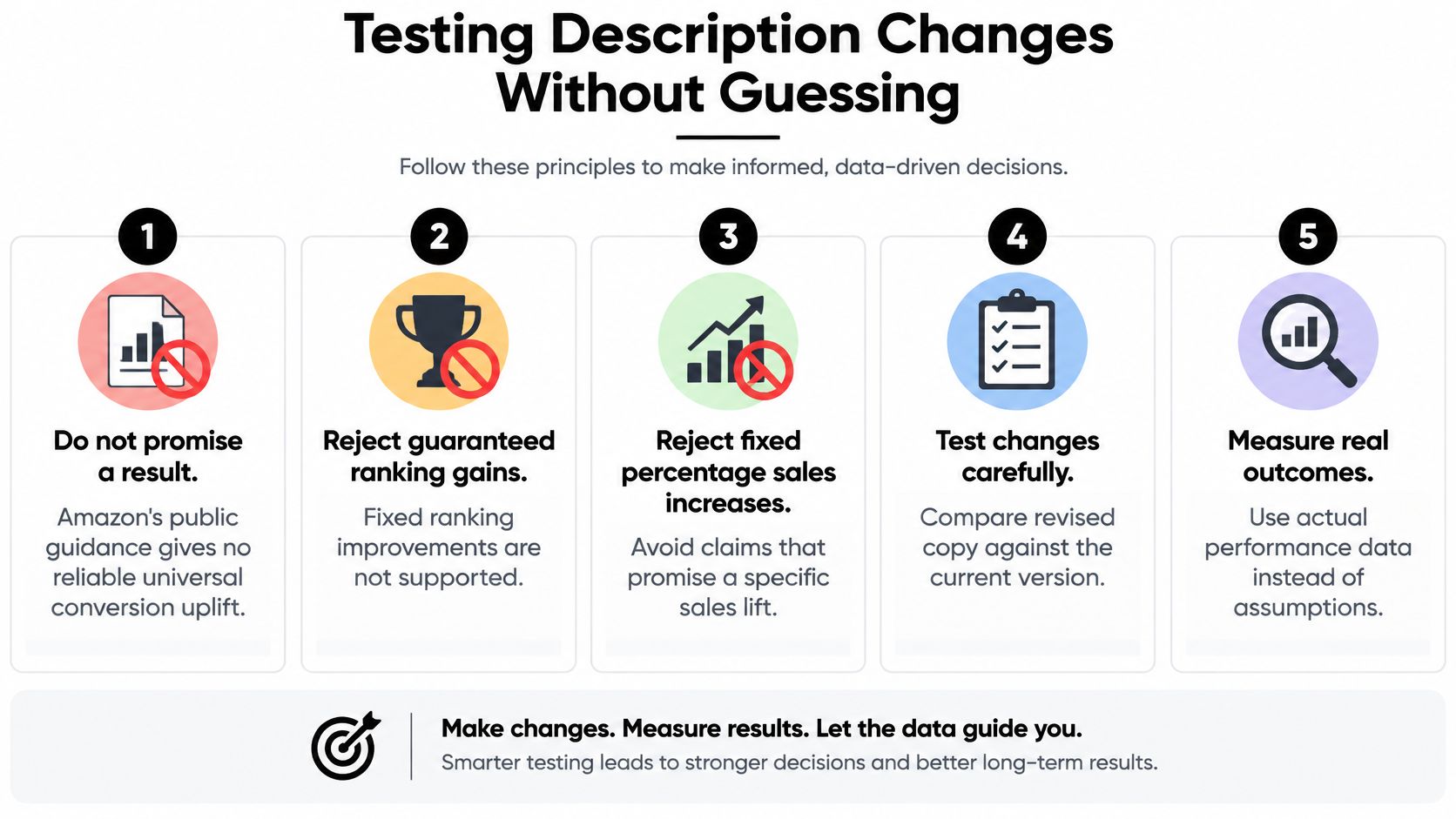
Don't promise a result from a description rewrite. The Amazon Seller Central detail page guidance treats the page as a shared ASIN level system with title, images, bullets, description, variations, and reviews, and no reliable universal conversion rate uplift can be inferred from Amazon's public guidance, so guaranteed ranking gains or fixed percentage sales increases should be rejected unless a controlled experiment on the specific ASIN supports them.
The test sequence
- Pull top objections. Use search query reports, reviews, returns, and customer service contacts. Rank them by frequency and by whether copy can resolve them.
- Assign one fix per objection. Give each objection one evidence-backed paragraph or bullet. Don't rewrite the whole page and then guess which sentence mattered.
- Keep information order consistent. Use the same order across the catalog so returning shoppers and your own team can compare pages cleanly.
- Submit only compliant changes. Run the claim file check first. A test that gets suppressed teaches you nothing.
- Measure before and after. Hold price, availability, advertising, images, and review conditions as steady as possible, and compare matching periods.
Manage Your Experiments is useful for eligible main image and title tests, but description changes generally need a clean before-and-after window. Change one element, note the submission date and when the page updated, and don't launch a coupon in the same week if you want a readable result.
Watch sessions, unit session percentage, return reasons, and the specific contact type you tried to reduce. A description that cuts compatibility returns without lifting conversion may still be a win once you account for return processing and unsellable units.
We rebuild product detail pages to win both SEO and conversion, and that order matters here. Retrieval gets the right shopper to the page. Clear, proof backed copy gives that shopper fewer reasons to leave or return the product.
Audit Your Top ASIN This Week
Pick your best selling ASIN and run it through the field limits table. Check title length, cut any bullet that repeats the title, move keywords out of blocks and into sentences, and strip every claim with no proof file. Work through the broader checks in this Amazon account audit checklist so account health issues don't contaminate your copy test.
Record a baseline before you change anything: sessions, unit conversion, return reasons, and sales rank. The Sales Rank Checker at /amazon-sales-rank-checker gives a quick rank read, and the Amazon profit calculator at /calculator shows whether margin can absorb a longer test. If restocking overlaps the test, run the FBA storage fee calculator at /tools/storage-fee-calculator so storage cost isn't mistaken for a conversion problem. Those tools sit alongside our other free tools, the Amazon Profit Calculator, Sales Rank Checker, 2026 Fee Guide, FBA vs FBM Comparison, Breakeven Calculator, Storage Fee Calculator, and Category Margin Guides.
Schedule the review for the end of a full sales cycle, then decide whether the new copy rolls to the rest of the catalog. If you want a team to run this audit across every ASIN and track results, book a free strategy call at /#book-call.
Online Brand Growth rebuilds Amazon product detail pages for SEO and conversion, with compliant titles, bullets, descriptions, and A+ Content backed by claim files and controlled testing. If your top ASINs need that audit run across the catalog, visit Online Brand Growth and book a free strategy call to map the first fixes.