
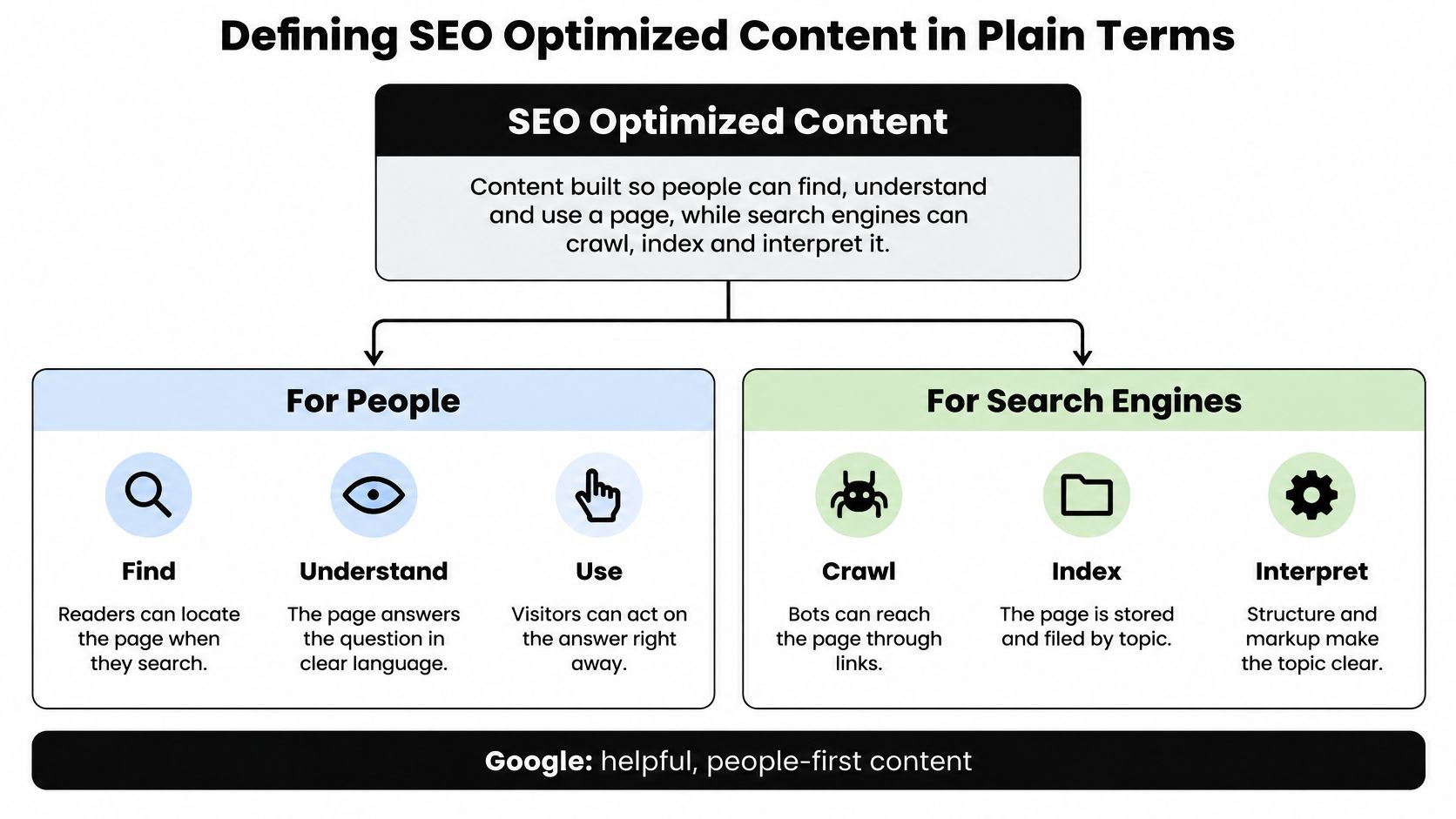
SEO optimized content is content built so people can find, understand and use a page while search engines can crawl, index and interpret it.
If your product page contains every target keyword but still leaves shoppers asking whether the product fits, what have you optimized? For an Amazon brand owner, the answer matters: getting found and helping someone buy are different jobs, and a useful page has to do both.
Defining SEO Optimized Content in Plain Terms
SEO optimized content connects a search need with a useful answer. Search engine optimization, or SEO, helps search engines discover and understand that answer. It doesn't turn repetitive copy into something worth reading.
Google's SEO Starter Guide puts “helpful, reliable, people-first” content at the center of that work. The practical implication is straightforward: write for the customer's decision, then make the information easy to find and interpret.
Think of a well-labelled grocery aisle. Signs tell shoppers where to find coffee, filters and brewing equipment. An aisle with the same coffee bag stacked on every shelf contains plenty of coffee, but it's poorly organized. Repeating a keyword across a page creates the same problem.
The diagram separates the reader's needs from the search engine's tasks.
Give the page a defined job
Search intent means what someone wants to accomplish by searching. A compatibility page should resolve fit questions. A category page should help shoppers choose between products. A comparison page should explain meaningful differences.
That scope extends beyond blog posts to product descriptions, buying guides and landing pages. Even specialist resources, such as SimpleLab Digital's attorney blog writing support, illustrate why subject-specific writing needs a clearly defined audience rather than interchangeable keyword copy.
Working test: Does this page answer the customer's question better than the results already ranking?
Keyword research reveals the language shoppers use. It doesn't replace the work of understanding their question, supplying accurate information and offering an appropriate next step.
Core Elements and How Search Engines Read Them
| Element | What It Does | Example | Quick Check |
|---|---|---|---|
| Search intent match | Answers one defined question people type | Compatibility page answers whether it fits model X | Top three results answer the same question as your page |
| Descriptive title and main heading | Names the topic for users and crawlers | Hypothetical title: 32 oz Insulated Steel Bottle with Leak-Proof Lid | Title and H1 describe the same topic |
| Readable structure | Breaks content into named sections | H2 heading named Dishwasher Safe Parts | Every section makes sense from its heading alone |
| Text-based information | Keeps facts crawlable and quotable | Dimensions and materials typed as text | Key specs appear in text, not only in an infographic |
| Descriptive links and alt text | Shows how pages and media relate | Link labelled compare insulated bottle sizes | Links and informative images have meaningful labels |
| Original value | Adds something competing pages lack | Own test results or stated usage limits | Page contains a useful fact no top result states |
| Useful next step | Moves the reader toward a decision | Link to a sizing guide or buying checklist | Page ends with one clear action |
Google's guidance on page content and organization supports natural language, descriptive headings and important information presented as text. These elements create semantic clarity, meaning the words and structure make the subject and its relationships understandable.
Start with intent, then label the answer
Check the leading search results before drafting. If shoppers searching for bottle compatibility mostly encounter fit guides, a general article about hydration probably won't meet their expectations. Use the top three results as a practical spot check, not a fixed rule about how Google ranks pages.
Next, align the title and main heading. The title tag supplies a page title that search engines may use in results. The H1 is the main heading visitors see on the page. A hypothetical title such as 32 oz Insulated Steel Bottle with Leak-Proof Lid communicates substantially more than Best Bottle Ever.
Supporting H2 and H3 headings should name actual questions or decisions. Dishwasher Safe Parts tells readers what they'll learn. Premium Quality doesn't.
Make the evidence readable
The next elements, text-based facts and descriptive labels, are easy to overlook during design. Say your size chart exists only as an image. Don't assume search systems will reliably extract every measurement or associate it with the correct size. Build the chart as an HTML table, with labelled rows and columns, and retain the image only if it helps visually.
Use descriptive link text rather than click here. Add alternative text, or alt text, that describes informative images for people using screen readers and provides context for search systems. Decorative images don't need keyword-filled descriptions.
The other common omission is original value. Manufacturer copy alone doesn't explain your own fit findings, care limitations or observed product trade-offs. Publish those details only when you can substantiate them.
Finally, connect the answer to a useful action, such as checking a size or comparing compatible accessories. Structured data, code that labels details such as products and articles, can clarify the page further and support eligibility for enhanced search appearances. It doesn't guarantee rankings.
This is a checklist, not a ranking formula. Missing an element doesn't make ranking impossible, but it can leave a customer's decision unfinished.
Strip away the design and read only the headings. If they don't describe what the page offers, revise them before adding more keywords.
Page Experience Thresholds Search Engines Measure
Google's Core Web Vitals documentation sets the following recommended targets and poor-performance thresholds, assessed at the 75th percentile of real mobile and desktop page loads.
| Metric | Recommended Target | Poor in Search Console | Usual First Fix |
|---|---|---|---|
| Largest Contentful Paint (LCP) | 2.5 seconds or less | Above 4 seconds | Compress and resize the largest image |
| Interaction to Next Paint (INP) | Below 200 milliseconds | Above 500 milliseconds | Reduce JavaScript and long main-thread tasks |
| Cumulative Layout Shift (CLS) | 0.1 or less | Above 0.25 | Reserve fixed dimensions for images, ads and embeds |
LCP measures loading performance, focusing on when the largest visible content element appears. On an ecommerce page, inspect the main product or lifestyle image first. Uploading an oversized image and shrinking it visually in the browser doesn't solve the underlying file-size problem.
INP measures responsiveness to interaction. If a shopper taps a variant selector and the page hesitates, investigate scripts and long browser processing tasks. Removing unnecessary widgets can be more useful than polishing another paragraph.
CLS measures unexpected movement. A review widget appearing above the purchase button can push that button away just as someone tries to tap it. Reserve space for images, embedded video and other components before they load.
Fix the template, not just the sample page
For a plain-language explanation to share with your developer or content team, Blog Health App's Core Web Vitals guide provides supporting context. Keep ownership clear between the person editing content and the person maintaining the site.
- Test representative templates. Check a product detail page, category page and article, including their mobile layouts.
- Inspect interactive states. Open menus, switch variants and use filters rather than testing only the initial load.
- Confirm after deployment. Review real-user results in Search Console instead of relying solely on a development test.
These are requirements for your owned website, where you control the template. Amazon controls its own page infrastructure. Faster delivery and steadier layouts remove friction, but neither can compensate for an unanswered buying question.
Examples From Product, Category and Guide Pages
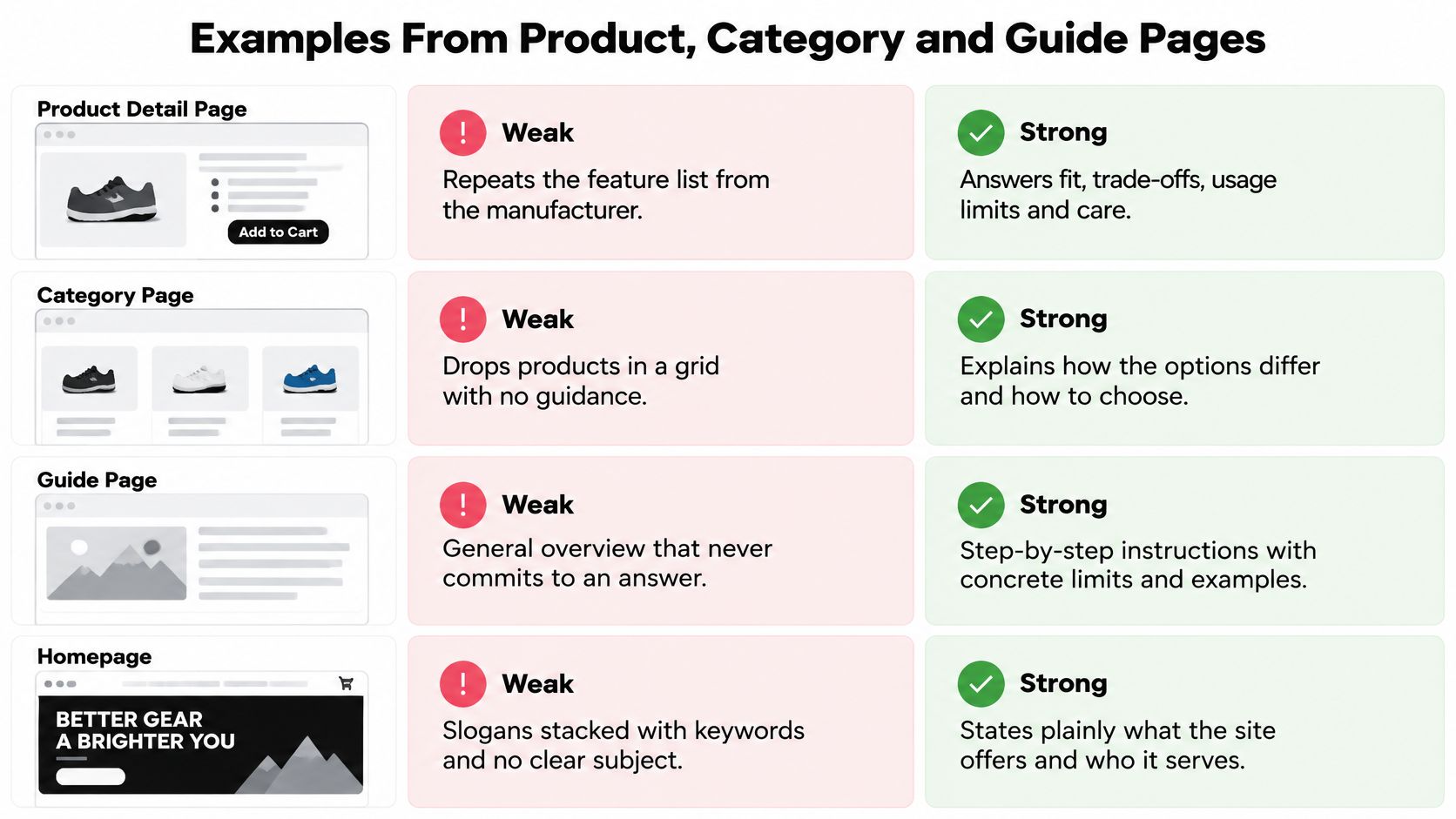
The difference between weak and strong content is usually visible in what the shopper can decide after reading it. This comparison shows that distinction across common page formats, including the homepage.
Product and category pages
A weak product detail page repeats the manufacturer's feature list. A stronger version explains fit, available sizes, care requirements and usage limits in readable text. For a bottle, that might mean identifying which lids fit and whether individual components require hand washing.
We rebuild product detail pages at Online Brand Growth to win both SEO and conversion rate optimization, or CRO, which means helping more visitors complete the intended action. Our Amazon listing optimization walkthrough applies that work to titles, bullets and supporting listing content. Backend terms support discovery, while visible copy must help shoppers evaluate the product.
A weak category page drops visitors into an unexplained product grid. A stronger version briefly explains how the options differ, then links to useful subcategories. For yoga mats, organize the choice around cushioning, portability and intended use rather than repeating yoga mat throughout an introductory paragraph.
Guides and comparisons
A weak buying guide discusses a topic without helping anyone choose. A stronger guide answers a specific question, such as how to choose yoga mat thickness, and puts a decision table near the top. Explain the trade-off between cushioning and stability without inventing universal suitability claims.
A weak comparison page praises each option using different criteria. A stronger version evaluates every option in the same order, such as fit, materials, care and limitations. Readers can then compare across rows instead of reconstructing the differences themselves.
Use video as supporting explanation, not as a substitute for the written details shoppers need.
Page check: One intent, one answer, one next step.
That check doesn't require every page to look alike. It requires each page to make its purpose clear.
Amazon Search Terms and Byte Limits
Amazon's Seller Central Search Terms guidance limits the attribute to fewer than 250 bytes, not 250 characters, and warns that exceeding the limit means none of those search terms for the ASIN will be indexed. A byte measures encoded storage, so some accented and non-Latin characters consume more space than a simple character count suggests.
Build the field deliberately
- Collect relevant shopper phrases. Start with keyword research and group terms by purchase intent. Keep compatibility searches separate from unrelated use cases so you don't broaden the listing beyond what the product supports.
- Put the most important relevant phrase first. This is an editing priority, not a claim that field position guarantees better ranking.
- Expand vocabulary without repetition. Use appropriate synonyms, abbreviations, alternate names and spelling variations. Don't spend the field repeating words already covered naturally in the title and bullets.
- Remove commas and unnecessary punctuation. Separate terms cleanly, and cut redundant variants rather than treating the field as a sentence.
- Count bytes before saving. Use a byte counter, then confirm the listing editor's count. Don't rely on the character count in a document or spreadsheet.
- Recheck each international marketplace. Translation changes both phrasing and encoded length, so a field that fits in one language may not fit in another.
Our Amazon backend keywords guide explains how to keep that hidden vocabulary aligned with the visible listing.
Backend terms supplement the product's meaning. They aren't a place to hide a different product promise.
After saving, reopen the listing editor and check that the intended terms remain in the correct attribute. Keep a record of the submitted text so future edits don't reintroduce duplicates.
The title and bullets still need to communicate the same shopper intent in natural language. A hidden synonym can support discovery, but it can't explain a limitation to someone making a purchase.
Measuring Visibility When Clicks Fall
In March 2025, 40.3% of U.S. Google searchers clicked an organic result, down from 44.2% in March 2024, a decline of 3.9 percentage points, according to Datos and SparkToro's analysis cited in Taylor Scher's SEO statistics roundup. That's a search-market observation, not a forecast for your website.
A falling traffic chart therefore needs investigation, not an automatic verdict that the content failed.

Google's guidance for AI search features keeps the emphasis on helpful, reliable content and technical accessibility rather than a separate shortcut for AI visibility. Treat your page as both a destination and a potential cited source, without assuming either outcome is guaranteed.
Measure the page's wider contribution
- Search visibility. Track page-level impressions, clicks and click-through rate in Google Search Console.
- Brand demand. Monitor branded queries separately from nonbranded queries, while allowing for advertising and other influences.
- Answer citations. Record observable citations in AI answers using a consistent set of relevant questions. Treat this as a sample, not complete coverage.
- Commercial outcomes. Track product-page visits from content, purchase conversion and assisted journeys where your analytics can identify them.
Say a compatibility guide loses organic clicks while branded searches and purchases following guide visits increase. That pattern may indicate useful influence despite fewer visits. It doesn't prove the guide caused the brand-search increase, so check campaign activity, availability and seasonality before drawing conclusions.
Establish a baseline before editing, annotate the publication date and review the same measures each quarter. For Amazon outcomes, keep Seller Central Business Reports, including Detail Page Sales and Traffic by Child Item, alongside your website reporting. Don't combine those views into a customer journey you can't verify.
Audit Your Pages Before You Publish
Run the draft through a publish gate rather than approving it because the keyword appears in the title. Assign each failed check to an owner, whether that's the copywriter, catalog manager or developer.
- Name the intent. Write down the specific question or purchase decision the page serves.
- Compare the title and main heading. They should describe the same subject without needing identical wording.
- Answer early. As an editorial standard, put the direct answer within the first 100 words. Don't make shoppers pass a brand story before reaching a fit limitation.
- Read only the headings. Check whether they summarize the content instead of offering vague benefit claims.
- Inspect the facts as text. Confirm that specifications, sizes, compatibility details and limitations aren't trapped exclusively inside graphics.
- Add useful original evidence. Include a documented measurement, a substantiated test result or a customer objection answered completely.
- Test the mobile template. Check it against the Core Web Vitals targets and inspect the actual purchase path.
- Validate any structured data with Google's Rich Results Test. Resolve errors and confirm that the markup matches visible content.
- Choose a clear next step. Remove competing actions that distract from the page's main job.
Make revision a release decision
Use a firm internal rule: a page failing two or more checks gets revised before publication. That's a quality-control policy, not a search-engine threshold. A single serious accuracy or compliance problem should also block release.
For Amazon, pair this review with an Amazon account audit checklist so listing copy isn't evaluated separately from catalog and account issues. Confirm that the correct variation, offer and inventory are available before attributing weak sales to content.
Record what changed and why. The next reviewer should be able to distinguish a keyword adjustment from a corrected compatibility claim or a redesigned buying path. That makes subsequent performance reviews more useful than a simple before-and-after traffic screenshot.
Online Brand Growth rebuilds Amazon product detail pages around search intent and purchase decisions, connecting keyword research with conversion-focused copy. Book a free strategy call for an outside review of your Amazon product and category pages.