
Your best-selling ASIN still ranks organically, but a rival keeps appearing above it in Sponsored Products. You increase the bid, spend climbs, and the extra orders don't leave much profit. Meanwhile, another seller has changed its price on your listing, so the problem might not be the keyword at all.
PPC competitor analysis should tell you where to compete profitably, not just who's above you. For an Amazon brand, that means connecting search visibility to your own conversion performance, contribution margin, and Featured Offer status before changing bids.
Amazon Data Sources for Competitor Analysis
Amazon never shows you a competitor's actual ad spend, bids, or contribution margin. You can observe placements and identify leading products, but you can't turn those observations into a reliable competitor profit-and-loss statement.
Build your analysis around reports you control. Amazon's Brand Analytics documentation describes the query-level funnel available through Search Query Performance, the top three products and brands in Top Search Terms, and the ASIN-level funnel in Search Catalog Performance.
Competitor data sources, what they reveal and their limits
| Data source | Where to find it | What it reveals | Limit |
|---|---|---|---|
| Search Term Impression Share | Advertising Console, Report Center | Your Sponsored Products share and rank per search term, 90-day lookback | Your share only, not competitor totals |
| Search Query Performance | Seller Central, Brand Analytics | Query volume, impressions, clicks, cart adds, purchases and your share of the query total | Requires brand registration |
| Top Search Terms | Seller Central, Brand Analytics | Top three products and brands for a keyword | Shows leaders, not their ad spend |
| Search Catalog Performance | Seller Central, Brand Analytics | ASIN funnel from impressions to purchases, organic and Sponsored Products combined | Covers your ASINs only |
| Featured Offer status | Manage All Inventory, Price and shipping costs column | Whether your offer holds the Featured Offer | Current snapshot only |
| Pricing Opportunities | Pricing Health page | Offers not currently eligible for the Featured Offer | Needs seller account access |
| Sponsored placement check | Live search results for each priority keyword | Which sponsored results sit above your listing and in what position | Manual, one keyword at a time |
Keep historical reports and current observations separate. An exported query report describes a period; a Featured Offer check describes the moment you opened the page. Label both so a current offer problem doesn't get mistaken for a historical advertising problem.
Use our Amazon Brand Analytics guide to orient the team around the dashboards before exporting.
Working rule: Use matching reporting periods wherever possible, record each source's date range, and timestamp live checks in the same worksheet.
Include marketplace, advertised ASIN, query, and brand versus non-brand intent. Without those fields, you can easily compare different products or shopper situations and draw the wrong conclusion.
How to Build a Competitor Keyword Map Step by Step
Your competitor list should come from the queries that can sell your products, not a list of brands your commercial team already knows. A smaller specialist can matter more than a category leader if it repeatedly appears against your highest-intent searches.
Build the map around buying intent
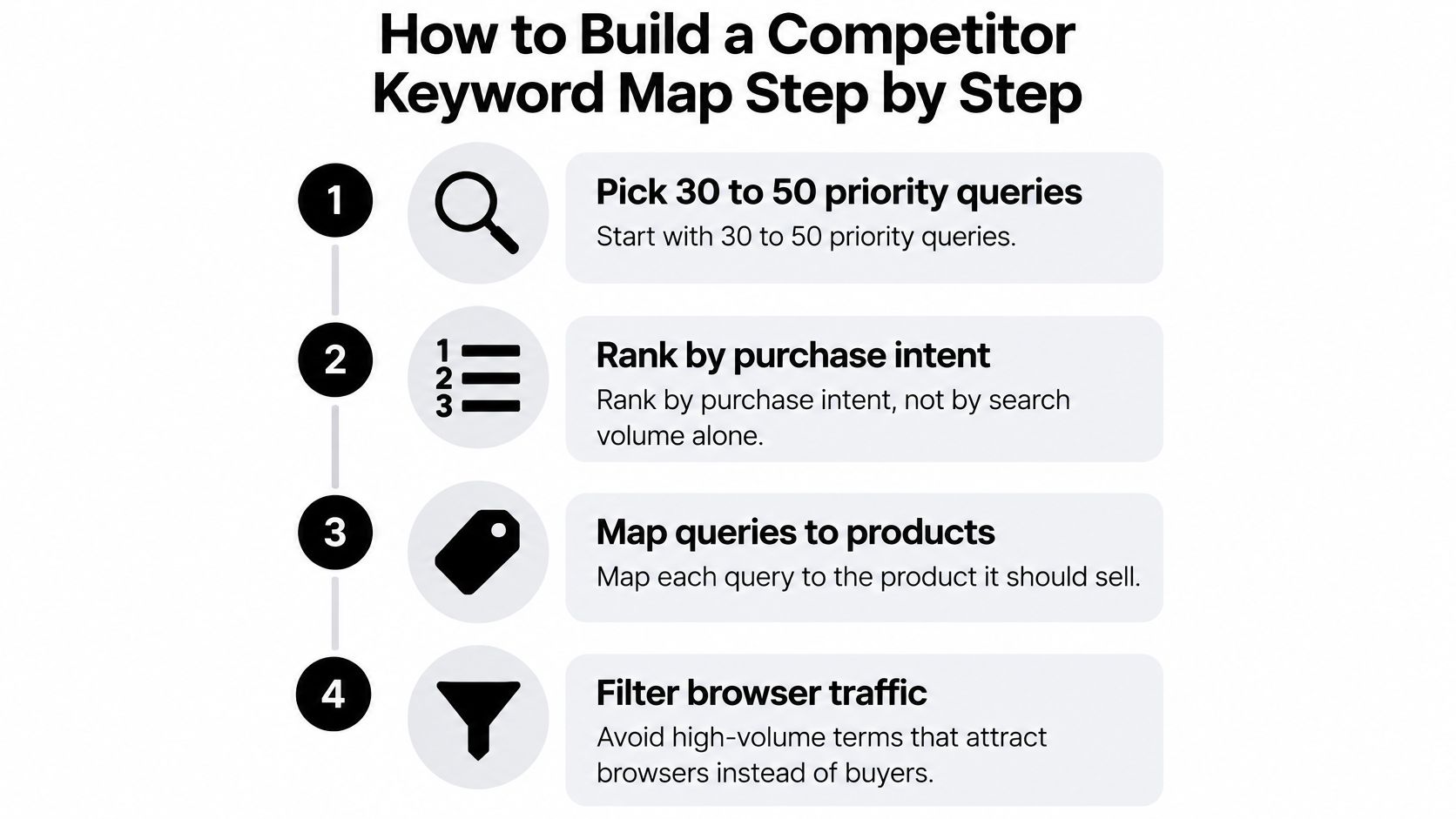
Pick and prioritize your queries. Start with a working set of 30 to 50 priority queries, ranked by purchase intent, and assign each to the product it should sell. Don't let broad search volume outrank product fit, a browser-heavy term can consume budget without producing the right customer.
Export Search Query Performance. Record query volume alongside your shares of clicks and purchases for the same reporting period. Compare those shares to locate demand leakage, but don't treat a click-share gap and a purchase-share gap as the same problem.
Identify the named rivals. Use Top Search Terms to record the leading ASINs and brands for each query, then give recurring competitors a separate profile row. Don't assume those leaders bought their positions, because query leadership isn't proof of advertising activity.
Log sponsored placements manually. Search each query in a clean session and record every sponsored result above your listing, its position, delivery location, device, and check time. Repeat on two different days rather than treating a single session, which can reflect location and browsing context, as a stable ranking.
Add your advertising baseline. Pull Search Term Impression Share for the corresponding queries and enter your account's share and rank beside the placement observations. Match the reporting dates and marketplace, because a recent screenshot cannot establish what happened throughout an earlier reporting period.
Choose conquest, defend, or ignore. Conquest means testing relevant rival demand, defend means protecting economically valuable branded demand, and ignore means withholding spend where fit or margin is weak. Avoid classifying every visible rival as a target, especially when its product serves a different use case or price tier.
Online Brand Growth maps keyword priorities around real purchase intent, not just high search volume. Our Amazon keyword research process supports that product-first approach.
Confirm what shoppers actually see
A 2024 marketplace search-results study found sponsored results represented nearly 30% of observed results, with at least one sponsored result before the first organic result in 85% of cases, across four large digital marketplaces. Treat those findings as a directional benchmark, not a forecast for your Amazon category, and confirm the placement pattern on your own queries.
The finished map needs one row per query with the intended ASIN, named rivals, sponsored placement pattern, your visibility baseline, and a decision. Add an owner and a reason for that decision so the next review produces action rather than another export.
Keep category sales rank separate from query ranking. Neither a strong category position nor a good organic keyword position proves that shoppers encounter your product before rival ads.
Reading Impression Share and Placement Data
A 20% Search Term Impression Share means your account captured 20% of all Sponsored Products impressions for that term on the selected date, according to Amazon's report announcement. The report also provides a numeric impression-share rank, supports daily or summary reporting, and has a 90-day lookback.
That denominator matters. This is your share of Sponsored Products impressions for the search term, not your share of every result on the page, every shopper's attention, or total category demand.
Impression share patterns and the next move for each
| Pattern | What it usually means | Next move |
|---|---|---|
| High conversion with low impression share | Auction coverage gap, potentially a rival outbidding you on a term that sells | Raise bid or budget on that term before touching the listing, within your margin ceiling |
| High impression share with low conversion | Listing, price or Buy Box problem rather than bid weakness | Check Featured Offer status and price before adding spend |
| Low share and low conversion | Weak relevance or the wrong shopper intent | Move the term to a research campaign or drop it |
| Share falling while sponsored rivals rise on the same query | Rival bidding pressure on your term | Test defensive bids on brand terms and recheck the placement log weekly |
High conversion with low share is the strongest candidate for a controlled coverage test. First distinguish a campaign running out of budget from a campaign that remains funded but doesn't win enough relevant exposure; those require different changes.
High share with low conversion doesn't justify paying more for the same traffic. Check offer competitiveness and the product page, then inspect whether the query promises something your product doesn't deliver.
For low share and low conversion, reduce commitment until you have a credible relevance hypothesis. A competitor's repeated appearance isn't sufficient evidence that the term belongs in your scale campaign.
When share falls while rivals appear more frequently, treat competitor pressure as a hypothesis rather than proof of their higher spending. Check your own budget, targeting, and offer changes before assigning the cause.
Separate placement economics before changing bids
Open the Placement report in Amazon Advertising Console and compare top of search, rest of search, and product pages. A profitable term can still have an unprofitable placement mix, so a blanket bid increase may buy more of the wrong exposure.
Save a baseline, document the change, and compare equivalent periods afterward. Amazon identifies bidding, targeting, and budget changes as variables affecting impression share; avoid changing them together if you want a useful diagnosis.
Segment performance by campaign and brand versus non-brand terms. Where account-level query share spans several campaigns, use campaign reports to investigate the cause rather than pretending the share report supplies a campaign-specific competitor breakdown.
More visibility is useful only when the additional orders clear your profit requirement.
We coordinate ad strategy with organic ranking so paid and organic efforts reinforce each other. Prioritize the term with the highest revenue and lowest share, provided its conversion, offer status, and contribution margin support additional spend.
Check the Buy Box Before You Raise Bids
Spend rises on a rival-contested term, conversion falls, and the instinct is to increase bids. That's the wrong first move if another seller now holds the Featured Offer on your ASIN.
Amazon's Featured Offer guide explains that selection considers price, condition, shipping speed, free-shipping threshold, and other attributes, not headline price alone. A keyword adjustment won't repair an uncompetitive offer.
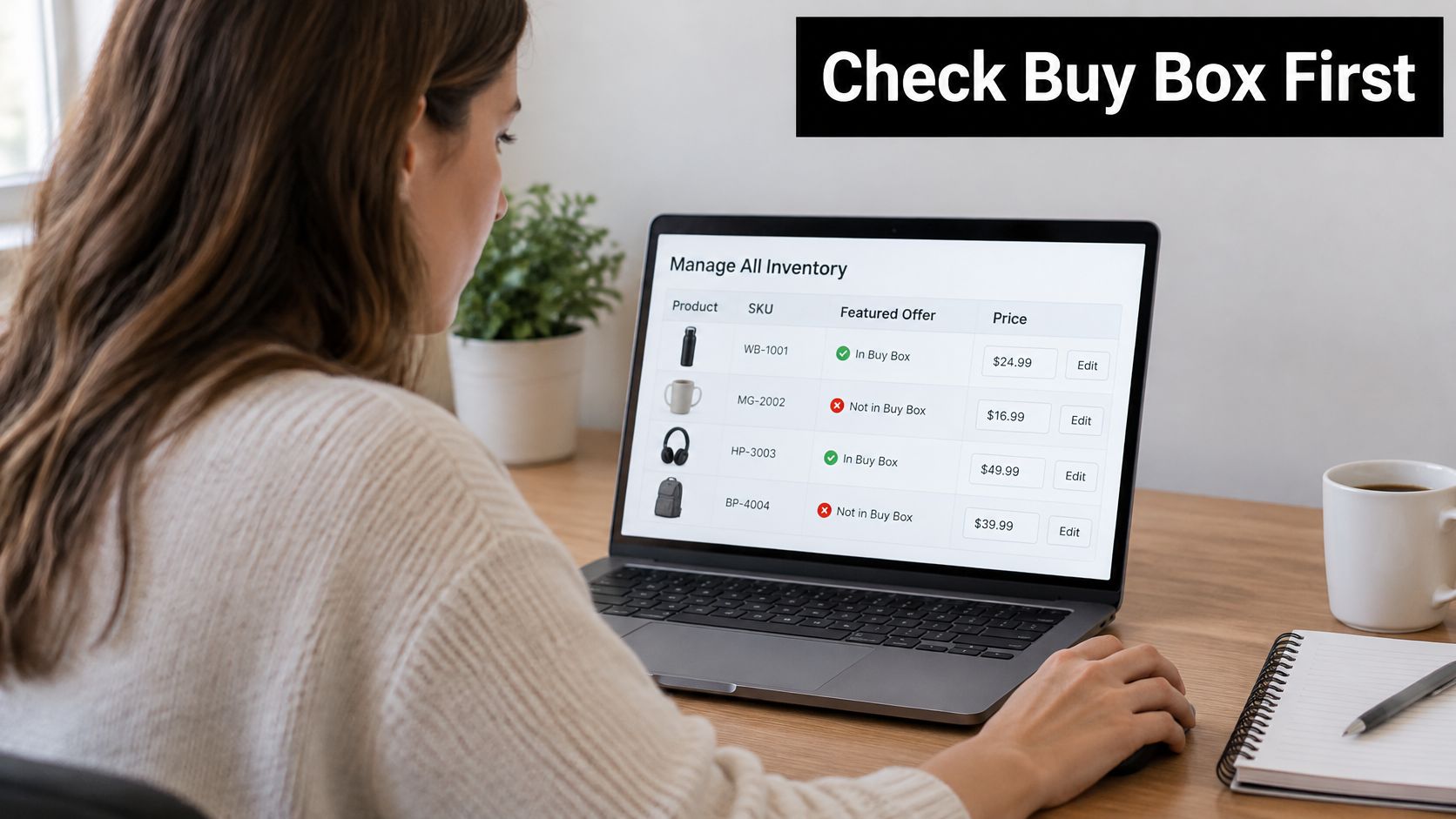
Inspect the offer before the auction
Open Manage All Inventory in Seller Central and inspect the Price and shipping costs column for current Featured Offer status. Record the seller holding the offer and the delivery promise shoppers see, rather than recording only your own list price.
Then open View reference and business prices. Compare your offer with the competitive external price and the lowest price in Amazon's store, checking whether a coupon, pack-size difference, or shipping charge changes the meaningful comparison.
Next, visit Pricing Health, then Pricing Opportunities, to identify offers that aren't currently eligible for the Featured Offer. Eligibility and current ownership are separate checks, so don't assume that an eligible offer is necessarily winning.
- Rival repricing: Review the price difference and your minimum acceptable contribution before matching it.
- Slower fulfillment: Investigate inventory availability and delivery promises before paying for more visitors.
- Competing offers: Establish whether you're dealing with another brand's product or another seller on your own ASIN.
Our guide to winning the Amazon Buy Box explains the operational checks behind offer competitiveness. If an unauthorized seller takes the Buy Box or undercuts MAP, investigate authorization and enforcement rather than treating the incident as a bidding contest.
MAP alone doesn't establish an Amazon policy violation, and removal requires an appropriate enforcement basis. Keep seller evidence, pricing observations, and authorization records available for that assessment.
The order is simple: status, price against reference, eligibility, then bids. If your offer can't convert the traffic profitably, buying a better ad position only increases the cost of the unresolved problem.
Turn Findings Into Campaign Structure and Bids
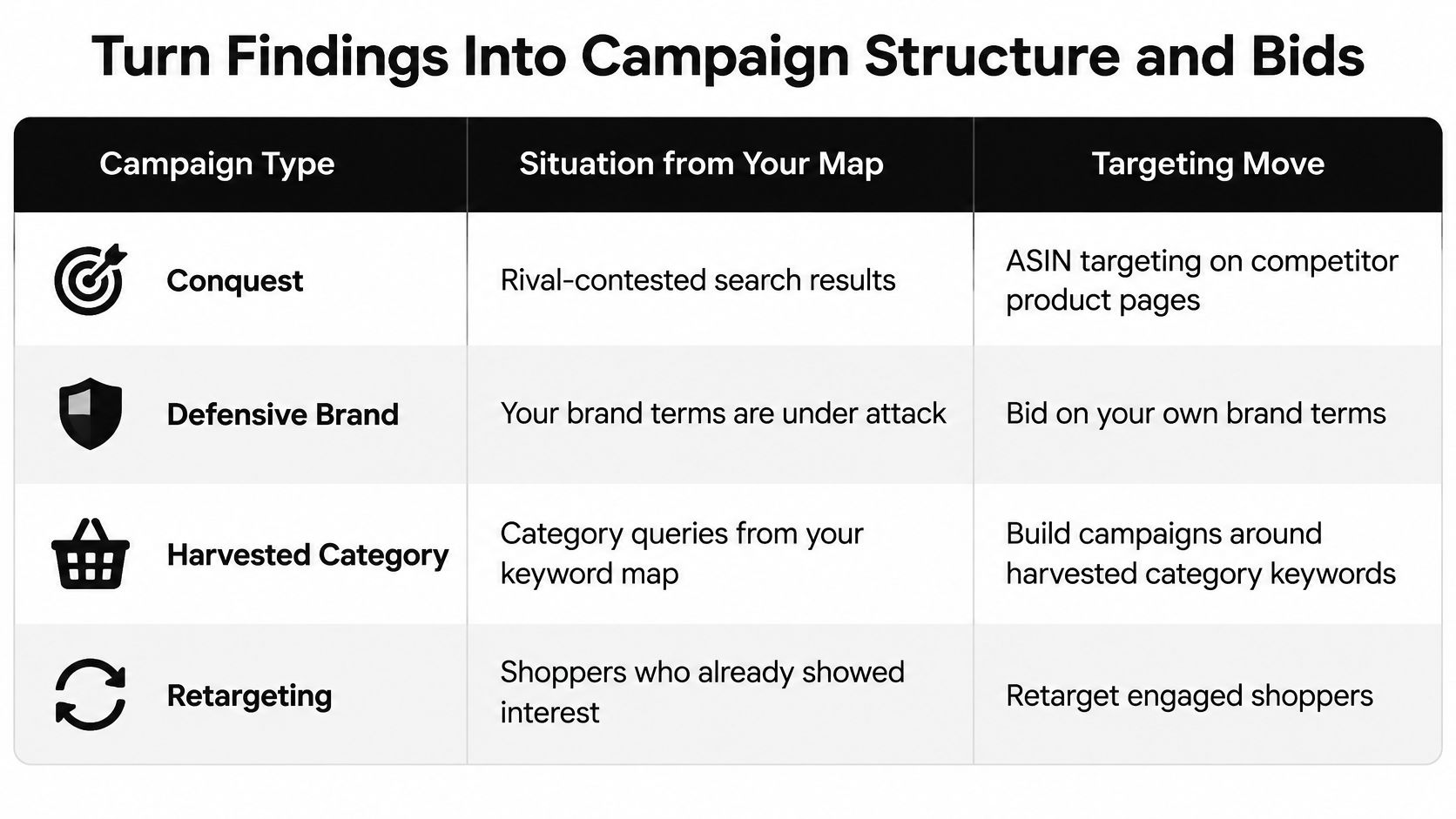
A rival's ad rank tells you where it appears. It does not tell you whether matching that placement clears your contribution margin or keeps your offer Buy Box eligible. Campaign structure is where a competitor finding becomes a spending decision, so give each job its own campaign and its own bid logic.
| Campaign type | Use it when | Bidding basis | Watch for |
|---|---|---|---|
| Competitor conquest by ASIN | A rival ASIN takes your intent with a stronger offer | Bid per ASIN against a contribution margin target | Paying for shoppers the rival would have won anyway |
| Defensive brand terms | Rivals bid on your brand name | Protect branded terms at a margin-safe bid | Branded traffic you would have captured organically |
| Harvested category keywords | Rivals dominate a generic term that converts | Scale converting terms, then move them to exact match | Expensive clicks with weak intent |
| Retargeting available audiences | A supported audience overlaps with shoppers who viewed rival listings | Lower bid tied to conversion results | Small audiences and frequency fatigue |
Treat the retargeting row as conditional on the audience options available in your account. Product targeting isn't the same as identifying individual competitor viewers, and you shouldn't promise exact competitor-viewer access where the campaign setup doesn't provide it.
Set the bid from the margin backward
Consider a hypothetical $30 product with $6 in FBA fees, $4.50 in referral fees, and $9 in cost of goods. It retains $10.50 before advertising; these are example inputs, not Amazon fee benchmarks.
If a conquest campaign spends $8 per sale, the example leaves $2.50 before coupons, returns, storage, and other omitted variable costs. That's too thin if those costs and your required contribution consume the remainder, so lower the bid or drop the target ASIN.
Use this calculation for each advertised product:
Maximum advertising cost per order = net sales minus non-ad variable costs minus required contribution profit.
Translate that allowable acquisition cost into a starting CPC using the target's observed conversion rate. Keep the estimate conservative when the target has little purchase history, and don't borrow branded conversion performance to justify a conquest bid.
Online Brand Growth manages bids ASIN by ASIN against contribution margin targets, rather than using ACoS as the decision-maker. Targets are set with the client team and reported against every week, including changes in costs that alter the allowable advertising spend.
Separate campaigns by the job they perform
Keep conquest and defensive campaigns separate so cheap branded orders don't conceal expensive competitor acquisition. Use Sponsored Products product targeting for selected rival ASINs, with Sponsored Brands and Sponsored Display where their formats and available targeting support the objective.
Move converting category search terms into exact match for cleaner bid and budget control. Manage overlap deliberately, cap defensive brand spend, and pause click-heavy terms without purchases when their test spend reaches your product's allowable acquisition cost.
Don't claim incrementality from attributed orders alone. For defensive campaigns, use controlled reductions or suitable holdouts to investigate whether paid orders replace organic orders rather than create additional demand.
Off-Amazon Google and Facebook campaigns need their own measurement setup. Continuum Solutions covers GA4 and GTM tracking for ads, and that website data stays separate from Amazon reporting because it doesn't reveal competitor margins or their internal campaign results.
A tidy campaign structure won't rescue inaccurate economics. The structure is only as good as the margin inputs behind it.
Run Your First Competitor Pull This Week
Start with an export and a baseline. Pull the full Search Term Impression Share window in Seller Central and build the baseline for 30 priority queries.
Name an owner for the keyword map: rival ASINs, placement observations, your share, and a conquest, defend, or ignore decision. Leave estimates of competitor spend out of the sheet. A rival's placement means little if your Buy Box is suppressed or the campaign misses its contribution target.
Turn the pull into an operating cycle
Run the next 30 days in the order that keeps cause and effect clear: listing performance, keyword coverage, PPC efficiency, and conversion lift. Check the listing before judging an advertising change, so a weak product page does not hide whether the targeting worked.
- Validate unit economics: Run each advertised ASIN through the free Amazon profit calculator before setting its contribution target.
- Include inventory costs: Use the FBA storage fee calculator when stock sits in fulfillment centers. Storage is part of margin.
- Monitor category movement: Use the sales rank checker to track rival category positions, and keep those observations separate from keyword placement.
- Flag seller interference: Route unauthorized sellers and MAP issues for assessment through our Brand Registry & Enforcement service for unauthorized seller removal and MAP enforcement.
Set the next review around decisions: which target earned more budget, which offer needs repair, and which query no longer deserves spend. Record the reason for each change so the team can tell a deliberate test from an unexplained adjustment.
This week, export the visibility baseline and assign those query rows. A believable story about a rival's budget will not help. A defensible decision about your own will.
Online Brand Growth connects Amazon PPC Management with SEO & Listing Optimization, FBA Logistics & Operations, Strategic Growth Consulting, Brand Registry & Enforcement, and Full Account Management. To turn your competitor map into margin-based bids and operational priorities, book a strategy call.