
The campaign with the best ACoS in your account is often the one doing the least work. Branded search sits at a low ACoS, looks superb in a monthly report, and gets praised in the meeting, while the non-branded campaign that finds new buyers runs higher and gets trimmed every time someone needs to hit a number. One of those two makes money. It's rarely the one the dashboard praises.
Amazon keeps raising the stakes on that mistake. The company reported about $56.2 billion in advertising-services net sales for 2024, up from $46.9 billion in 2023, a rise of roughly 19.8%, with fourth-quarter ad sales of $17.3 billion, up 18% year over year, according to Amazon's advertising FAQ. Total net sales grew 11% over the same period. Advertising is expanding faster than the store around it, so bid pressure on the terms you want won't ease.
The fix isn't a cleverer bidding trick. It's deciding what a conversion is worth before you touch a bid, then refusing to pay above that number, and diagnosing why a term is losing before you change anything at all.
Set Break-Even ACoS Before You Change Any Bid
Every bid in the account answers to one number, and it isn't the ACoS target you inherited from a template. It's pre-ad contribution margin. Take the selling price, subtract COGS, the referral fee, FBA fulfillment, storage, inbound placement and an allowance for returns, then divide what survives by the price.
That percentage is your ceiling. A product at 35% pre-ad contribution margin cannot carry a 40% ACoS and stay profitable, however healthy the campaign report looks. Amazon's own documentation frames it the same way, defining break-even ACoS as contribution margin before advertising divided by attributed sales and noting that a 35% margin product can't sustainably tolerate 40% ACoS. Because Amazon reports ROAS as attributed sales divided by ad cost, break-even ROAS is the inverse of that percentage (Amazon Ads help).
Take a $30 unit with $9 in COGS, a $4.50 referral fee and $6 of FBA fulfillment. That leaves $10.50, or 35% margin, so the account can absorb 35% ACoS and needs 2.86x ROAS to break even. Storage, inbound placement and returns come out of the same $10.50, which is why the number you calculate on a napkin is always kinder than the one in your P&L.
| Pre-ad contribution margin | Break-even ROAS |
|---|---|
| 20% | 5.00x |
| 25% | 4.00x |
| 35% | 2.86x |
| 40% | 2.50x |
| 50% | 2.00x |
Read the table, don't recompute it
Find your margin, read across, and you have the ROAS floor for every campaign on that SKU. A 20% margin product needs 5.00x. A 50% margin product gets by on 2.00x. Same ad spend, completely different tolerance, which is why a portfolio-wide ACoS target is a fiction.
If you want the arithmetic laid out step by step with a calculator, the break even ROAS formula explained walks through the same conversion from margin to ROAS floor. And if the fee stack in the example above felt unfamiliar, our breakdown of how to calculate contribution margin pulls each line apart, returns included.
Run your own SKUs through the Amazon profit calculator to model 2026 referral, fulfillment, storage and inbound fees before you commit a target, and use the FBA storage fee calculator when Q4 storage rates change the answer.
Working rule: campaigns running above their break-even ACoS get bids cut this week. Campaigns below it with a stable conversion rate are scaling candidates, not problems to solve.
That single rule eliminates most of the arguments that stall an account. No one has to defend an ACoS number when the margin sets it.
Structure Campaigns Around Shopper Intent
Rewrite the structure before you optimize a bid. One campaign holding branded queries, category queries and competitor queries produces a blended ACoS that tells you nothing about which intent paid for itself, and the branded terms will flatter the average every single month.
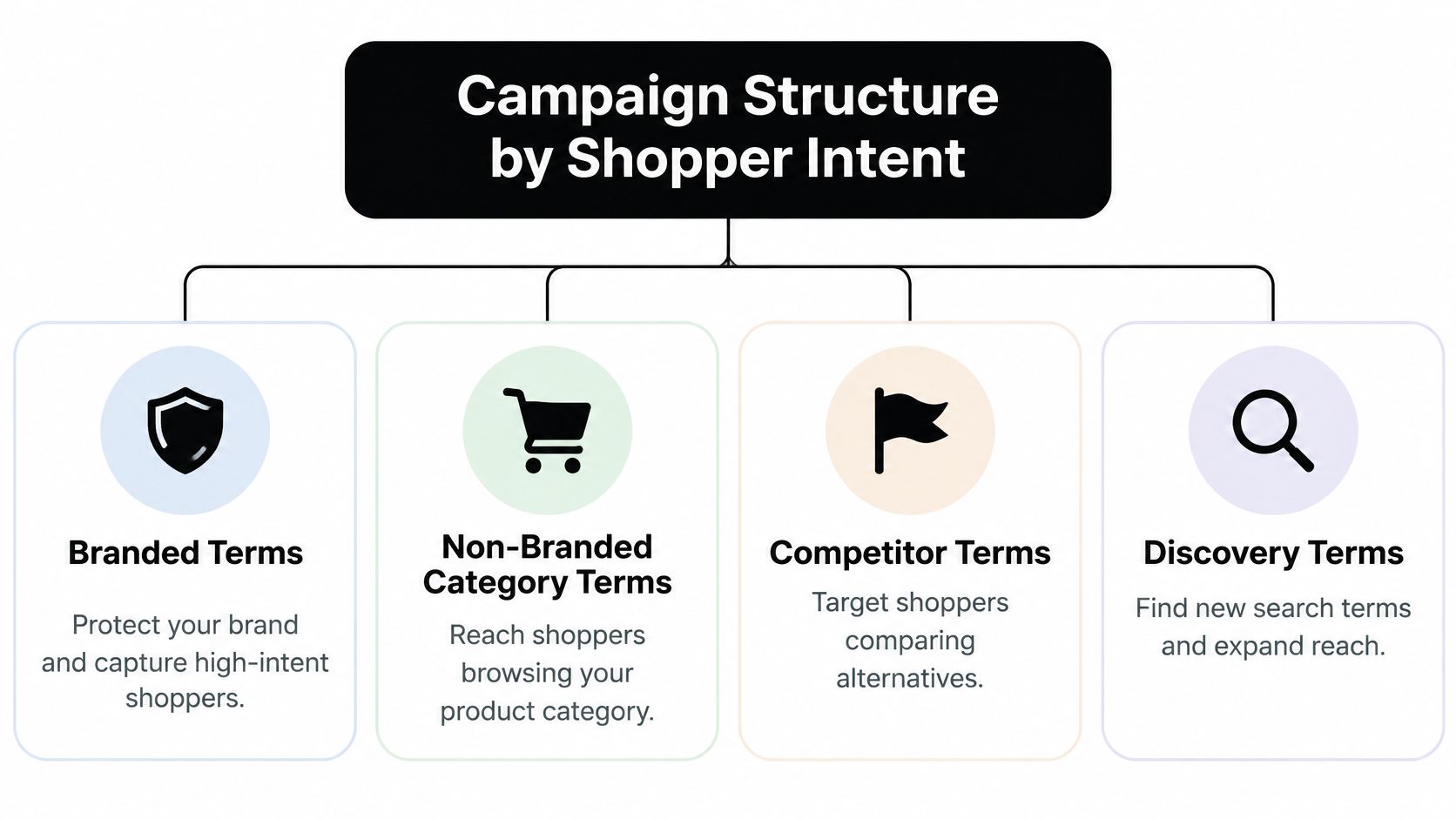
The four buckets and what each must never contain
- Branded. Your brand and product names plus common misspellings. Its job is defense: capture the shopper who already wants you at the lowest cost per sale in the account. It must never share a campaign with category terms, because a strong branded ACoS hides a losing non-branded campaign behind a good average.
- Non-branded category. What the product is, not who makes it. Exact match carries proven terms; phrase and broad carry controlled expansion. Build the seed list from our guide to finding Amazon keywords and let the search term report refine it.
- Competitor conquest. Product targeting against rival ASINs, plus categories, brands and product features. Judge it on new-to-brand purchases rather than a blended ACoS target, since its job is stealing share, not harvesting demand you already own.
- Discovery. Automatic campaigns whose only purpose is surfacing queries you hadn't considered. Cap the budget deliberately instead of letting it drift.
Amazon separates automatic targeting into close match, loose match, substitutes and complements, so you can bid each group differently rather than forcing one bid onto every query type, and manual coverage runs broad, phrase and exact while product targeting hits specific products, categories, brands or features (Sponsored Products targeting guide).
The structure is a loop, not a chart. Discovery surfaces terms, exact campaigns scale the winners, negatives remove the waste, and only converting queries graduate. Keep each winning term in exactly one campaign, or your own campaigns bid against each other and push your CPC up for no extra impression. We structure PPC campaigns to validate winners, isolate waste, and scale what performed, which is only possible when each bucket reports separately.
How to Run a Weekly Search Term Review
Run this review every week on a rolling 7 to 14 day window. Yesterday's numbers are noise, and a Sunday panic bid cut is usually a Monday regret.
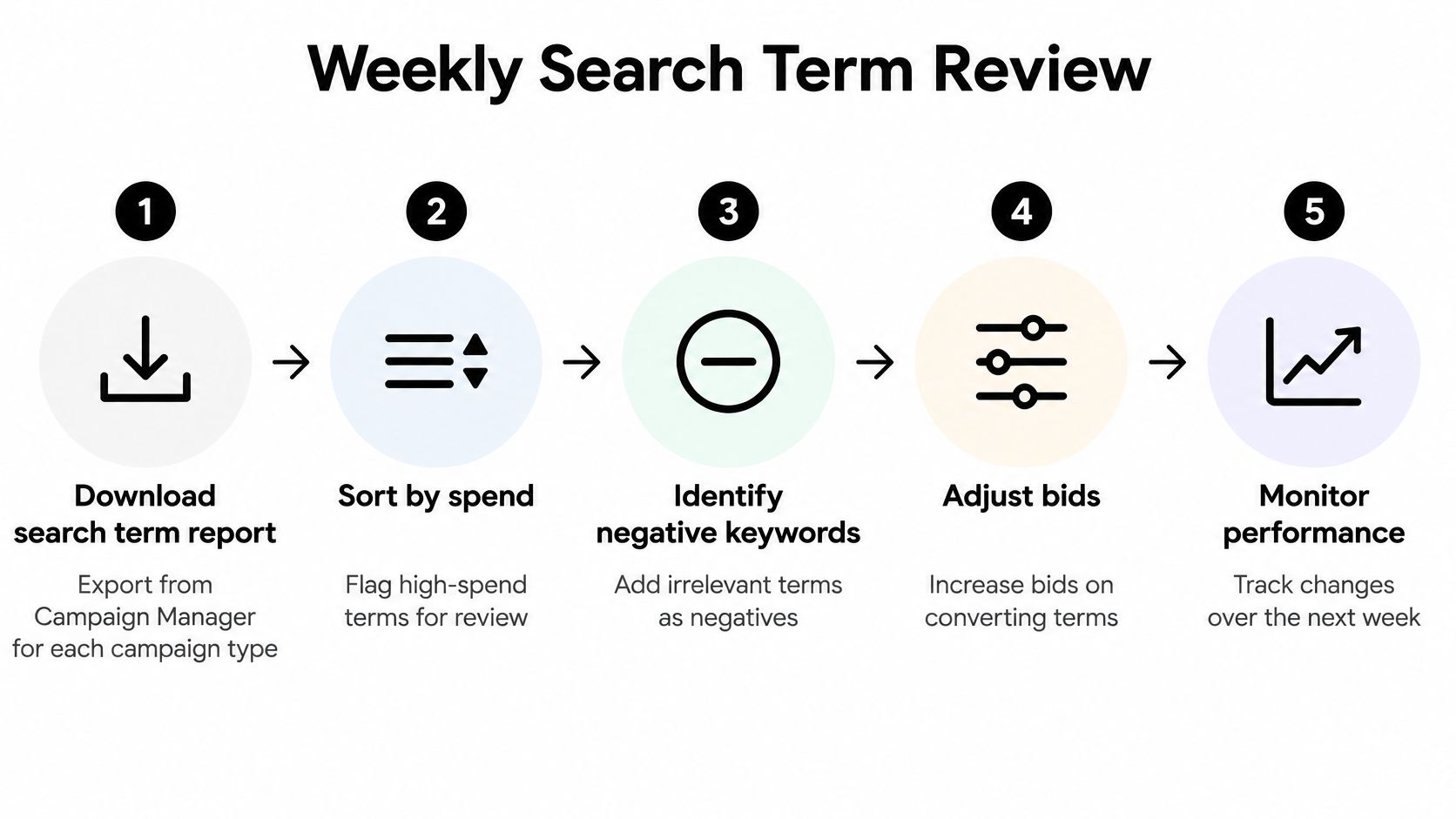
- Download the search term report from Campaign Manager, one export per campaign type. The common mistake is exporting Sponsored Products only and never checking what automatic campaigns are buying.
- Sort by spend and flag dead weight. Any term that has spent at least 1.5 times your average order value with no sale is a candidate for a negative. Using AOV instead of a fixed dollar figure keeps the threshold honest as prices change.
- Promote winners into exact match. Terms at or above break-even ROAS move into a manual exact campaign, and you add them as negative exact in the automatic campaign so the same query isn't paid for twice. Skipping the negative is the mistake that doubles your cost on your best term.
- Cut bids in 10 to 20 percent steps on terms that still sell but convert below break-even. Large jumps destroy the read, because you can't tell whether the change or the week caused the swing.
- Block irrelevant queries as negatives. A stainless steel bottle listing collecting clicks for "baby bottle" is funding someone else's customer. If you want a repeatable process for building those lists, this guide to how to build negative keyword lists covers the structure, and the logic transfers directly to Amazon.
- Check impression share before raising any bid. Without it you don't know whether a term is capped by bid or by budget, and raising the wrong one just moves the ceiling.
- Log every change with the date and the expected result, then revert anything that worsens ACoS after 14 days. An unlogged change is a change you'll argue about later.
A healthy account shows exact-match ACoS under break-even, automatic campaign spend rotating into new terms each week, and a shrinking list of wasted queries. If all three aren't true, the structure needs work before the bids do. Pulling these numbers alongside the rest of your Seller Central reports to check weekly keeps ad performance tied to inventory and listing health rather than floating on its own.
Choose the Right Bid Strategy and Placement Multipliers
Start every new campaign on dynamic bids down only. Amazon can lower your bid when conversion looks unlikely but never raises it, so a campaign with no conversion history can't run away from you while it learns.
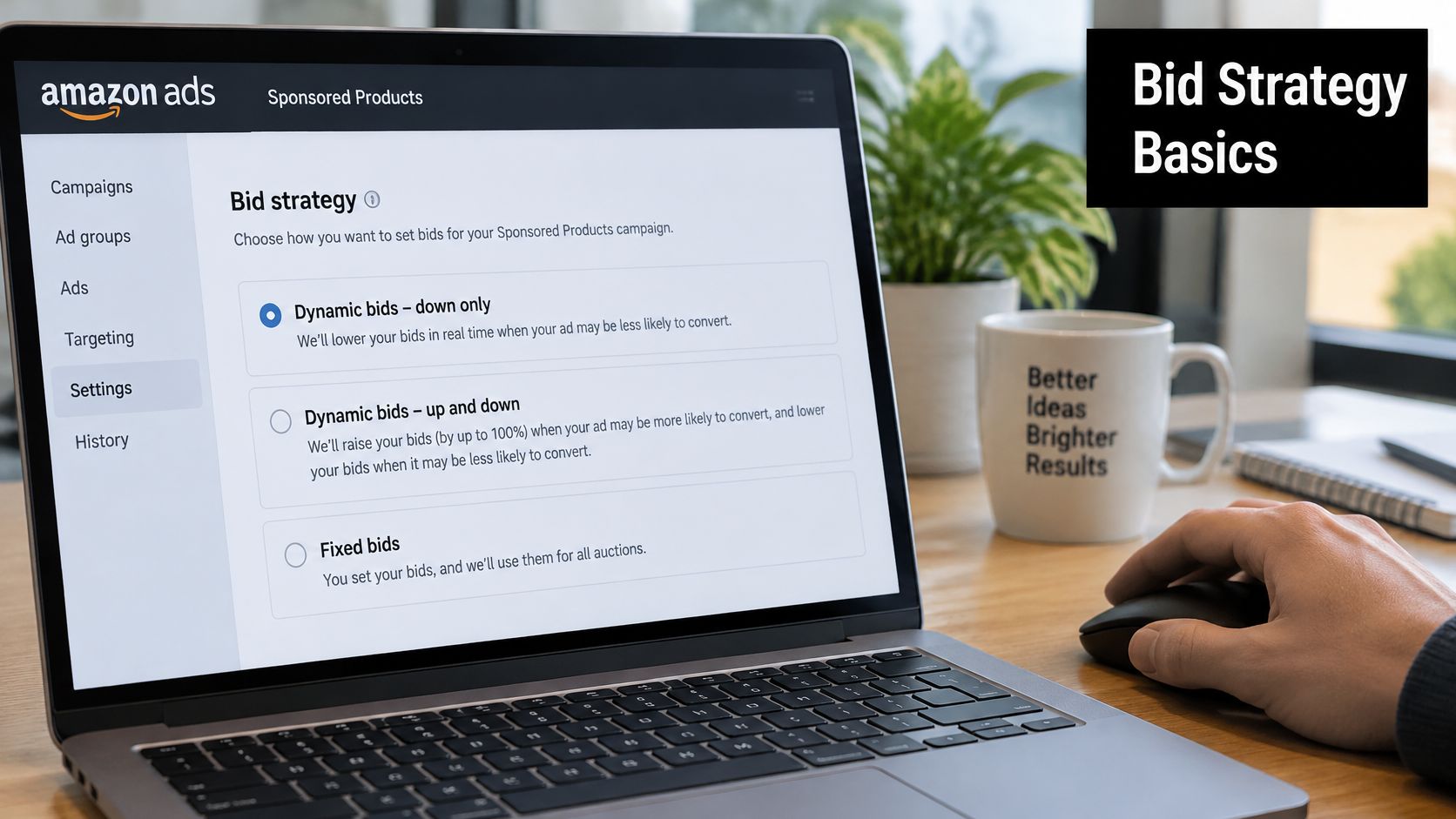
The three Sponsored Products strategies behave very differently. With dynamic bids up and down, Amazon can raise or lower a bid by as much as 100% in real time, so a $1.00 bid can become $2.00 for a stronger opportunity, or drop when conversion likelihood weakens. That's a volume lever for an established campaign with solid conversion data, not a default for a launch. Fixed bids remove algorithmic movement entirely and suit proven targets where you want total control (Sponsored Products best practices).
| Strategy | How Amazon moves the bid | Start here when |
|---|---|---|
| Dynamic bids down only | Lowers the bid when conversion is unlikely, never raises it | New campaigns and efficiency-focused accounts |
| Dynamic bids up and down | Raises the bid by up to 100% or lowers it based on conversion likelihood | Established campaigns with conversion history that need extra volume |
| Fixed bids | Stays at the bid you set | Proven targets where you want no algorithmic movement |
Placement multipliers for top of search, rest of search and product pages can be adjusted by up to 900%, which is a ceiling, not a strategy. Check conversion rate and margin by placement first, because a placement that converts better at a worse margin adds volume without adding profit. I'd start at 20% to 50% on top of search only where that placement already runs under break-even ACoS, then hold.
If you'd rather see the controls in context than read about them, this walkthrough covers the same settings inside the console.
Find Lost Visibility With Impression Share and Benchmarks
A bid change is the wrong first move when the term is already winning the auction, or when the listing is what kills the sale. Start from pre-ad contribution margin and the break-even ROAS that margin supports. Then read impression share. Only then decide whether a bid is the constraint.
The Search term impression share report in the advertising console's Report Center shows each term's percentage share of total impressions against competing advertisers and assigns a numeric impression-share rank. A profitable exact term with strong conversion and low share points to a bid or budget limit. A term with high share and poor sales points to a bid that's too high for the intent, or a relevance problem, so you lower the bid or negate it (Search term impression share report).
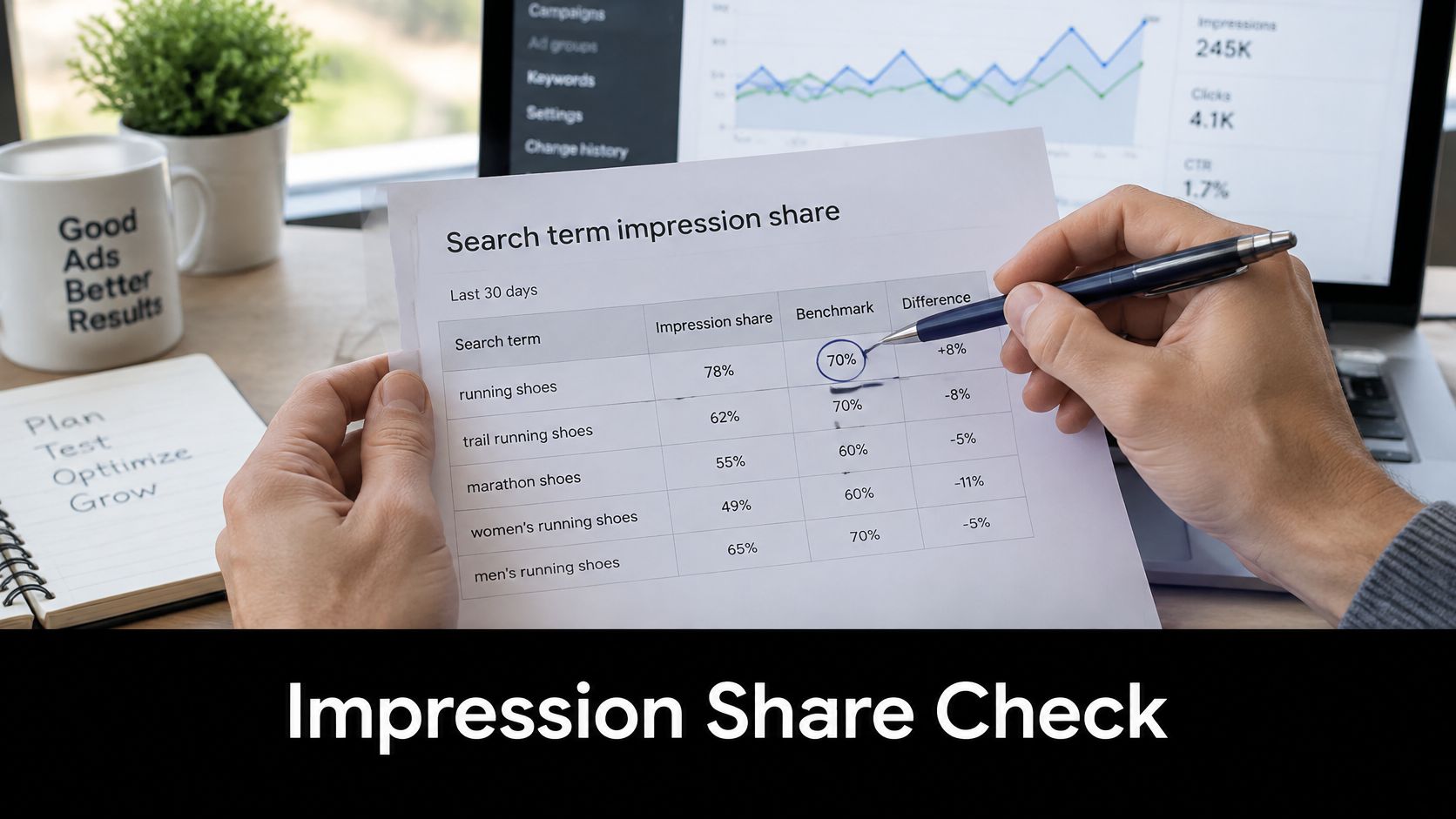
Pair it with the budget report, which shows how performance is affected when campaigns run out of budget. Read together, those two reports separate a bid constraint from a budget constraint. Raising a bid when the campaign already hits its cap just burns the same dollars faster. Getting that backwards wastes weeks.
Use benchmarks as a diagnostic, not a target
Export weekly CTR, CPC, conversion rate, new-to-brand purchase rate and ROAS by campaign type. Compare each against closely matched peers in the same category and period. Benchmark comparisons are directional because peer samples vary, so a gap versus the category is a clue, not a number to chase. Nobody's category average is your break-even. If your ROAS sits under the break-even line your contribution margin set, a "healthy" category ROAS is still a loss.
| Symptom | Likely bottleneck | First action |
|---|---|---|
| Low CTR | Main image, title, price or targeting relevance | Test main image and title first |
| CTR fine, conversion weak | Detail page, reviews, price or stock | Fix the listing and check in-stock rate |
| Conversion strong, ROAS weak | CPC too high or margin too thin | Lower bids or cap placement multipliers |
| High impression share, poor sales | Bid too high for the intent | Lower the bid or add a negative |
| Profitable term, low impression share | Bid or budget too low | Raise the bid or budget in steps |
Fix one bottleneck at a time. I'd hold account-wide bid cuts after a bad day. Auction conditions and seasonal demand move daily, and a single Monday tells you nothing. Cut the wrong terms and you lose the conversion history you need to judge the next bid.
Set Daily Budgets From Orders, Not Guesses
Set each campaign's cap from the orders you need, not from a round number that feels safe. The formula is simple. Daily budget equals target orders per day multiplied by average CPC, divided by conversion rate.
Say a campaign needs 8 orders a day, pays an average CPC of $0.80 and converts at 10%. That's 80 clicks a day, so the cap is about $64. Run the math per campaign rather than per account, then compare every result against the budget report to see which campaigns hit their ceiling.
Amazon's own help example shows how fast a cap turns into an ACoS number: a $2.00 maximum CPC with 1,000 clicks a day over a month produces about $2,000 in advertising cost, and 200 units at $25 generates $5,000, which is a 40% advertising cost of sales before product costs, fulfillment, fees and returns (Sponsored Products help). If 40% sits above your break-even line, that cap is buying you a loss.
Where the budget goes first
Give exact-match campaigns budget priority over discovery, because they hold terms that already convert. Set discovery spend as a fixed share of total budget that you choose in advance, and cap it so one unproven query can't eat the day. Review caps every 7 to 14 days on the same window as the search term review, and change budgets only after bids have stabilized so each result traces back to one lever.
Mistakes That Quietly Drain Ad Budgets
A campaign can clear a generic ACoS target and still lose money. I start every bid decision from pre-ad contribution margin and the break-even ROAS that margin implies. Last-click ROAS is the metric to ignore until that line is set. Four habits spend past it anyway.
Judging on last-click ROAS alone. Single-day and last-click ROAS miss new-to-brand and repeat purchases, so a prospecting campaign can look inefficient while it acquires first-time customers worth keeping. Amazon expanded Amazon Marketing Cloud purchase-signal lookback from 13 months to five years in 2025 specifically to make lifetime-value and replenishment analysis possible, which shows how much of that judgment was blind before (AMC measurement expansion). Use the longer window to price the customer, then bid only if the click still clears break-even after fees and COGS.
Changing several variables in one week. When bid, budget, placement, and targeting all move together, no result traces to one lever. Change one variable per campaign per week. If the listing, the Buy Box, or inventory is the bottleneck, a bid change will not fix the loss.
Sending paid traffic to a weak listing. A stockout, a weak main image, or an unstable Buy Box turns every click into a lost sale. The right bid can be lower for a product with constrained FBA inventory or high stockout risk even when attributed ROAS looks excellent. Amazon is pushing measurement toward total retail impact rather than isolated clicks (Omnichannel Metrics). Pause or cut bids until the page can convert the traffic you are already paying for.
Ignoring unauthorized sellers and MAP violations. Resellers undercut price, take the Buy Box, and pull conversion down on your own ASIN while you fund the traffic. Brand Registry enforcement can handle unauthorized seller removal and MAP enforcement, so you're not bidding to advertise a price someone else controls.
The same discipline applies off Amazon. If you're managing hiding negative comments on Meta ads, the principle is familiar: contain the damage to the impression before you spend a dollar more buying it.
Confirm Your Break-Even Before the Next Budget Cycle
One action this week. Pull the last 14 days of search term data from Campaign Manager, split the terms by the four campaign buckets, and mark every term sitting above your break-even ACoS. Refresh the 2026 fee inputs, storage included, before you trust a margin you calculated last quarter.
Then take the marked terms into the next weekly review. Negate anything with no sale past 1.5 times average order value, cut bids in 10 to 20 percent steps on the terms still selling below break-even, and log the date and expected result for each change so the first read in 14 days is clean.
If Amazon ads already cost you a few thousand dollars a month, this is the conversation worth having. After the intro call, a complimentary brand audit and strategic roadmap digs into the account and returns specific recommendations. Book a free strategy call at /#book-call.
Online Brand Growth runs Amazon PPC across Sponsored Products, Sponsored Brands and Sponsored Display, rebuilding campaign structure around contribution margin instead of an inherited ACoS target, and pairing that with the listing, inventory and Brand Registry work that decides whether paid traffic converts at all. The team manages more than $30M in annual revenue and owns its own Amazon brands, so the margin conversation comes before the media plan. Visit Online Brand Growth to see how an engagement works.