
You changed a pack size from 12 to 24 last month. The Amazon detail page still says 12, the inbound shipment was planned off the old cube, and the FBA fee you're being charged doesn't match the quote. Nobody edited the listing. The number came from somewhere upstream and Amazon repeated it faithfully.
That's the shape of nearly every catalog problem worth fixing. The listing is where the error becomes visible, and it's almost the last place the error was created. Catalog management on Amazon is the ongoing work of keeping each product's identity, listing content, variation structure and attributes correct so Amazon can match the item to a record, rank the page and ship the right unit. Govern it at the source and the page takes care of itself. Fix it one ASIN at a time in Seller Central and you'll be back on the same page next quarter.
The operating order below is the one I'd use: identity, then content, then variations, then the diagnostics that tell you which system broke.
Catalog Health Checkpoints at a Glance
Start with a definition you can act on and a lookup you can run in ten minutes. The spine of the whole discipline is the Global Trade Item Number, the identifier that grew out of retail barcode standardization in the 1970s and now anchors catalogs across manufacturers, marketplaces and warehouses, as GS1's account of that standardization sets out. Without a persistent identifier, the same product can't be recognized as the same product by the factory, the marketplace and the 3PL, and every downstream record drifts.
Then work the six control areas in the table, in order. Each one has a first page to open and a failure that surfaces before anything else.
| Control area | What Amazon checks | Where to check in Seller Central | Typical failure |
|---|---|---|---|
| Product identity | GTIN, brand and product type match an existing record | Inventory, Add a Product search | Duplicate ASIN or barcode mismatch |
| Listing content | Title, bullets, images and required attributes | Inventory, Manage Inventory, Listing Quality and Suppression | Suppressed listing or weak conversion |
| Variations | Parent-child links, allowed theme and child attributes | Inventory, Manage Inventory variation settings | Wrong children grouped under one page |
| Dimensions and packaging | Item weight, size and pack count | Inventory, Manage Inventory attributes | Wrong fees and mismatched customer expectations |
| Issue resolution | Open suppressions, catalog requests and account health flags | Listing Quality and Suppression, Account Health | Lost visibility while the issue sits unresolved |
| Performance | Sessions, conversion and Buy Box share by ASIN | Reports, Business Reports by ASIN | Sales decline noticed weeks late |
Work identity first. A bad GTIN or a wrong parent ASIN multiplies across every child, every feed and every channel, so polishing copy while identity is broken wastes the effort. Content fixes come second because they're cheap and reversible. Variation and dimension fixes come third because they change how Amazon groups, fees and ships the item, and you want clean identity underneath before you move structural parts. Performance is read last, because it tells you a bad change landed weeks ago, not where it came from.
How Amazon Matches Your Product to a Catalog Record
Amazon's catalog behaves like a library with one card per book. A second card for the same book doesn't create a second book. It splits the borrowing history. On Amazon that split shows up as reviews, rank, inventory signals and advertising relevance spread across two ASINs that should have been one, and it never fully repairs itself.

The mechanic is the product identifier. For most categories, Amazon requires an ISBN, UPC, EAN, JAN or another applicable GTIN when you create a new product page or listing, and it uses that identifier to match new offers to existing catalog records, per Amazon's product ID guidance. That's why the first action is never "create listing." It's Inventory > Add a Product, search the catalog, and see whether your product already exists.
If a detail page exists, you add an offer to it. A new page is legitimate only for a new product or version. Creating a parallel page for something already in the catalog produces exactly the fragmentation the library analogy predicts.
When you have no barcode
If a product has no identifier, you request a GTIN exemption in Seller Central through Add a Product, Create a new listing, the correct product type, and the option stating the product has no Product ID. Private-label and handmade products, items manufactured or branded without barcodes, certain parts, bundles and generic products are among the cases Amazon lists as possible exemptions. Two rules matter: the exemption is granted at the parent product-type level and automatically covers child product types, and a product that already has a GS1-approved barcode is not eligible. That last rule exists to stop brands using exemptions to dodge valid barcode matching and manufacture duplicate records.
| Situation | How Amazon responds | Action to take |
|---|---|---|
| Product has a GS1 barcode and a live detail page | Match to the existing ASIN | Add your offer to that page |
| Product has a barcode but no page yet | New page allowed for a new product | Create the listing with the existing GTIN |
| Private-label product with no barcode, eligible category | GTIN exemption possible | Request it through Add a Product at the product-type level |
| Product already has a GS1 barcode but seller requests an exemption | Not eligible for exemption | Use the existing GTIN instead |
| Same product found on a second ASIN | Duplicate page is prohibited | Identify the canonical ASIN and consolidate through catalog support |
The policy tail is sharper than most sellers expect. Amazon prohibits duplicate detail pages for a product already in the catalog and requires variations to relate validly to the primary product; repeatedly changing listings to add and remove prohibited images, disclaimers or claims in order to bypass policy controls can trigger corrective action, including termination of selling privileges, according to Amazon's detail page rules. If you're consolidating duplicates, the sequence is canonical ASIN, strongest compliant content, catalog support request. Never a replacement page.
If the underlying data model is the core problem, our guide to product information management maps the field structure that keeps this from recurring.
Listing Fields That Drive Search and Conversion
Seven fields carry most of the search and conversion weight, and each one has a rule you can enforce in a template rather than argue about per ASIN.
- Title. Brand, product type, then the one differentiator a shopper types. Keyword stuffing makes the title harder to read, and harder to read means lower conversion on the traffic you already have. Read the category style guide in Seller Central before writing, because limits and required order differ by product type.
- Bullet points. Five, each opening on a benefit and closing on the spec that proves it. Put the material, capacity or compatibility in the bullet, not only in the description.
- Description and A+ modules. The place for the buying doubts the bullets couldn't hold, such as care instructions, fit notes and what's in the box.
- Backend search terms. Synonyms, misspellings and use cases. No competitor brands, no repeats of title words.
- Brand and product type. These are matching attributes, not marketing fields. Get them wrong and Amazon files the item in the wrong taxonomy.
- Pack count. A 12-pack and a single are different units with different fees and different customer expectations. It's the field that produces the angriest reviews when it's wrong.
Item weight and package dimensions belong on this list too, and not only because of fees. A wrong dimension produces the wrong FBA fee, the wrong storage projection and the wrong inbound plan. Run the packed unit through the FBA storage fee calculator and you can see what a stale measurement costs per unit per month before you decide whether to remeasure.
Practical rule: if a field can be measured, measure the shipped unit, not the product. The box the customer receives is what Amazon fees and what the customer judges.
The quality bar isn't theoretical. A 2025 GS1 India study assessed product-data quality across 510 SKUs on eight e-commerce, quick-commerce and e-pharmacy platforms, and its conclusion is that product information has to be governed at SKU level with validated identifiers, standardized attributes, consistent units of measure and channel-specific completeness checks, as the GS1 India e-commerce data quality report details. The same sample supports benchmarking quality by marketplace and category instead of trusting one overall listing score.
The governance loop that works is unglamorous. Maintain a master SKU sheet with required fields and a named owner per field, validate before publication so nothing goes live from memory, and run a monthly comparison of live detail pages against the sheet for your top 20 ASINs by revenue. Rebuilding a detail page for search relevance and conversion at the same time is exactly when that sheet earns its keep: the sheet is the input, the live page is the output you verify against it.
How to Build a Variation Family Step by Step
Three mechanics break more families than anything else. The parent ASIN is non-buyable, so it carries no UPC or EAN, no price, no quantity and no offer details. Every child needs its own seller SKU and, unless an approved Product ID exemption covers it, its own unique identifier. And every item in the family must share the same brand and product type, with differences limited to legitimate attributes such as size, color or flavor, as Amazon's variation relationship guidance specifies.
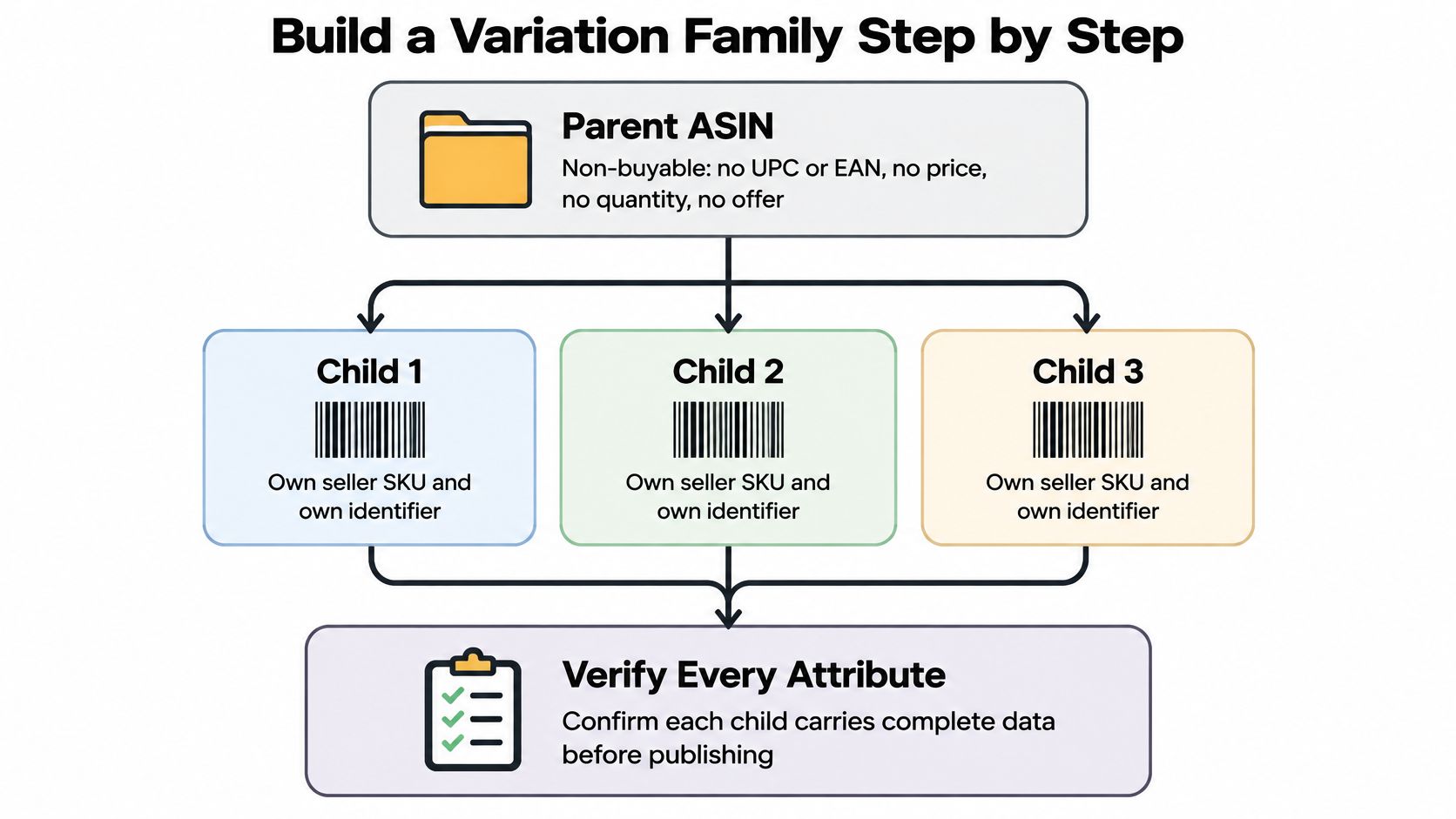
- Confirm each child is a genuine purchasable variant. Size, color, flavor or count of one product. Not a bundle, not a different model, not last season's version. Bundling unrelated items into a family is the fastest route to a suppression.
- Pick the theme Amazon allows for that product type. The theme is category-specific, so check what's available before you design the family around color and find out the category only accepts size.
- Create the parent through Add a Product or an inventory template. Keep the parent title generic enough that it's still accurate for every child, because some display elements inherit from it.
- Attach each child with its own SKU and identifier. Check for identifier conflicts here rather than after publication, when fixing one child means touching the whole family.
- Read inherited content on every child. A parent-level description or shared attribute propagates down, and a wrong value at parent level becomes six wrong detail pages.
- Keep a variation audit with parent-child mappings, the allowed theme, GTIN and brand evidence, pack configuration, images and inherited attributes. Reread it after packaging changes, new size or color launches, merges, splits and compliance cases.
If you'd rather watch the mechanics than read them, this walkthrough covers the parent-child build and the places it usually fails.
The tell that a family is wrong is simple to spot and expensive to ignore: a shopper lands on the child page for a medium and sees the large photo, or a size chart from a different product line. That's inherited content leaking. For the common failure patterns and how to unwind them, our breakdown of Amazon listing variation issues covers the merges and splits that go wrong most often.
Diagnosing and Resolving Catalog Issues
A title that keeps reverting usually points to a problem upstream. The master record, feed mapping, and Amazon contribution may each contain a different value. Editing the live listing without finding which system owns the field treats the symptom, not the cause.
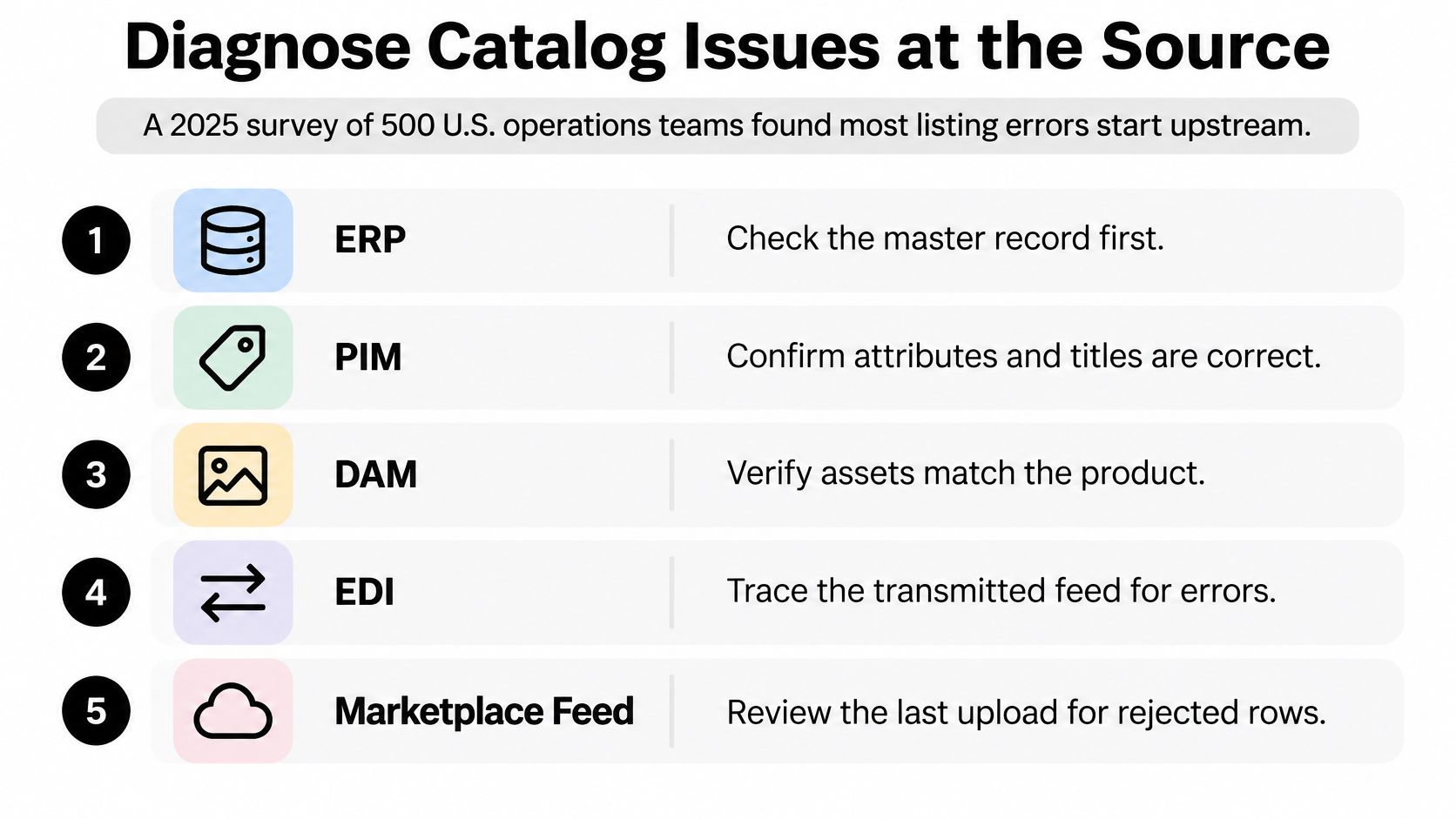
In Seller Central, open Listing Quality and Suppression for the ASIN and record the exact error. Trace the affected value to its source, then classify the issue: incorrect master data, a feed transformation that changes the value, or a conflicting contribution from another seller or feed. Each cause needs a different fix. Correcting the wrong layer invites the same error to return.
| Symptom on the live listing | Likely source | First fix |
|---|---|---|
| Wrong title or size on a child ASIN | Child inherited from parent or wrong source row in the feed | Correct the source row, then check inheritance on every child |
| Listing suppressed for missing or invalid attribute | Required field empty or value outside allowed list | Fill the attribute from the master SKU sheet and resubmit |
| Content changes back after you edit | Feed or another contributor overwrites the field | Find the conflicting feed, fix its mapping, and assign field ownership |
| Two ASINs for one product | Duplicate created instead of adding an offer | Identify the canonical ASIN and request consolidation through catalog support |
| Wrong dimensions or weight | Packaging data not updated after a change | Measure the packed unit and update the source before the next inbound shipment |
| Unfamiliar seller edits your content | Unauthorized reseller or contribution | Document the change and escalate through Brand Registry & Enforcement |
Assign every catalog field an owner: the person or team responsible for its source value, approval, and correction. Keep a change history and a rollback path. An issue log should capture the date, ASIN, field, source system, owner, and resolution time. Track error recurrence and time to resolution; completeness alone will not show whether the governance process is working.
When an unauthorized reseller changes content or undercuts MAP, document the specific change and escalate through Brand Registry & Enforcement for reseller monitoring and enforcement to remove violators. Clear field ownership also helps distinguish a reseller contribution from a feed conflict, so the response targets the cause rather than triggering another round of edits.
Catalog Quality Metrics That Show Up in Sales
The chain is causal, not correlational. A clean catalog keeps the right ASIN eligible in search. A complete listing converts the sessions it gets. A single canonical page keeps reviews and sales history in one place, so a fix compounds instead of resetting. Break any link and the sales number falls without telling you which link broke.
| Metric | Where to read it | What a change signals |
|---|---|---|
| Sessions | Business Reports, by ASIN | Falling traffic points to suppression or lost ranking |
| Unit Session Percentage | Business Reports, by ASIN | Falling conversion points to content, images or price |
| Featured Offer (Buy Box) percentage | Business Reports, by ASIN | Falling share points to duplicate or unauthorized offers |
| Sales rank trend | Sales Rank Checker | Sustained rank decline after a catalog change means the fix did not restore relevance |
| Contribution margin impact | Amazon profit calculator | Quantifies whether a conversion lift justifies the update cost |
Read the pattern, not the single number. Sessions down while conversion holds is a visibility problem: look for a suppression, a lost featured offer or a page that dropped out of index. Sessions flat while Unit Session Percentage slides is a content problem: images, bullets, price, or a child page inheriting the wrong parent content. Featured Offer share dropping on a listing you know is healthy is an offer problem, and duplicate or unauthorized sellers are the usual cause.
Value the fix before you ship it. Put the conversion lift you expect and your true margin into the Amazon profit calculator and look at the contribution number. If a title rewrite can't pay for the hour it takes, it isn't this month's priority.
Give any change two to four weeks before you judge it. Amazon's indexing and reporting lag means a week-one read will show you noise, and reverting a good fix because the first three days looked flat is its own catalog error.
Run Your Catalog Audit Before Your Next Launch
Treat the next 30 days as an operating cycle, not a second tour of each control area. In Business Reports, sort ASINs by ordered product sales and mark the top 20. Score each one 0 or 1 against the six control areas for a total out of six. Anything under four, plus any failed identity or variation check, goes on this month's fix list regardless of revenue.
Then sequence the work. Week one handles parent-child links, duplicate ASINs and GTIN mismatches only. Week two handles attributes, images, dimensions, pack count and open suppressions. Hold advertising and price tests until both weeks close, because running a test on a family that's about to be split gives you a result you can't read.
Keep the log thin: the score, the date the fix shipped, and the one metric you'll reread. A 20-row sheet beats a 200-row audit every time, because the 20 rows get finished.
Before the next launch, open Inventory, then Add a Product, and confirm the variation theme Amazon allows for that product type. That two-minute check decides whether your new SKU joins the canonical page or starts a duplicate. Our Amazon account audit checklist covers the account-health items to inspect alongside it.
Thirty days later, reread Sessions, Unit Session Percentage and Featured Offer percentage on the same 20 ASINs, and confirm the rank movement in the sales rank checker. If an unauthorized seller changed the page or broke MAP, escalate under Brand Registry enforcement rather than editing around them. Book a free strategy call and bring the scored list.
Catalog errors that return to the same three fields every quarter are a governance gap, not a copy problem, and they cost you fees, rank and reviews while you rewrite the same title. Online Brand Growth runs catalog management as an operations system, with field ownership, validation before publication, variation structure, seller support case management and account health, handled by the same team that manages advertising and FBA inventory for those ASINs. Visit Online Brand Growth to book a free strategy call and start with the 20 ASINs that carry your revenue.