
A 15% TACoS can be a reasonable planning point for a mature supplement brand and a warning sign for a mature home product. That difference is why Amazon TACoS benchmarks by category are most useful as diagnostic ranges, not universal targets: the number only means something alongside product maturity, organic sales, and contribution margin.
What TACoS Measures and Why Category Benchmarks Matter
Total Advertising Cost of Sale (TACoS) measures advertising spend as a percentage of total revenue, including both paid and organic sales. Calculate it by dividing ad spend by total revenue, then multiplying by 100. That makes TACoS a broader measure of advertising's relationship to the business than ACoS, which compares ad spend with ad-attributed sales. For a plain-language explanation of the related metric, see what ACoS stands for.
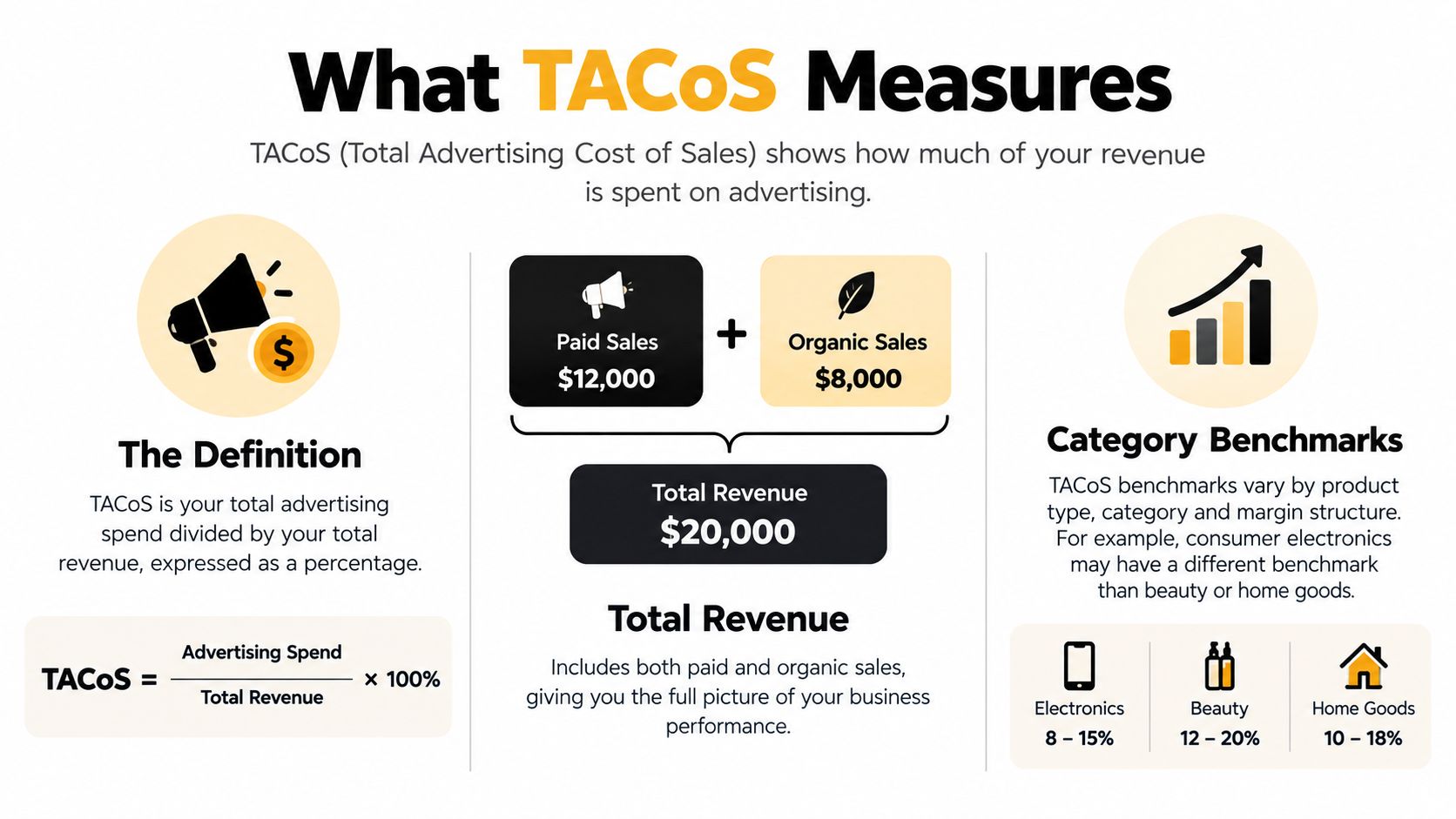
Public benchmark summaries commonly place mature-account TACoS around 10%–15%, while category ranges differ. One benchmark places mature electronics and accessories at 7%–11%, sports and outdoors at 9%–13%, home and kitchen at 10%–15%, supplements and health at 12%–18%, and beauty and personal care at 14%–20% (category TACoS benchmark ranges).
Those figures reflect different commercial realities. Selling price and gross margin affect how much advertising cost a product can absorb. Repeat purchases can make acquisition spend more valuable over time, while strong competition can require sustained bids. And a mature listing with meaningful organic visibility may generate more revenue without requiring the same ad spend as a new or less-established product.
A benchmark is a point of comparison, not a profitability verdict. A 15% TACoS could be workable for a supplement portfolio with repeat purchases, but it may suggest weak organic contribution for a mature home product. The right question isn't whether your TACoS is above or below a category figure. Ask whether the number fits the SKU's margin, inventory exposure, and current role in the brand's growth plan.
Practical rule: Treat a category range as a starting hypothesis. Your contribution margin and product lifecycle determine whether the result is acceptable.
TACoS Benchmarks by Category
Published benchmark tables rarely agree with each other, and that disagreement is useful information. The benchmark set cited above groups mature categories in a fairly tight band, while a second source publishes wider spreads: consumer electronics at 10%–18%, home and kitchen at 8%–14%, sports and outdoors at 7%–13%, supplements and vitamins at 12%–20%, and beauty and personal care at 10%–16% (category and launch-stage TACoS benchmarks). When two credible sets diverge by this much, the category label matters less than the assumptions baked into each sample.
Mature and launch-stage ranges compared
The same source separates mature products from launch-stage ones, which gives you a planning range for each lifecycle phase rather than a single number to hit.
| Category | Mature range | Launch-stage range |
|---|---|---|
| Consumer electronics | 10%–18% | 20%–30% |
| Sports and outdoors | 7%–13% | 14%–22% |
| Home and kitchen | 8%–14% | 15%–25% |
| Supplements and vitamins | 12%–20% | 25%–35% |
| Beauty and personal care | 10%–16% | 18%–28% |
| Pet supplies | Not listed | 12%–20% |
Launch ranges run roughly double the mature figures. That gap reflects how paid traffic carries new listings before organic rank develops, so treat the launch column as a budgeting ceiling for a defined period, not a permanent operating level.
Read the range as a diagnostic, not a target
Two SKUs in the same category can justify very different TACoS. A replenishable supplement with strong repeat purchase can absorb acquisition spend that a one-time-purchase kitchen gadget cannot, even if both sit inside the same published band. Check where your product falls relative to the range, then explain the position. Above the range on a mature listing points to paid dependence or weak organic rank. Below the range can mean efficient spend, or demand left on the table.
Amazon's own Category Benchmark Report in the ads console adds a second reference point, showing how your performance compares against advertisers in your product's category. Cross-checking published ranges against that report and your contribution margin tells you whether a gap is a category reality or an execution problem.
How to Calculate TACoS Step by Step
The formula is straightforward:
TACoS = (Total advertising spend ÷ Total revenue) × 100
The hard part is keeping the time period, revenue definition, and product scope consistent. A brand-level number is useful for executive reporting, but it can hide a launch SKU that needs investment or a mature product whose paid dependence is rising. Calculate at the level that matches the decision you're making, then roll the results up.
Pull matching figures from Amazon
- Set the period and scope. Choose the same reporting window for ad spend and total revenue. Decide whether you're measuring one ASIN, a product family, or the full account.
- Collect ad spend. Use Amazon Ads Campaign Manager and include the spend associated with the same products and period. Keep your campaign selection consistent when you compare later periods.
- Collect total revenue. Pull the matching sales figure from Seller Central Business Reports. For an ASIN-level calculation, use revenue for that ASIN; for a portfolio view, use the corresponding portfolio total.
- Divide, then multiply by 100. The result is the share of total revenue represented by ad spend.
For a worked calculation, suppose the advertising spend for your chosen scope is A and its total revenue is R. Divide A by R and multiply by 100. If that calculation returns 10%, advertising represents a tenth of the total revenue in the selected period. The percentage is illustrative; use your own Seller Central figures to calculate the actual result.
Read TACoS alongside ACoS
ACoS compares spend with ad-attributed sales. TACoS compares spend with total revenue, which includes organic sales. If ACoS improves while TACoS worsens, campaign efficiency alone hasn't resolved the larger business issue. Check whether total revenue or organic contribution is weakening before deciding that the account is healthier.
Don't compare figures built from different periods or scopes. Mixing an ASIN's advertising cost with total account revenue can make TACoS look better than the product's actual performance. Keep the denominator aligned with the products represented in the numerator.
Interpreting TACoS by Product Lifecycle Stage
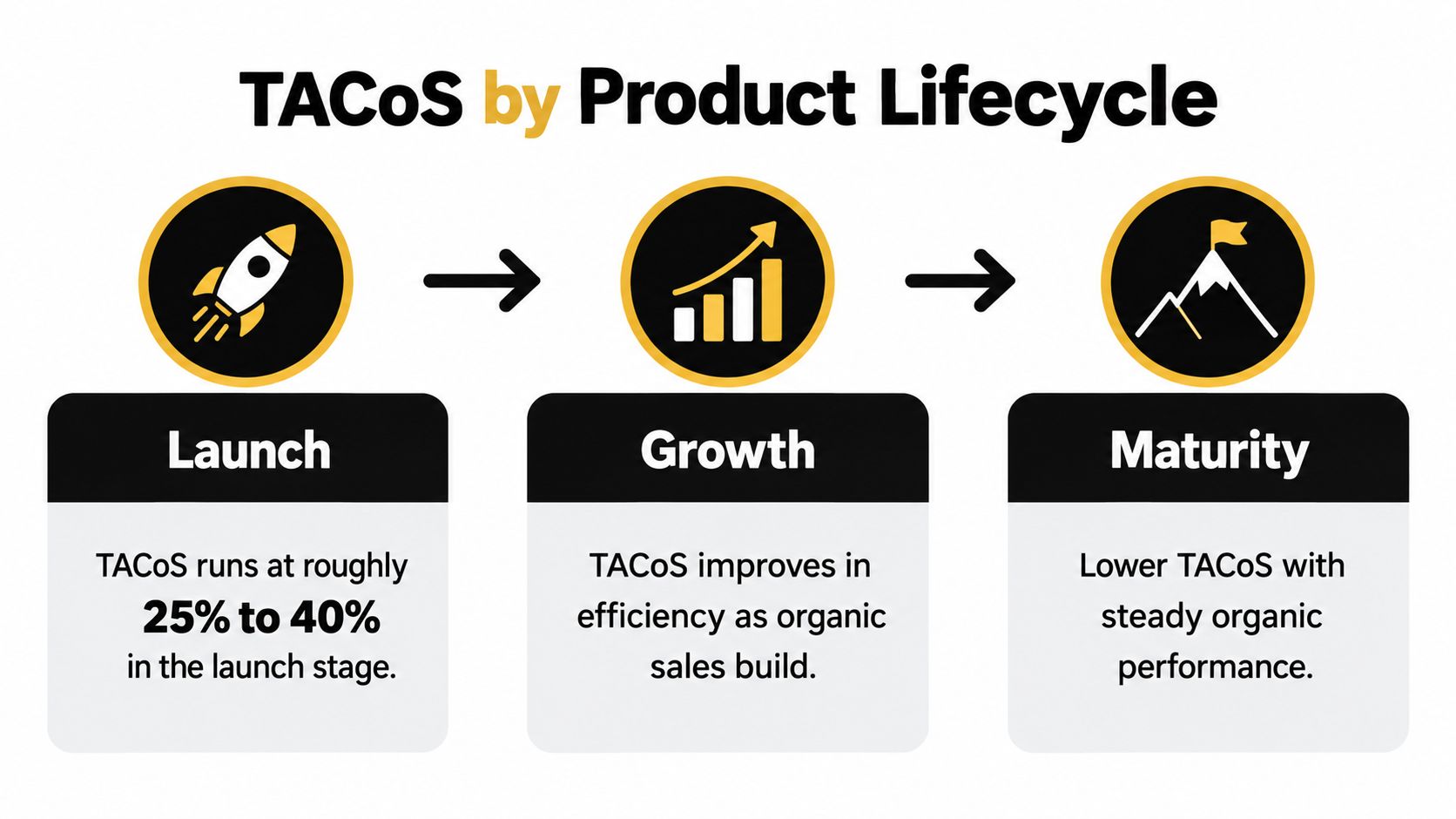
A TACoS figure only means something relative to where the product is in its lifecycle. The launch-stage ranges introduced earlier extend to roughly 25%–40% while a product builds ranking and reviews. Once it enters growth, the expected band tightens to approximately 12%–20%, and a mature product with established organic demand typically sits around 5%–12%, assuming organic sales contribute 50%–70% of revenue. Treat those bands as diagnostic planning ranges, not pass/fail thresholds.
Judge the investment against the stage
During launch, spend buys visibility, keyword data, and sales velocity before organic demand exists. High TACoS at this point is the price of building that demand. It becomes a problem only when the spending continues without visible progress in ranking, reviews, or retail readiness.
Growth is the diagnostic window. Organic revenue share should be climbing toward the 50%–70% band while TACoS compresses. If ad spend rises but organic revenue stays flat, campaigns are substituting for organic sales rather than building them.
For a mature SKU, TACoS that holds near growth-stage levels calls for a conversion audit: pricing, reviews, keyword coverage, and whether ads generate incremental sales or capture demand the listing would have won anyway. Two mistakes recur here. One is holding a launch SKU to a mature target and strangling its momentum. The other is letting "we're still investing" excuse a mature product year after year.
Use Amazon's Category Benchmark Report to diagnose, not dictate
Amazon's Sponsored Brands Category Benchmark Report compares a brand with peer advertisers in its shopping category using impressions, click-through rate (CTR), ACoS, and return on ad spend (ROAS). It provides median, bottom-quartile, and top-quartile values over a 90-day lookback period (Amazon's Sponsored Brands Category Benchmark Report).
Use the quartile gaps to locate the constraint. CTR below the lower quartile points to a relevance, creative, or placement issue. CTR near the median paired with weak ROAS shifts attention to detail-page conversion or pricing. Strong ROAS on thin impressions usually means bids, budget, or category reach are the limiter.
The report gives you a peer comparison rather than a break-even line. Pair it with your own TACoS, margin after advertising, organic revenue share, and stock coverage before changing spend. A product trailing its category median can still justify its budget if the economics work; a launch SKU beating every quartile can still lose money per order.
Connecting TACoS to Contribution Margin and Returns
A category can convert well and still lose money on every order. TACoS measures advertising as a share of revenue, and revenue is not profit. Referral fees, fulfillment, storage, returns, discounts, and product cost all sit between the top line and what you keep, so an allowable acquisition cost has to be built from the order's actual contribution rather than a category average.

Model the costs that benchmarks leave out
Start with the customer-paid amount, then subtract each layer: referral fees, FBA fulfillment and storage, advertising, returns, discounts, and cost of goods. Amazon calculates referral fees on the total sales price, which includes delivery and gift-wrap charges, and the fee charged is the category percentage or the applicable minimum, whichever is greater (Amazon's Seller Central referral-fee explanation).
Fee schedules shift, and small changes compound across a catalog. Amazon's published 2026 US fee update says average FBA fees will increase by $0.08 per unit sold, representing less than 0.5% of an average item's selling price, with no new FBA fee types planned for 2026. The update points sellers to the Revenue Calculator and Fee and Economics Preview report for revised rates (Amazon's 2026 US fee update). An average is not a per-SKU answer. Recheck the economics of each SKU before assuming the headline figure applies to your assortment.
Account for returns and repeat demand
Returns reshape what a strong conversion rate delivers. Published benchmark data puts apparel and shoes at roughly 20%–30% returns, while consumables and books run far lower (category advertising and profitability benchmarks). A consumable can absorb higher acquisition spend because repeat purchases and Subscribe & Save spread that cost over many orders. An electronics product with weaker conversion can still produce more contribution per retained order because the sale tends to stick.
Estimate allowable CAC by answering three questions per SKU:
- How much contribution remains after variable costs?
- How much does the return rate erode that contribution?
- Does repeat purchase justify paying more for the first order?
Inventory risk belongs in the same calculation. Slow-moving or oversized stock adds storage pressure that an ad dashboard will not surface.
Run the per-unit numbers through the Amazon profit calculator, then sanity-check storage assumptions with the FBA storage fee calculator. For the full cost framework behind those inputs, see how to calculate contribution margin. The goal is an acquisition ceiling grounded in contribution. A ROAS target set without costs behind it is a guess, and lifecycle stage still decides how hard you push toward that ceiling.
Actionable Steps to Improve Your TACoS
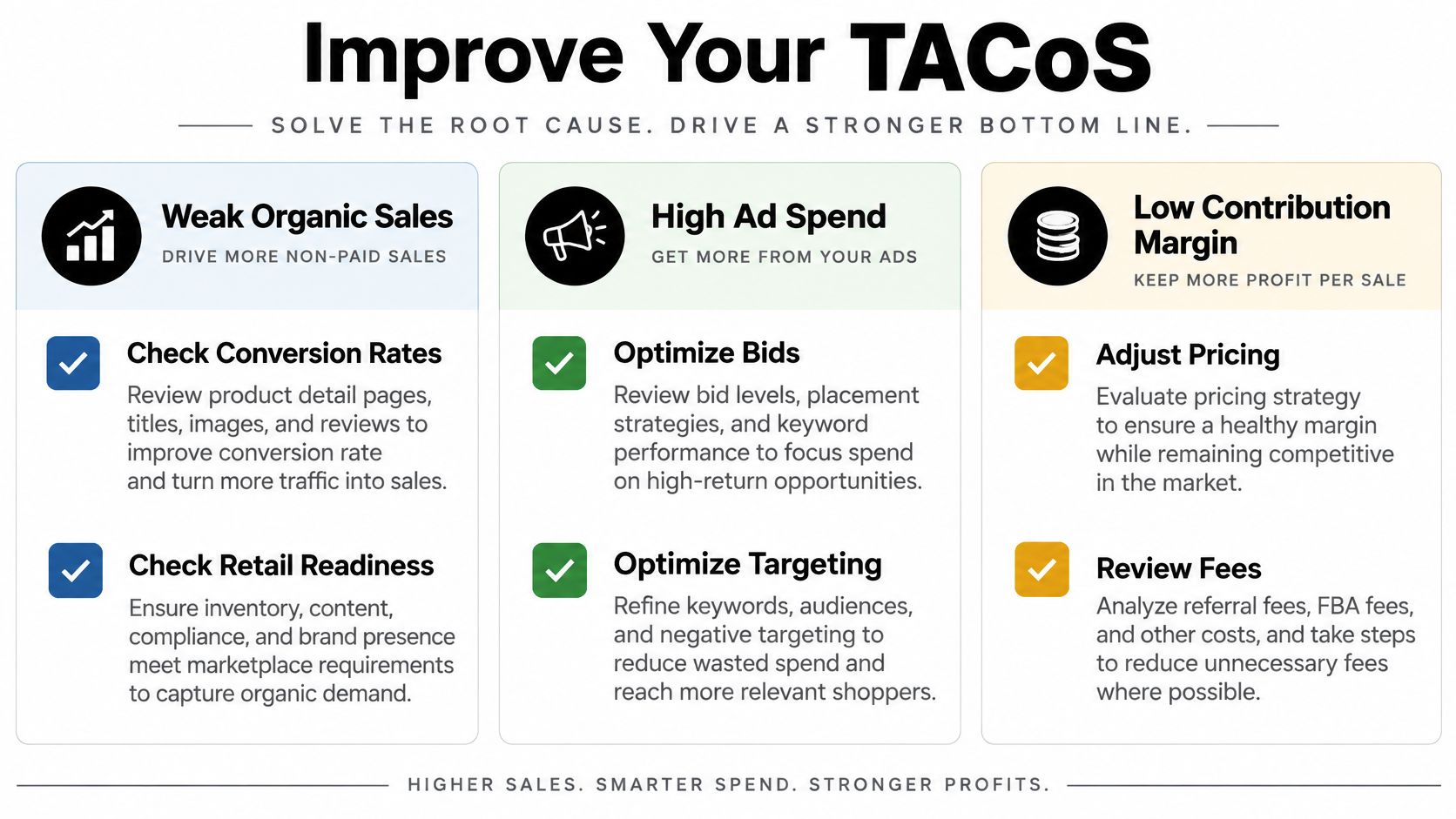
A high TACoS has more than one possible cause. It can reflect weak organic contribution, unproductive ad spend, or thin contribution margin. Diagnose which problem you have before changing bids. Cutting spend may lower the numerator, but if it also reduces total sales, the ratio may not improve.
Treat your category benchmark as a diagnostic range, not a finish line. The right response depends on which of the three causes is driving the gap.
If organic sales look weak
Check conversion rate, retail readiness, keyword coverage, pricing, review strength, and advertising incrementality. A listing that receives relevant traffic but fails to convert needs a different fix from one that rarely appears for relevant searches. Confirm the offer and detail page are sound before adding more traffic.
Seller Central defines Unit Session Percentage as Units Ordered divided by Sessions, multiplied by 100. A third-party guide summarizing Seller Central reporting gives a broad 5%–10% typical range and notes that performance below 5% may signal pricing, reviews, or content issues (guidance on using Amazon reporting). Treat that range as a prompt to diagnose, not an automatic bid instruction. Segment by ASIN and traffic source, then inspect price, main image, title, reviews, delivery promise, and detail-page relevance.
If ad efficiency is the issue
Review search terms and placements before reducing bids across every campaign. Harvest relevant converting terms into more controlled targeting, add negatives for irrelevant traffic, and lower bids where spend produces no return. Keep testing and discovery activity separate from proven campaigns so you can see which part of the structure is responsible for the cost.
For the campaign review itself, a consistent Amazon PPC optimization process keeps bid, keyword, and negative decisions in one routine instead of scattered fixes. Then compare campaign results against total revenue and organic contribution. A more efficient campaign is not a stronger business result if it stops supporting profitable growth.
If costs are squeezing contribution
Rerun each SKU through the profit and storage calculations after the 2026 fee update described earlier, using the storage fee calculator for oversized, seasonal, or slow-moving inventory. Re-run these calculations quarterly, or within two weeks of any fee announcement, so TACoS targets track actual unit economics rather than last year's cost base.
Weigh pricing and product cost changes alongside advertising before setting a new TACoS expectation. When contribution margin shrinks, the benchmark range that was healthy last quarter may be unreachable without a price move or a cost reduction. Adjust the plan to the margin you have.
Quick Reference for Executives and Directors
A useful executive readout connects category context, lifecycle, and profitability. Treat the mature-category ranges introduced earlier as planning bands rather than pass/fail lines; their spread is a reminder to ask what kind of product and account a comparison represents. The lifecycle ranges from the previous section work the same way.
Two flags belong in every monthly review. Flag any mature SKU running above its category's upper bound for two consecutive months. Flag any launch SKU sitting below the lower bound that is also missing keyword coverage targets.
What to pair TACoS with in a review
- Driver of the result. Separate paid spend, total revenue, and organic revenue share. A falling TACoS is more useful when it reflects stronger total sales, not reduced investment.
- Stage fit. Compare a launch with launch expectations and a mature SKU with mature economics. Don't evaluate the portfolio as if every ASIN had the same job.
- Peer position. Use Sponsored Brands Category Benchmark Report metrics to locate issues in impressions, CTR, ACoS, or ROAS. A peer median isn't a margin target.
- Residual profit. Review contribution margin after advertising, referral and fulfillment economics, returns, and stock coverage.
The executive dashboard should put TACoS, contribution margin after advertising, organic revenue share, and stock coverage beside peer-relative Sponsored Brands metrics. That gives the team a view of advertising performance and the operating conditions behind it.
A category median can tell you where you sit among peers. Your break-even ACoS and fulfillment economics tell you whether the business can afford to stay there.
Frequently Asked Questions About TACoS
What's a good TACoS for a new product launch?
Use launch benchmarks as planning context, not a guaranteed target. Set a budget based on the SKU's allowable investment, then check whether spend is producing useful keyword data, visibility, and sales momentum.
How does TACoS differ from ACoS in practice?
ACoS measures ad spend against ad-attributed sales. TACoS measures ad spend against total revenue, including organic sales. Use ACoS to assess campaign efficiency and TACoS to assess advertising's relationship to the broader business.
Should I track TACoS by ASIN or by brand?
Track both when possible. ASIN-level reporting helps identify products with different lifecycle stages or margins; brand-level reporting shows the combined picture. Don't let a portfolio average hide a SKU with deteriorating economics.
How often should I review benchmarks?
Review them on a regular operating cadence, and revisit them when a product's stage, inventory position, or category conditions change. For seasonal products, compare like periods where possible rather than treating an off-season result as a year-round standard. For a high-average-selling-price product, prioritize its actual contribution and fulfillment economics over a broad category average.
Online Brand Growth offers Amazon reporting and operating support, including TACoS analysis alongside advertising, listing, and inventory decisions. Book a free strategy call to review how category benchmarks fit your margins and product lifecycle.