
Amazon Brand Registry is a trademark check, not a sales-volume check. The applicant has to be the trademark owner, hold an active registered trademark or a pending application the marketplace accepts, match the brand name to the trademark record exactly, and show the mark permanently affixed to the product or its packaging, and each application covers one government trademark office rather than every Amazon store at once.
The most repeated advice about Amazon Brand Registry requirements is some version of "get a trademark and you're in." That advice is expensive because it's half true. A trademark gets you to the door. What decides the case is whether four separate records agree with each other: the government trademark record, the Brand Registry enrollment form, the artwork physically printed on your packaging, and the brand name sitting in your catalog. Most rejections aren't legal failures. They're mismatches between those four things.
Treat enrollment as an identity-matching audit and the whole process gets predictable. Treat it as a paperwork formality and you'll spend weeks resubmitting.
Sales Volume Does Not Get You In
Say a brand does seven figures on Amazon, owns its listings, has a clean account health record, and still gets turned away at enrollment. Nothing about that is unusual, because revenue never enters the check.
The rule that decides every case: Brand Registry verifies trademark rights and a matching identity. There is no sales threshold, no listing-count threshold, and no account-age threshold to clear.
This is a program for the trademark owner, or for the ecommerce director acting with that owner's authority. The mark itself has to be a word mark, or a design mark that contains readable words, letters, or numbers. That's the whole audience definition.
Three states follow from there. First, you can already sell: a brand can list products on Amazon with no registry at all, using catalog authorization or brand approval. Nothing stops the storefront. Second, you're ready: the owner holds an active registration or an accepted pending application, the brand name on the form matches the record, and the mark is permanently on the goods or pack. Third, you're headed for a stall: an agency filed before the owner, the logo has no readable text, or your only packaging proof is a mockup.
One detail that catches international teams: a single application covers one country-based trademark office. A USPTO filing does not clear the UK, German, or Japanese stores. If you haven't filed yet, be blunt with yourself about it. A pending application only counts in the stores that accept pending applications, so confirm that store's rule before you build a launch calendar around it.
What follows is the pass-or-fail grid, the filing order inside Seller Central, the evidence packet, the tools approval provides, and the mismatch patterns that bounce applications.
The Pass or Fail Requirements Table
Score your brand against every row below before anyone opens an enrollment form. One failed row means the case stalls, no matter how strong the other six look.
| Requirement | What passes | What fails |
|---|---|---|
| Trademark status | Active registration, or a pending application where that store allows it | Common-law use, or a brand name that exists only in Seller Central |
| Applicant | The trademark owner enrolls, then adds users | An agency or distributor files before the owner |
| Mark format | Word mark, or a design mark with words, letters, or numbers | A logo with no readable text |
| Name match | Trademark wording matches the application exactly, and image marks match the office record | Differences in spelling, spacing, punctuation, capitalization, or extra words |
| Office | One accepted government office for a country with an Amazon store | An office Amazon does not accept, or one filing assumed to cover every marketplace |
| Identifiers | Registration or application number plus the product categories | A missing number, or categories that do not match the catalog |
| Packaging proof | Standalone logo plus images of the mark permanently on the product or packaging | Mockup, removable sticker, insert, or brand name only in listing copy |
Amazon is explicit that this is a trademark-based program rather than a sales or revenue qualification: the brand needs an active registered trademark or, in eligible cases, a pending application issued through a designated government office in a country with a corresponding Amazon store, and the mark must be text-based or an image-based design containing words, letters, or numbers, per Amazon's Brand Registry overview.
Trademark status is the first gate, and common-law rights don't open it. Neither does the brand name you already typed into Seller Central. The applicant must be the owner. An authorized agency or distributor can't independently enroll the brand; it gets added as an additional user after the owner finishes enrollment. That single sequencing rule causes more failures than any other.
Mark format kills famous brands every month. A purely graphical logo, however recognizable, doesn't satisfy the format test if it carries no words, letters, or numbers. Name match is literal: the trademark wording must match the brand name on the application, and an image mark must mirror the official record, punctuation included. If your packaging says "NORTHBEND" and your registration says "North Bend Trading Co.", one of those two things has to change before you file.
Office and identifiers come next. You need the government registration or application number, plus the product categories the brand will sell, and those categories should align with what's in your catalog. Finally, packaging proof: a standalone logo image and a photo showing the mark permanently affixed to the product or its packaging.
If any row fails, fix the trademark record, the form, or the physical pack before filing. That's cheaper than a rejection, and it's a lot cheaper than refiling a mark you built your labels around. For the filing side of the mark itself, our guide to getting a trademark for Amazon covers what the application has to contain.
How to File Inside Brand Registry
Enrollment is a rights-verification workflow, not an account setting. Every field on the form maps back to a document, so the packet gets built before anyone logs in.
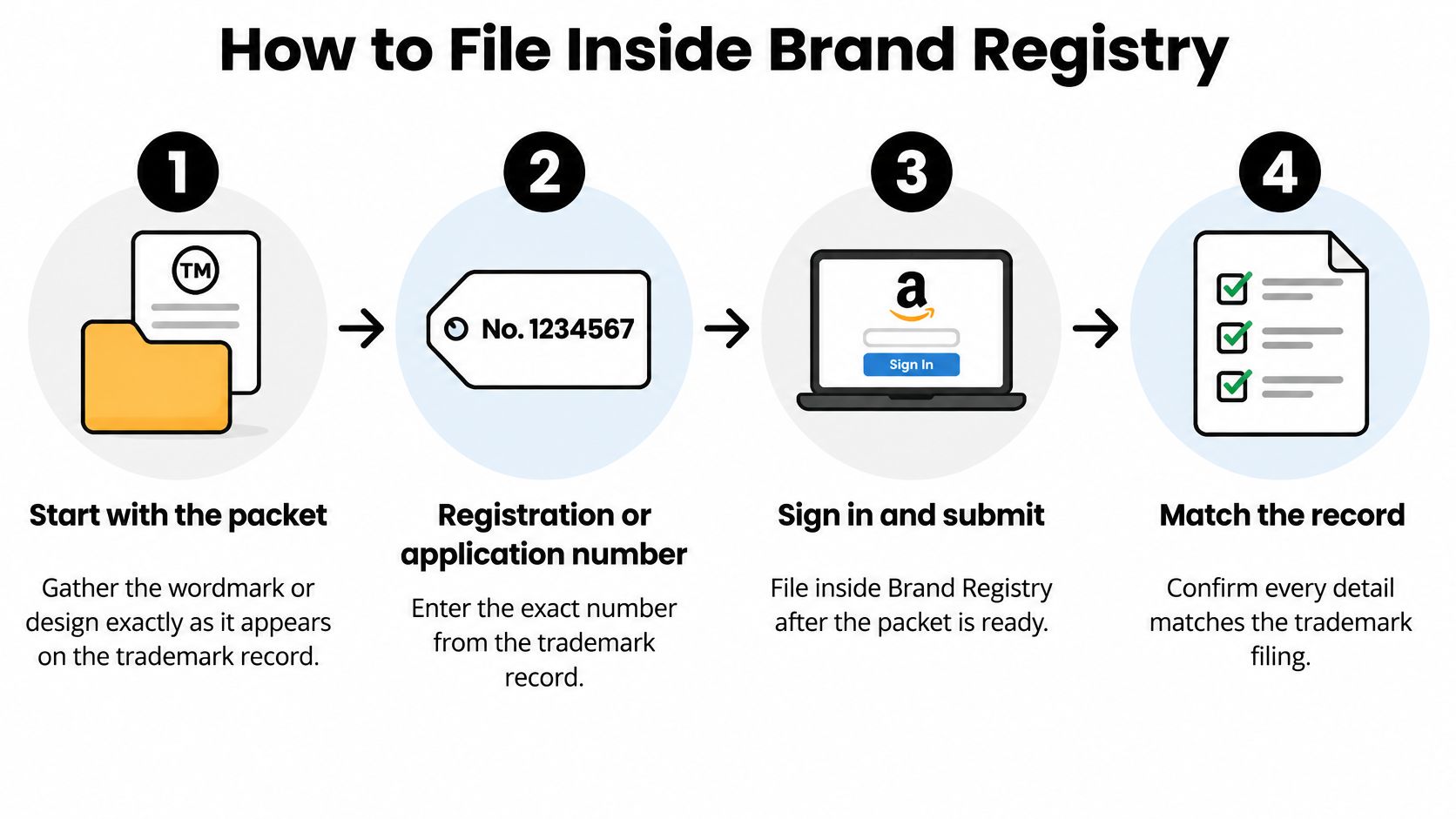
The infographic shows the sequence. The packet behind it is what carries the review.
Build the packet before anyone logs in
Six items, all in one folder:
- The exact mark: the wordmark or design precisely as it appears on the trademark record, copied and pasted rather than retyped from memory.
- The registration or application number and the name of the issuing office.
- The product categories the brand will sell, checked against the catalog.
- A high-resolution standalone logo file.
- Packaging photographs showing the mark permanently printed, molded, or sewn onto the goods or the pack.
- A reachable trademark contact, verified against the office record.
That last item gets skipped and it shouldn't. Amazon's verification process contacts a qualifying trademark-related contact, so the email on the trademark record has to reach someone who can respond promptly, per Amazon's brand protection guidance for global sellers. If your attorney filed the mark and moved on, a verification code sitting in an unmanaged inbox stalls the case.
Then standardize one spelling across the trademark record, the packaging artwork, your GS1 or catalog data, and the Seller Central brand field. Amazon requires the trademark wording to match the Brand Registry application exactly, and image marks to match the official trademark-office record, which creates a straight data-integrity dependency across all four surfaces, as the Brand Registry enrollment page sets out. Punctuation, capitalization, and logo composition all count.
File as the owner, in this order
- Sign in to the right account. Use the Seller Central login that should own the brand, with the owner's credentials. An agency login or a distributor's won't work.
- Open Brand Registry and start enrollment for one brand and one trademark office.
- Enter the brand name by pasting the trademark text. The ad nickname and the Shopify storefront name belong elsewhere.
- Enter the number exactly as issued, with the correct office selected.
- Select the product categories that match what's live in the catalog.
- Upload the standalone logo and the packaging photos showing permanent branding.
- Submit, then watch the verification channel. Amazon sends a code to the trademark contact, and a missed code stalls the case with no rejection notice.
- After approval, add people. Agencies and internal operators become additional users without any transfer of ownership.
Step eight deserves emphasis because ownership doesn't move when you add a user, and it shouldn't. If you're a manufacturer selling through a distributor, the brand entity enrolls, then grants access. The filing order stays intact either way.
Multi-market launches and review timing
For each additional store, add one line to your planning doc naming that marketplace's accepted office and whether pending applications qualify there. Amazon applies country-specific rules and limits enrollment to one country-based trademark office per application, so a multinational rollout is a series of office checks rather than a copy of the US file.
Plan for review to take days to a few weeks. While the case is open, leave packaging artwork and the catalog brand field alone. Changing a brand name mid-review creates a second mismatch while the first is still being evaluated, and evaluators read the file as it stood at submission.
The walkthrough below shows the enrollment screens end to end, including which fields reviewers check first.
Mismatches That Bounce the Application
Being eligible and being ready to pass review are different states, and the gap between them is where most applications die. Four cases show the pattern.
The logo-only filing. A brand with real recognition files a design mark that's purely graphical. The mark fails the format rule because design marks must contain words, letters, or numbers. Fame doesn't rescue it.
The nickname on the pack. Packaging reads "Halo Home" while the registration reads "Halo Home Goods LLC." The exact-match rule rejects the split, even though the same company owns both.
The agency submission. The distributor agreement is genuine and current. It still fails ownership validation, because only the trademark owner can enroll.
The single-market assumption. A brand clears the US store on a USPTO filing and assumes Europe follows. It doesn't. Each marketplace needs its own office check, which is the point Amazon's requirements guide makes about eligibility being tied to a government office in a country with a corresponding Amazon store.
| What you see | Why it fails | Fix before resubmit |
|---|---|---|
| Logo has no readable text | Design marks must contain words, letters, or numbers | Use a word mark or a design that includes the brand text |
| Agency or distributor submitted it | Only the trademark owner can enroll | Owner files, then adds operators as additional users |
| Name is close but not identical | Spacing, punctuation, capitalization, or extra words differ | Paste the trademark text into the brand name field |
| Photo is a render, sticker, or insert | The mark must be permanently affixed | Photograph the printed product or pack, plus a standalone logo |
| Wrong office for that store | One accepted office per application, with country rules | Map each marketplace to an accepted office and pending-status rule |
| Verification code never completed | Amazon contacts a trademark-related contact | Correct the office contact and answer the code |
The repair list is short but the order matters. Amend or refile the mark if the format is wrong, have the owner submit, paste the record text into the name field, photograph permanent branding, map the office, and update the contact on the trademark record. Two things not to do: don't open a second application while the first is pending, and don't change the catalog brand name mid-review. Both create a fresh mismatch on top of the one being reviewed.
Five-minute pre-submit audit: mark format, exact name match, a packaging photo showing permanent branding, the owner's login, the correct marketplace office, and the category list. Six checks. Run them out loud.
What Approval Unlocks on the Listing
Approval is a gate, not a toolkit that switches everything on at once. Map each tool to where the brand owner uses it.
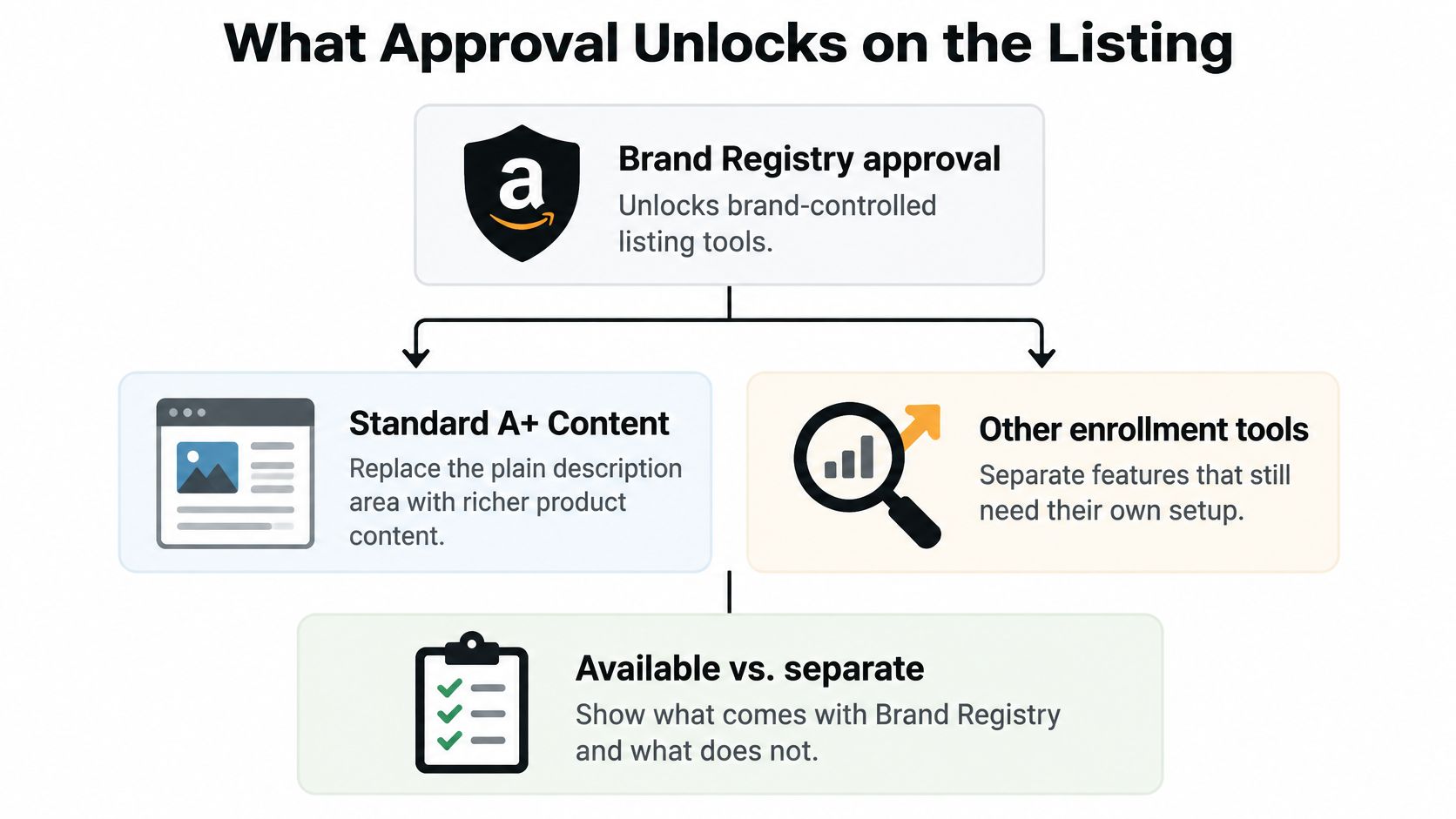
Standard A+ Content is the immediate win. A registered brand replaces the plain description block with image-and-text modules and comparison charts. For a manufacturer running three ASINs in one variation family, a comparison chart is often the highest-converting change available on day one. Brand Story modules sit on the detail page as a brand narrative, and most registered brands can use them, though they're not a substitute for A+.
| Tool | Gate | What it does |
|---|---|---|
| Standard A+ Content | Brand Registry enrolled brand | Image-and-text modules and comparison charts on the detail page |
| Brand Story | Most registered brands | Brand narrative module on the detail page |
| Premium A+ | Brand Registry status plus Amazon criteria | Enhanced modules, eligibility set by Amazon, confirm before design |
| Sponsored Brands and Store | Registry brand identity | Ads and storefront pointing at a brand identity you control |
| Report a Violation | Enrolled trademark | Trademark, copyright and patent complaints |
| Project Zero | Separate application | Own criteria, not a checkbox at approval |
| Transparency | Separate application | Own criteria, not a checkbox at approval |
Premium A+ is not automatic. Eligibility depends on your Brand Registry status and Amazon's own criteria, and I would confirm that before a designer spends a week building modules that can't go live. Project Zero and Transparency are optional programs with their own applications. Treat them as later projects, not as features that appear when approval lands.
The protection side is where approval pays for itself fastest. Report a Violation inside Brand Registry lets you file trademark, copyright, and patent complaints using the same mark you enrolled. The discipline is to file narrowly: a seller using your trademark in a listing they don't own is a clean complaint, while a seller reselling genuine goods you sold them is a different argument entirely. For a fuller picture of what each tool does for the channel, see our breakdown of Amazon Brand Registry benefits.
One honest limit. Approval doesn't set price, MAP, or Buy Box share. Those still come from offer competitiveness, account health, and how quickly you act when a violation appears.
Protect the Listing After You Enroll
Enrollment is the start of a recurring loop, not a one-time win. Here's the loop I'd run every week.
- Search your brand name and your top ASINs for sellers you never authorized. Log the seller name, storefront URL, their price against your MAP, and whether they hold the Buy Box.
- Keep a dated test-buy file. Order the offer, keep the receipt, screenshot the listing. That file is the evidence package.
- File through Report a Violation in Brand Registry using the enrolled trademark, the listing URL, and the evidence. A general Seller Support note isn't the same channel.
- Recheck the offer after Amazon acts. Removed sellers often reappear on a fresh account, so log the repeat.
- Run the margin check monthly. Enter landed cost, referral fee, and FBA fees in our Amazon profit calculator, then model storage in the FBA storage fee calculator to see what a suppressed Buy Box costs in contribution. When a hijacked offer distorts rank, the sales rank checker tells you how far off the data has drifted.
The test-buy file is worth a second look. Photograph what arrives next to your genuine packaging, because showing how the shipped product differs from authentic presentation strengthens the complaint. The same details investigators check are the ones buyers use, and outside guides like these coffee accessory verification tips from PureHQ walk through which packaging markers signal a genuine item versus a resold one.
If your internal team can't run that loop weekly, 360 Brand Protection handles unauthorized seller removal and MAP enforcement for you. And if you're early in the process, our walkthrough on how to remove unauthorized Amazon sellers covers the filing sequence step by step.
Where it usually breaks: the first complaint gets filed, the seller disappears, and nobody checks again three weeks later when they return under a new storefront name.
Online Brand Growth handles Brand Registry setup and enforcement for brands that need the trademark record, the enrollment form, the catalog name, and the packaging to agree before their first submission. We also run the enforcement loop after approval, so unauthorized offers and MAP violations get documented and removed instead of eroding your Buy Box. If you'd rather audit your brand's readiness with someone who files these weekly, visit Online Brand Growth and book a free strategy call.