
The usual advice to send external traffic to Amazon and collect a rebate skips the decision that matters: does the campaign create contribution margin after advertising costs, returns, and the delay before the credit becomes usable? The Amazon Brand Referral Bonus program can improve an already sensible acquisition strategy. It doesn't turn unprofitable traffic into profitable demand merely because an attribution report shows sales.
Treat the bonus as a referral-fee offset in your operating model, not as revenue or money available to fund today's media invoice. Keep attributed sales, incremental sales, estimated credit, and posted credit separate. Those distinctions determine whether you should increase the budget or stop buying traffic.
What Qualifies and How Tags Route Credit
Referral fees are a toll on sales, and Brand Referral Bonus, or BRB, offsets part of that toll for shoppers you bring from roads Amazon doesn't own, averaging about 10% of qualifying sales, according to Amazon's Brand Referral Bonus program terms.
The credit applies against seller referral fees, rather than arriving as a separate cash rebate. Its usable value is therefore constrained by the referral fees it can offset. Don't record an estimated bonus as cash received or assume you can withdraw it to pay a creator.
The toll analogy is useful because it separates the incentive from the sale itself.
Sort Traffic Before Building Links
A creator post, subscriber email, and paid search campaign can all send eligible external traffic. An Amazon advertising campaign doesn't become eligible just because someone attaches an external tracking tag to its destination.
Which traffic sources qualify and how to tag them
| Traffic source | Qualifies | Tagging rule |
|---|---|---|
| Social media post or story | Yes | One tag per platform, post and creative |
| Creator or influencer link | Yes | One tag per creator and destination |
| Email send to subscribers | Yes | One tag per send and segment |
| Search or display ads run off Amazon | Yes | One tag per ad group and creative |
| Sponsored Products or Sponsored Brands | No | Not eligible, keep out of external tags |
| Other Amazon advertising placements | No | Not eligible for the bonus |
The eligibility distinction follows Amazon's program rules. The tagging granularity is an operating recommendation: build the report around the decisions you'll need to make later.
For example, don't combine a creator's product demonstration with your subscriber announcement. Both may promote the same ASIN, but they have different costs, audiences, and reasons for converting. A combined result won't tell you which activity deserves another budget allocation.
Use a consistent naming string such as channel_campaign_creative_destination. Keep a separate register containing the full destination, campaign owner, launch date, media cost, and generated Attribution link. Our guidance on Amazon external traffic provides the broader channel-planning context.
Track Brand Purchases Without Assuming Incrementality
Amazon's attribution rules allow qualifying purchases of the promoted product and other products from the same brand within 14 days of the tagged click, as detailed in Seller Central's BRB eligibility and calculation guidance. That makes the credit a brand-level opportunity, not just a rebate attached to the advertised SKU.
A shopper might click a link promoting a hero product and purchase a complementary item instead. Keep that distinction visible in the report so the merchandising team can see what shoppers bought.
But an attributed purchase isn't automatically incremental. Someone on your subscriber list may already have intended to purchase from your brand. Attribution connects the purchase to a tracked interaction; your profitability assessment still needs to consider whether the campaign created additional demand.
Practical rule: Keep the attributed-sales report intact, but apply your incrementality assumptions in a separate profitability model.
Reconcile Mature Sales, Not This Week's Estimate
Export attributed orders from Amazon Attribution reports each week. Compare mature sales cohorts with the corresponding fee-credit activity in Seller Central Payments, Transaction View, retaining supporting transaction details rather than relying on a dashboard total.
Use this reconciliation sequence:
- Estimate the base. Remove known cancellations and returns from qualifying attributed sales.
- Apply the relevant rate. Match the purchased products to their category and price tier.
- Match the period. Compare credits with the sales cohort that generated them, not the week they appeared.
- Investigate exceptions. Check eligibility, missing tags, category assumptions, returns, and posting timing before disputing a difference.
As an internal control, a 5% variance tolerance is a reasonable starting policy, not an Amazon benchmark or guarantee. Adjust it when your actual reconciliation history supports a different threshold.
Never reuse the same tag across separate channels. You might still see attributed activity, but you won't have the evidence needed to allocate spending confidently.
Bonus Rates by Category and Price Tier
Amazon markets this program around a 10% average, and that figure does real damage when operators paste it straight into a margin model. The credit is calculated per category, sometimes per price band, on whatever mix of products your tagged traffic buys. Treat the published percentages as the gross fee offset, then adjust for returns and posting lag before the number touches your forecast.
Bonus rates by category and price tier
| Category or tier | Bonus rate | Notes |
|---|---|---|
| Program average, all categories | 10% of qualifying sales | Marketing headline, not a per-ASIN rate |
| Office products | 10% | Working assumption; confirm in current Seller Central program terms before modeling |
| Clothing | About 11% | From Amazon's published category examples and program explanation |
| Furniture, first $200 of sales price | 10% | Applies to the portion up to $200, per the same published examples |
| Furniture, above $200 | 7% | Applies to the portion above $200 |
| Other categories | Confirm applicable rate | Check current program terms before modeling |
Two rows in that table deserve scrutiny. The clothing and furniture rates come from Amazon's published category examples linked above. The office-products figure is a working assumption rather than a rate quoted from a specific Amazon page, so verify it against the Brand Referral Bonus terms in Seller Central before you build a forecast on it.
Apply Furniture Tiers to Portions of the Price
A furniture order doesn't receive a single rate based on whether its total crosses the threshold. Each rate applies to its own slice of the price.
For a hypothetical $500 chair, the published tiers produce $20 on the first $200, plus $21 on the remaining $300. That's $41, or an 8.2% effective rate on the order.
That math is illustrative. It draws on Amazon's tier structure from the linked category explanation, and it isn't an observed seller result or a figure you should generalize to other categories.
When you reconcile actual credits, pull the full order record rather than the displayed item price alone, and compare your expected credit with the posted transaction components in Payments reports. If the posted amount differs from your estimate, check the qualifying-sales definition in the current program terms before treating the gap as an error.
Build a Sales-Weighted Catalog Rate
Create a working rate file with each ASIN's category, applicable tier, expected qualifying sales, and estimated credit. For tiered products, calculate the expected credit at the order level before rolling it into a catalog average.
Then calculate:
Blended rate = total estimated qualifying credit ÷ total qualifying sales
For illustration, assume a catalog's qualifying sales run 60% clothing and 40% office products. Using the table's rates, the hypothetical weighted estimate is 10.6%, calculated as 0.6 × 11% + 0.4 × 10%.
Use that blended figure as a forecast input, nothing more. The posted credit will drift with your merchandise mix, your return rate on attributed orders, and the lag between the sale and the credit appearing. Refresh the file whenever the mix shifts or posted actuals diverge from the model.
How to Enroll and Launch Your First Tagged Campaign
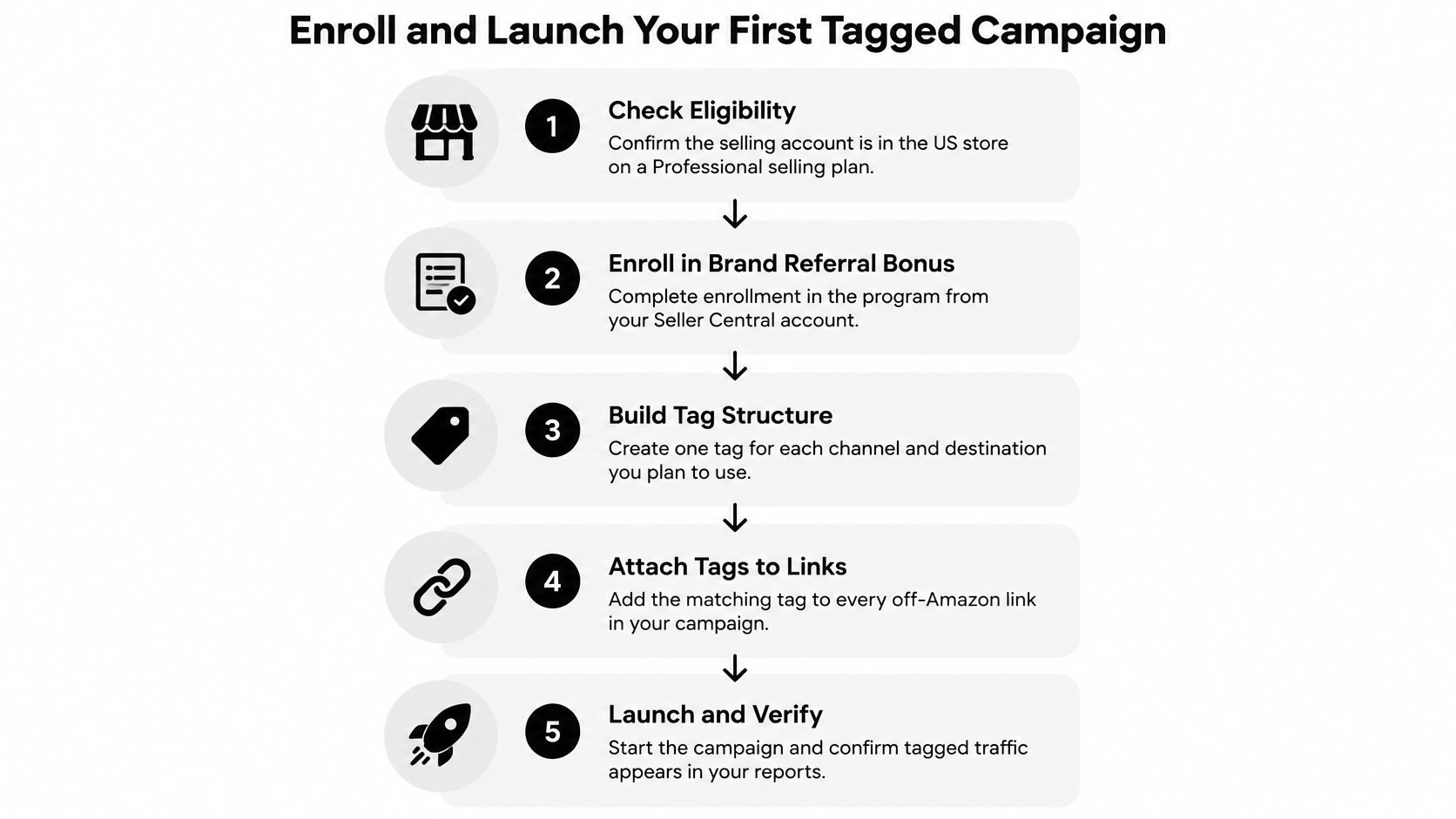
A tagged campaign fails more often at eligibility than at launch. Amazon's participation guidance for Brand Referral Bonus requires a US Professional selling account, a brand enrolled in Amazon Brand Registry, and a user holding the Brand Representative role for that brand. Verify all three on the account that will receive the fee credit, especially in organizations that run several selling accounts, before you generate a tag.
Complete the Account and Campaign Checks
Confirm the selling account. Check that you are operating in the US store on a Professional selling plan, on the exact account that will receive the credit.
Verify brand enrollment and permissions. Confirm Brand Registry enrollment and the Brand Representative role, then enroll through the Brand Referral Bonus page in Seller Central. Advertising-console access alone is not evidence that program enrollment is complete.
Approve the destination. Choose a qualifying product detail page or Brand Store. Check listing content, images, availability, pricing, and your offer first; paid traffic aimed at a weak or suppressed listing burns pilot budget before the credit question even matters.
Create the Attribution tag. Build the pilot campaign in Amazon Attribution under your naming convention, and save the generated link and destination in a tag register another operator can audit.
Choose one external channel. A single creator post or a subscriber email with a defined audience and cost. Point it at one destination so the result stays interpretable.
Launch and verify reporting. Confirm that attributed clicks, then attributed orders, appear in Amazon Attribution reports. If reported activity diverges from the live campaign, fix the deployed links before adding spend.
Schedule the credit review. Log the estimated credit and Amazon's roughly two-month review window, and keep estimated credit separate from posted credit in the ledger. The credit arrives as a referral-fee offset, so pending value should never sit in a column finance reads as settled.
The embedded walkthrough shows this sequence on screen: locating the Brand Referral Bonus enrollment page in Seller Central, confirming eligibility on the brand, and building an Amazon Attribution tag, including the fields where the generated link and destination URL appear. Keep it open beside your own console while you run steps 1 through 4.
Keep the Pilot Readable
Skipping Brand Registry leaves a stated eligibility requirement unmet. No tag, however clean its naming, earns credit for a brand that was never enrolled.
I've seen pilots die quieter deaths than that: correct enrollment, clean tag, and a destination that went out of stock on day two. The checklist exists because the credit only has value if the underlying sale survives returns review, and none of that is visible until you reconcile the campaign end to end.
Keep the first campaign narrow enough that a colleague can explain its audience, destination, cost, and expected credit without reconstructing your marketing calendar. A small test you can tie back to a posted referral-fee offset is worth more than a broad launch whose results never reconcile to a ledger line.
Margin Impact Worked Examples and Cash Timing
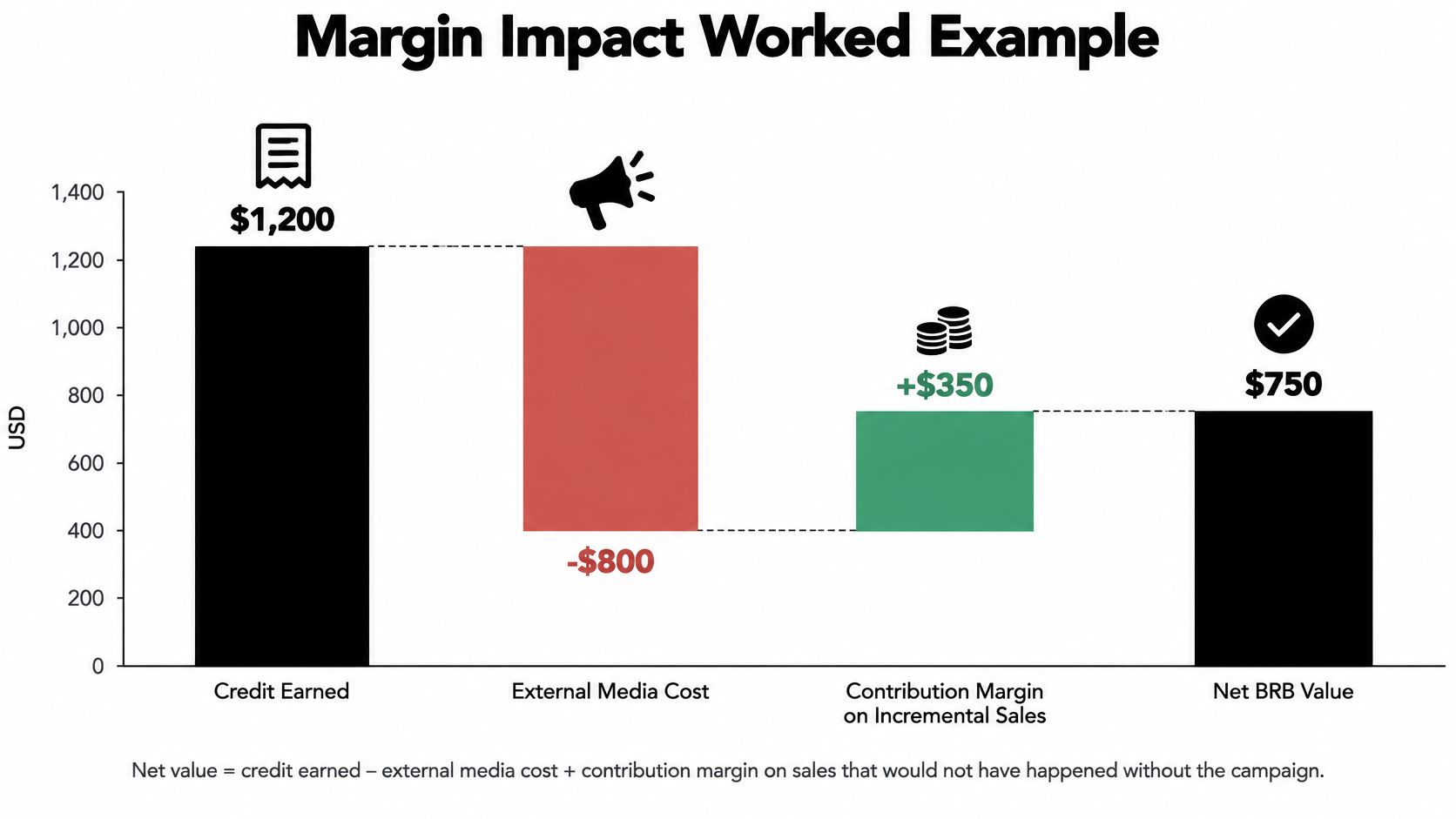
Use this operating equation:
Net campaign value = usable BRB credit − external media cost + contribution margin on incremental sales.
Calculate incremental contribution before BRB and external media costs in that equation. Otherwise, you'll count the credit twice or subtract advertising twice. Include other incremental campaign expenses alongside media when they aren't already reflected in your contribution calculation.
Compare the Credit Outcomes
The following calculations are illustrations, not seller case studies. They apply the category rules established earlier, with the creator campaign using explicitly assumed sales, returns, and spending.
Worked credit examples by sale and campaign
| Scenario | Qualifying base | Rate applied | Credit and result |
|---|---|---|---|
| One office-product order | $1,000 | 10% | $100 credit, matching Amazon's published example |
| Clothing order at $100 | $100 | About 11% | Approximately $11 credit |
| Furniture chair at $500 | Price split across applicable tiers | Published furniture tiers | $41 estimated credit, as calculated above |
| Creator campaign, $10,000 sales with 8% returns | $9,200 after assumed returns | Assumed 10% | $920 estimated credit; $280 short of assumed $1,200 creator spend |
For the hypothetical creator campaign, begin with $10,000 in qualifying attributed sales. Assumed returns of 8% remove $800, leaving $9,200 as the modeled base.
At the assumed 10% applicable rate, the estimated fee credit is $920. Against $1,200 in creator spending, the campaign needs $280 of incremental contribution to break even, before any other incremental expenses.
That isn't evidence the campaign failed. It's evidence that the fee offset alone doesn't cover acquisition spending. The remaining question is whether genuinely incremental orders produced enough contribution.
Use a consistent contribution-margin calculation so product cost, fulfillment, selling fees, discounts, and campaign expenses don't move between definitions from one report to the next.
The waterfall below illustrates the same structure with a separate hypothetical set of inputs.
Separate Profitability From Cash Availability
Amazon generally finalizes the bonus after a waiting period of about two months to account for cancellations and returns, as described in its program explanation cited earlier. Plan for that delay rather than assuming the credit finances the campaign that generated it.
Keep separate spreadsheet columns for estimated credit, posted credit, and credit applied against fees. A profitable forecast can still create a working-capital requirement while media invoices arrive ahead of the offset.
Scale changes the arithmetic but not the model. A hypothetical $1 million in BRB-attributed sales at a 10% average rate yields a $100,000 credit, which sounds decisive until you subtract the media cost that produced those sales, the returns that shrink the qualifying base, and the two-month wait before the credit posts. Large attributed revenue proves reach. It does not prove incrementality, and it says nothing about whether those orders would have happened without the external spend.
Rerun your own scenarios in the free Amazon profit calculator, using actual ASIN costs and the appropriate blended rate. For inventory-heavy promotions, use the FBA storage fee calculator to test the inventory cost separately rather than hiding it inside the credit estimate.
Storefronts, Affiliate Links and Promotions That Stack Credit
Choose the destination based on the buying decision, not on which page your team finished most recently. A product detail page works for a tightly focused hero-product campaign. A Brand Store can be more useful when shoppers need to compare products or discover complementary items.
Neither destination guarantees a higher bonus. The useful distinction is whether shoppers can find the right product without unnecessary navigation, while the brand-level attribution rules already discussed remain applicable.
Match the Page to the Campaign
| Campaign intent | Preferred starting destination | What to check |
|---|---|---|
| Specific product demonstration | Product detail page | Exact variant, offer availability, relevant images |
| Category discovery | Brand Store category page | Clear product comparison and navigation |
| Complementary-product campaign | Relevant Store collection | Logical pairings and accurate availability |
| Promotion announcement | Page showing the promoted offer | Consistent pricing, dates, and eligibility |
Surface relevant bundles and complementary products prominently where they help the purchase decision. Don't send a shopper responding to a specific product demonstration into a general Store homepage and expect them to search for the item.
A broader basket is useful only when it carries acceptable contribution. Discounted companion products can increase attributed revenue while adding little economic value, so evaluate the purchased-product mix rather than celebrating basket size alone.
Verify Partner Links Before Discussing Stacking
Keep the brand's generated Attribution link in your register and ask partners to use the approved destination. Test the final published path, including redirects or shortened links, rather than checking only the version you emailed.
Don't assume Amazon Associates commissions and BRB credits automatically stack on the same tagged activity. Confirm the current rules for the partner's arrangement before promising either party compensation.
- Confirm provenance. Know where the partner will publish the link and verify that the traffic is genuinely external.
- Require disclosure. Agree on accurate paid-partnership disclosures and promotional language.
- Reject opaque arrangements. Avoid coupon or cashback placements when you can't verify the source, incentive, or deployment method.
Align Promotions With Purchase Intent
As a planning recommendation, consider starting external activity two to three days before a Deal or coupon event, provided the messaging accurately distinguishes the announcement from the live offer. That's a scheduling choice, not an Amazon requirement or a performance benchmark.
Use the Amazon promotion planning guide to coordinate the offer, inventory, destination, and campaign calendar. After the campaign, check whether the promoted ASIN retains its rank movement with the free sales rank checker, but don't treat rank movement alone as proof of incremental profit.
Common Pitfalls, Compliance and Reporting Errors
Routing Amazon ads through external tags is a costly category error. It doesn't change traffic eligibility, and it can leave the team forecasting credit that shouldn't have entered the model.
Reusing tags creates a different problem: even when activity qualifies, the report can't support reliable channel decisions. Diagnose eligibility errors separately from measurement errors.
Fix the Operating Error, Not Just the Spreadsheet
Pitfalls, consequences and fixes
| Pitfall | Consequence | Fix |
|---|---|---|
| Amazon ads routed through external tags | Expected credit may be denied or not posted | Keep Amazon ad traffic out of every external tag |
| One tag reused across channels | Cannot tell which channel earned credit | Unique tag per channel, campaign and creative |
| Flat 10% assumed on every SKU | Margin misstated, overstated on some furniture orders and understated on clothing examples | Apply category and tier rates from the rate table |
| Gross attributed revenue used as the base | Credit overstated after returns | Model net sales after returns and cancellations |
| Resellers on the detail page | Your offer may lose the sale; brand revenue and expected economics become harder to reconcile | Monitor the Featured Offer and address unauthorized sellers through appropriate enforcement |
| Expecting credit in the same month | Cash-flow gap and false failure readings | Separate sales cohorts from delayed credit posting |
| Expired or misspelled tags | Attributed orders may be missing | Audit tag status, spelling, and the deployed destination weekly |
Keep Compliance and Offer Ownership Separate
For paid creator activity, have the responsible team confirm disclosure requirements under FTC endorsement rules. Keep product and promotional claims accurate, and review current Amazon program terms before launch, particularly where incentives or partner compensation are involved.
Don't assume a tagged click guarantees that your selling account captures the resulting sale. If another seller holds the Featured Offer, commonly called the Buy Box, your paid campaign may send shoppers toward an offer you don't control. Investigate the actual order and credit treatment rather than assuming every reseller situation has the same outcome.
360 Brand Protection is an option for unauthorized seller removal and MAP enforcement support. Treat that work as an offer-control issue alongside, not as a substitute for, attribution and profitability analysis.
A missing credit, a lost offer, and an unprofitable campaign are different problems. Assign each to the person who can resolve it.
At month-end, compare expected and posted credit by mature sales cohort. Show pending amounts separately, explain variances above your chosen tolerance, and retain the underlying order and transaction evidence.
Pilot the Program in 30 Days
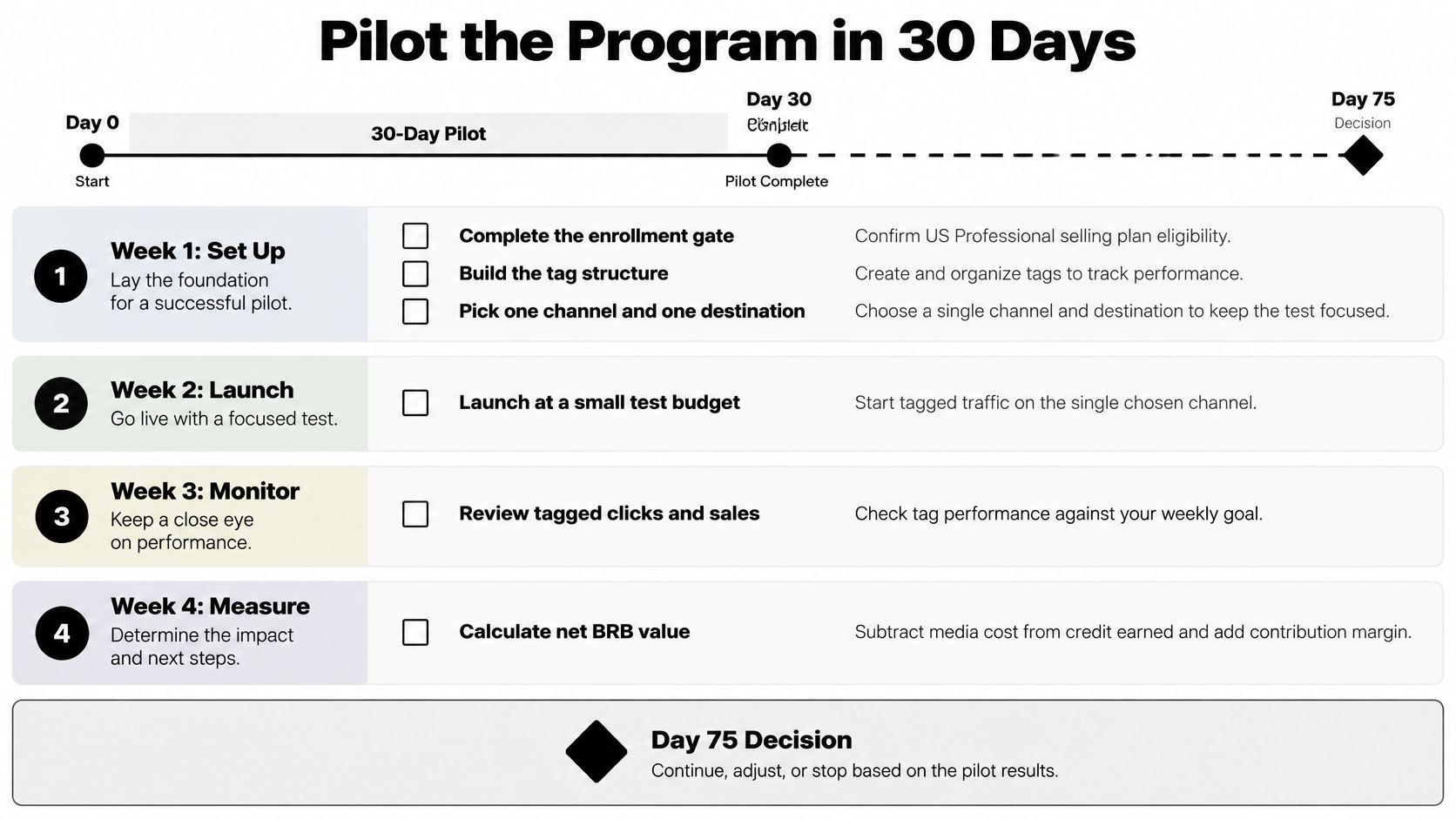
Run a 30-day pilot, with a planned Day 75 decision. These are recommended operating milestones, not Amazon service commitments; the later review gives the campaign time to mature beyond the initial acquisition period.
Before launch, put the blended-rate file, reconciliation sheet, and named audit owner in place. Without those controls, you'll generate activity before deciding how to judge it.
The timeline keeps setup and acquisition separate from the later financial decision.
Run the Acquisition Test
- Week 1, set up. Complete the eligibility checks, build the tag register, and choose the channel and destination. Record the budget, expected contribution, and reason you believe the activity will produce incremental demand.
- Week 2, launch. Start with a controlled budget and verify attributed activity. If the deployed link or reporting is wrong, pause the test rather than buying more ambiguous traffic.
- Weeks 3 and 4, monitor. Review returns, destination conversion where measurable, purchased-product mix, and promoted-ASIN rank movement. Keep a change log so a price change or stock issue doesn't get mistaken for a channel effect.
Don't optimize solely for estimated credit. A campaign can earn a larger fee offset while producing worse net contribution because media costs, discounts, or returns increased.
Make the Financial Decision After Reconciliation
At Day 60, begin checking mature cohorts weekly for posted credit, while recognizing that timing remains approximate. Log the expected amount, posted amount, variance, and explanation without treating every pending amount as a failure.
At Day 75, apply the go or no-go rule:
Continue only when posted credit plus defensible incremental contribution exceeds external spending after returns and other incremental campaign expenses.
If credits remain materially incomplete, label the financial result unresolved rather than forcing a decision from estimated value. If the mature campaign loses money, stop spending on that channel configuration and retain its tag history for diagnosis.
A viable next test should address a specific cause, such as an expensive placement, weak destination, unsuitable audience, or poor product margin. Don't change everything at once and call the next result a comparison.
Online Brand Growth can configure Attribution tags, build the credit-reconciliation sheet, and evaluate external channels against net contribution rather than attributed revenue alone. Book a free strategy call to review your category rates, credit timing, and pilot economics.